A backlink checker without a subscription, priced per lookup
You check backlinks when a client asks or a pitch is due, not every day. Here's how to get full link data per lookup, with no monthly plan.
- Free backlink checkers cap how many sites or links you can see. Paid suites charge monthly even when you check twice.
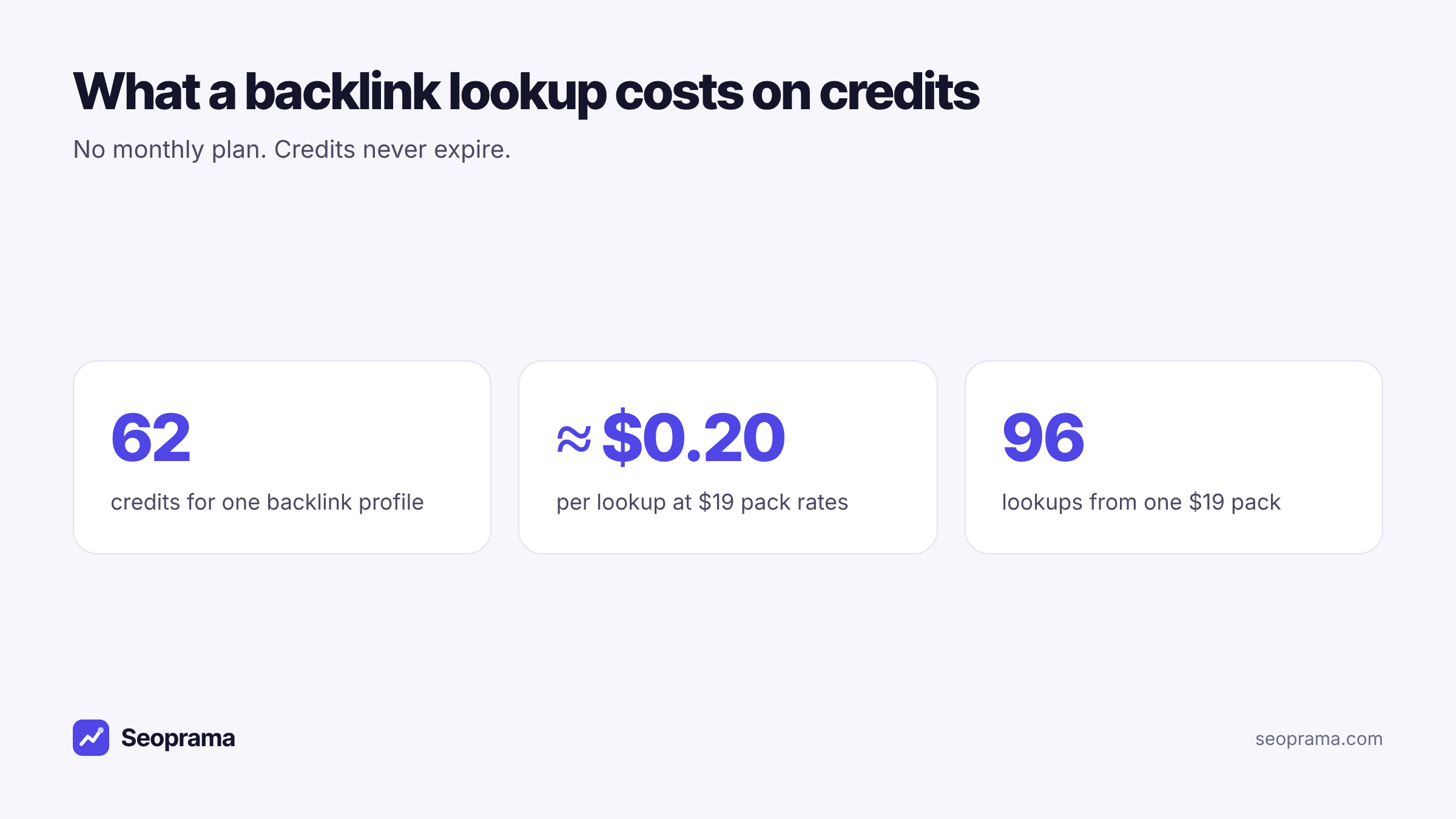
- On Seoprama a backlink profile costs 62 credits, about $0.20 a lookup.
- A $19 pack covers about 96 lookups, and credits never expire.
- You get spam scores, new and lost links, broken pages with links, and Ahrefs DR alongside for context.
- Start with the $2.99 trial (₹99 + GST in India) and check one client and two rivals.
Freelancers check backlinks in bursts. A client asks why a competitor outranks them, or a prospect wants a quick health check before signing. Then a link-building month starts and you need to see who links to the rivals.
After that, you might not look at links for three weeks.
So a backlink checker without a subscription makes a lot of sense. You want full data when you need it, a cost you can pass to a client, and no monthly charge in the weeks you’re doing other work. This guide shows how that works, what it costs per lookup and per month, and how to get the most out of each check.
The problem with free and monthly backlink checkers
There are two common options, and both are awkward for freelance work.
Free checkers are useful for a quick glance. But they limit you, usually on how many lookups you can run a day or how many links they show. Seobility’s free backlink checker, for example, allows 5 checks a day on its free plan (seobility.net, checked November 2026). Others show only the top links for a domain. That’s fine for curiosity. It isn’t enough to audit a client’s profile or plan outreach.
Monthly suites give you the full picture, and Ahrefs in particular is widely known for the size of its link index. The catch is the bill. You pay the plan price every month, whether you ran 30 lookups or 2.
For someone who checks links in bursts, neither fits. You want the depth of a paid tool with the billing of a free one.
How a backlink checker without a subscription works
Seoprama sells credits. You buy a pack once, each lookup takes a fixed number of credits, and whatever you don’t use stays in your account. Credits never expire and there’s no monthly minimum.
A backlink profile costs 62 credits. That’s about $0.20.
And it’s a full lookup. The backlink checker gives you:
- A summary. Backlinks, referring domains, referring pages, rank and spam score in one view.
- New and lost links. Charts of links gained and lost over time, so you can see whether a profile is growing or leaking.
- Every link. Source, target, anchor, link flags, domain strength, spam score and first-seen date. Each domain also shows its Ahrefs DR, from Ahrefs’ free public lookup, as a familiar yardstick.
- Referring domains. Every linking domain with its own numbers.
- Top linked pages. The pages that earn the most links, including broken pages that still have links pointing at them.
- Filter and export. Narrow the list down and take it into a spreadsheet.
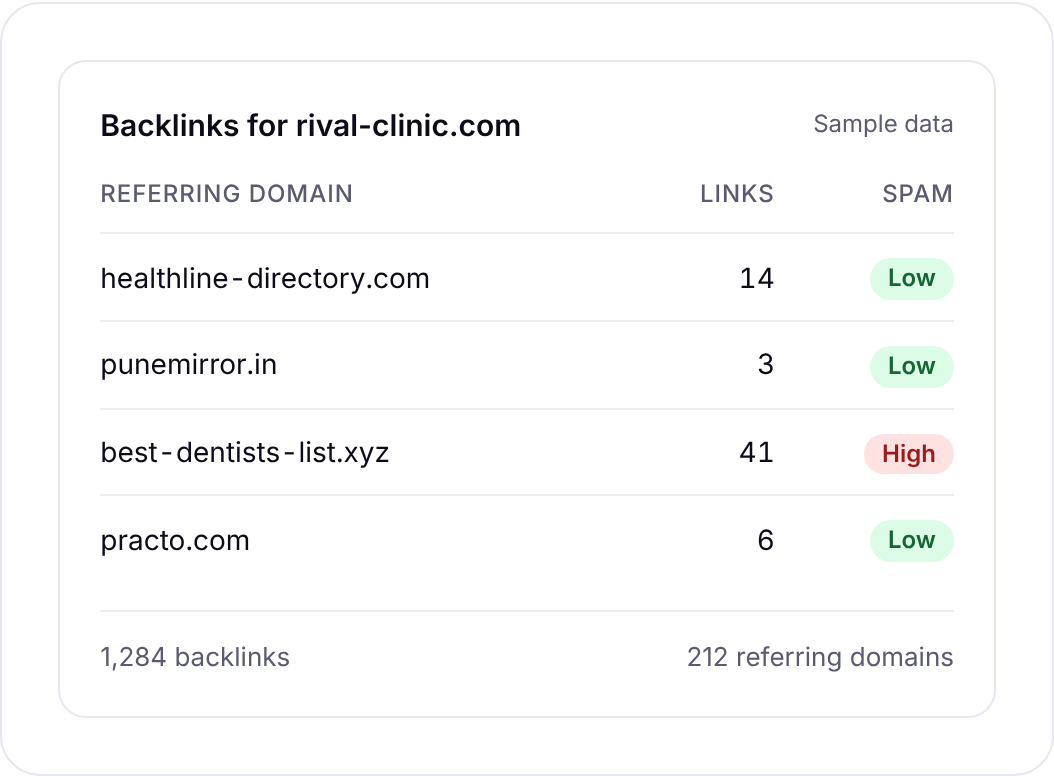
One thing I like for client work is the Ahrefs DR column. Clients often know DR as a number, even if they don’t know what’s behind it. Showing it next to spam score helps you explain why a “high DR” link from a spammy directory isn’t something to celebrate.
Spam scores, referring domains and broken pages with links, for about 62 credits a lookup.
What backlink checks cost per month
Here’s the maths for a typical freelancer. Say you look after five small clients. Each month you check every client’s own profile and two competitors for each, and you check a few prospects before pitching them.
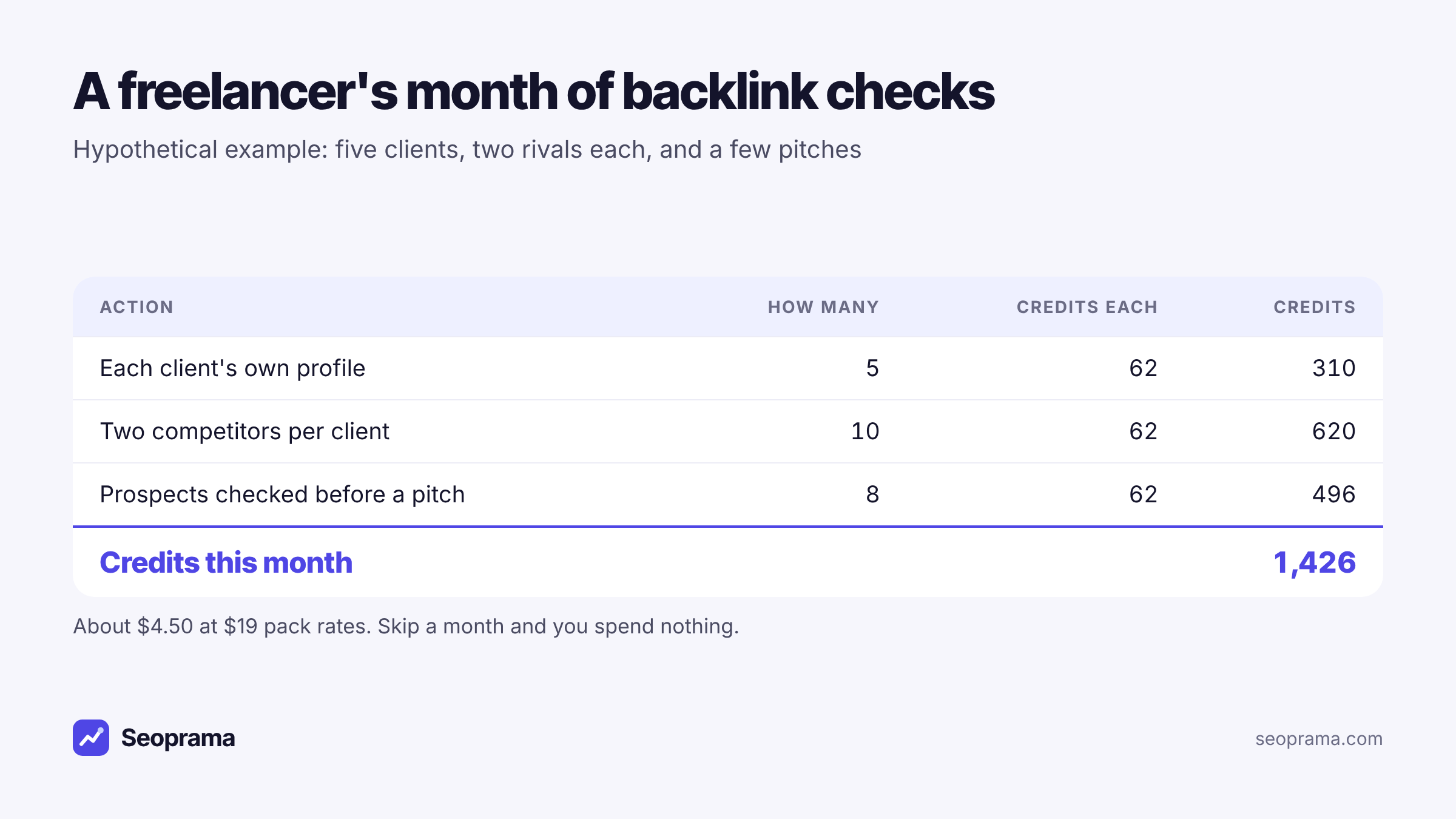
That’s 23 lookups for about $4.50 of credits. The ₹549 + GST pack in India gives you 2,900 credits, which covers about 46 lookups. In a month where you only check two clients, you spend about $0.40. And if you don’t check anything, you spend nothing.
For comparison, Ahrefs’ Lite plan includes 30 backlink profiles a month. The same 30 lookups on credits:
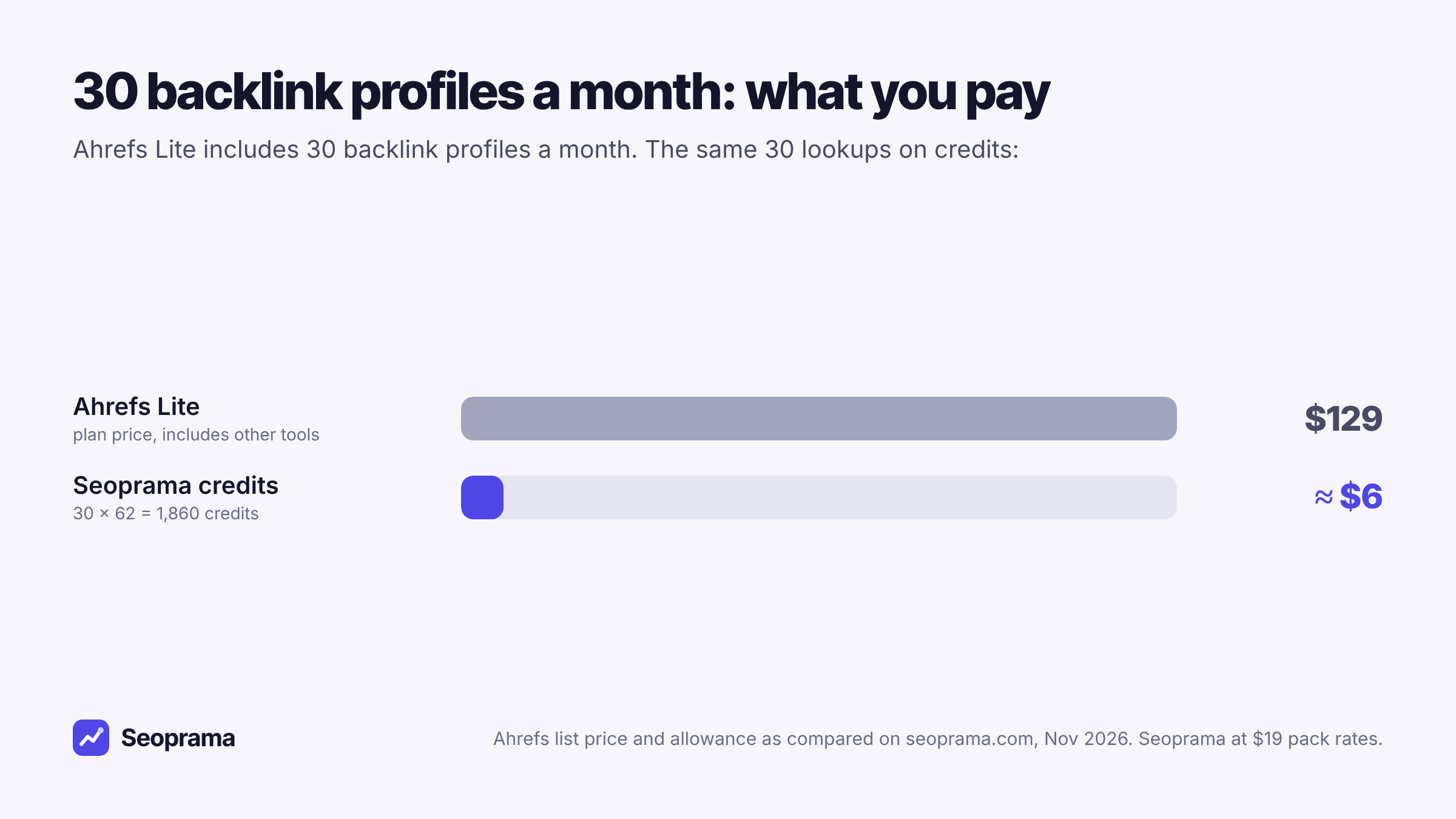
That isn’t the whole story, and it’s worth being straight about it. The Ahrefs plan also gives you rank tracking, site audits, keyword research and a bigger link index. If you’d use all of that, it’s a different calculation. But if backlinks are the main reason you’d open a suite, you’re paying for a lot you don’t touch.
If you’d rather see your own numbers, add up the lookups you ran last month and check them against the credit packs on the Seoprama pricing page.
About 21 keyword searches, or a few searches plus a backlink lookup and a week of rank tracking. No monthly plan, and credits never expire.
A backlink check, step by step
This is how I’d run one lookup on a client site. It takes about 15 minutes once you’ve done it a few times.
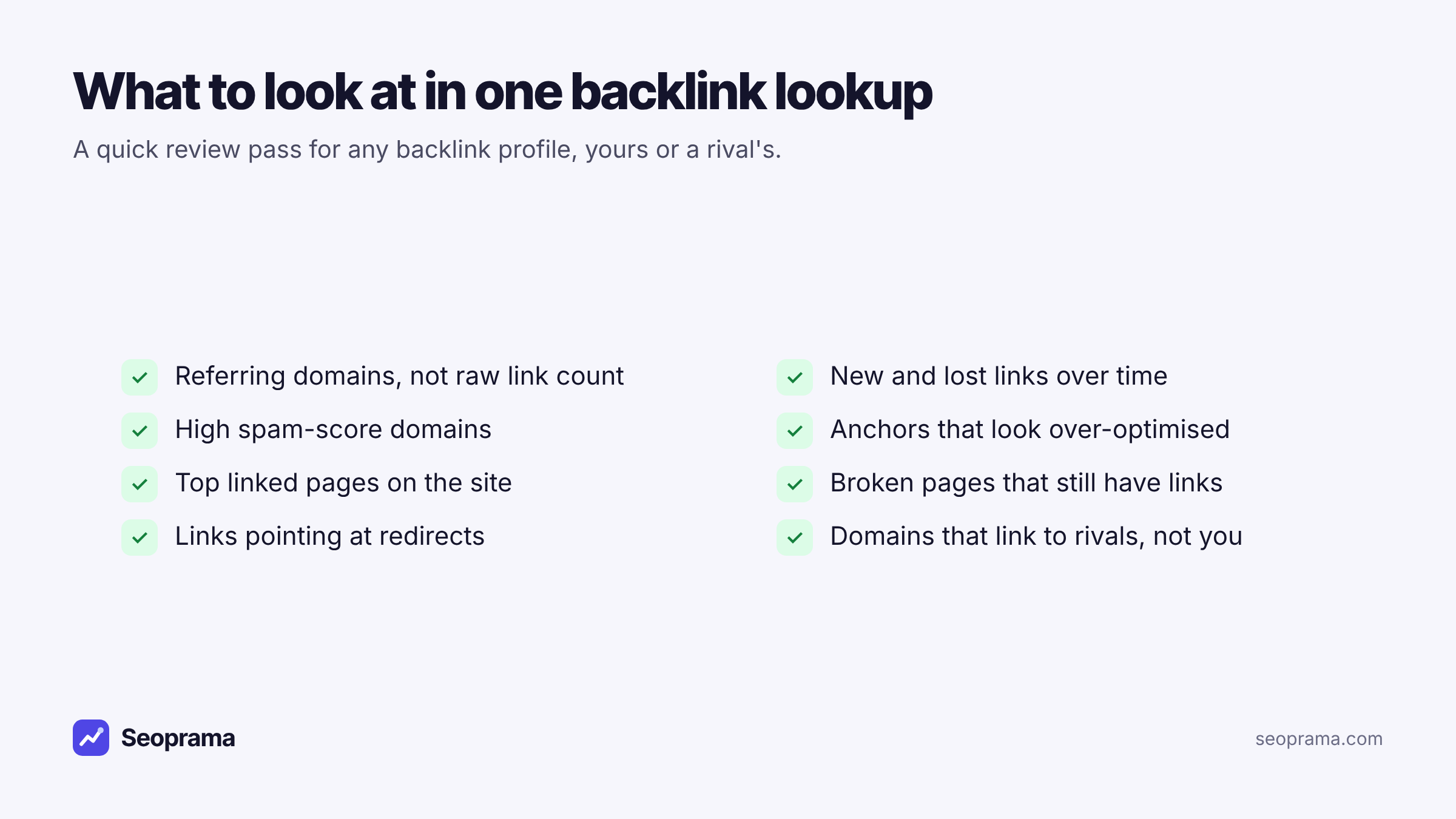
1. Enter the domain and run the lookup. You’ll see the credit cost before it runs.
2. Start with referring domains, not total backlinks. A site with 5,000 backlinks from 40 domains is weaker than it looks. One sitewide footer link can add thousands of backlinks from a single domain. Referring domains tell you how many separate sites vouch for this one.
3. Look at the new and lost chart. A steady line is normal. If it drops sharply, something happened: a partner site redesigned, a directory closed, or links pointed at pages that were deleted. A sharp spike can mean a good press mention or a burst of spam.
4. Sort by spam score. High-spam domains are worth a look. Most of the time they’re harmless junk that every site collects. But a large cluster of them, especially with exact-match anchors, is something to flag to the client.
5. Read the anchors. Natural profiles are mostly brand names, URLs and generic words. If a big share of anchors is “best dentist in Austin”, someone built those links on purpose, and they carry more risk than they’re worth.
6. Open the top linked pages. This is where the quick wins hide. If a page with links is now broken, those links are pointing at nothing.
The quick win most people skip: broken pages with links
Every site that’s been around a few years has some. A product was discontinued, a blog post was removed, someone changed a URL during a redesign. The links from other sites still point at the old address and now land on a 404.
Those links used to pass value to the site. Now they pass nothing. And fixing them is usually a five-minute job: redirect the old URL to the closest live page.
The top linked pages view flags broken pages that still have links. For a client, this is the first thing I’d fix after any backlink check, because it recovers links they already earned without any outreach at all.
When you set up those redirects, check them with the redirect checker. It follows each hop the way a browser does and warns you if a redirect is temporary or ends in an error, which is exactly what you don’t want after a fix. It costs 2 credits a URL.
Checking competitors’ backlinks for link ideas
The same lookup works on any site, not only your client’s. Run it on a competitor and you see who links to them, which pages earn their links and what anchors those links use. That’s your outreach list.
Some patterns to look for:
- Local directories and associations that list your competitors but not your client. Often a form and a short wait.
- Suppliers and partners who link to businesses they work with.
- Resource pages and roundups in your client’s niche.
- Broken pages on the competitor’s site that still have links. If you have a better page on the same topic, those site owners might link to you instead.
If you’re comparing several rivals at once, the competitor analysis tool puts you and up to five competitors in one view. Its backlink gap tab shows domains that link to rivals but not to you, and the 404 opportunities tab lists broken competitor pages that still have links. It costs about 250 credits per competitor compared, plus about 140 for your own site, and exports to Excel with one sheet per tab.
What makes one link worth more than another
Raw counts are where most people stop, and they tell you the least. When you read a lookup, these are the things I’d weigh, roughly in this order.
Relevance. A link from a local business association or a trade blog in the client’s niche is worth more than a link from a general directory with ten thousand categories. Ask whether a real customer might click it.
The linking site’s own strength. Domain strength and Ahrefs DR give you a rough sense of this. They’re shortcuts, so treat them that way. A small, well-read local news site can be worth more than a high-DR site nobody visits.
Where the link sits. A link inside an article is usually worth more than one in a footer, sidebar or comment. Check the link flags column too, since a flagged link may pass less value.
Spam score. Low is good. High doesn’t automatically mean harmful, but it does mean you shouldn’t count that link as a win in a client report.
The anchor. A brand name or URL is natural. An exact-match money phrase repeated across many sites isn’t.
Put together, these let you tell a client something useful. “You gained 14 links this month, and 3 of them are from relevant local sites” is honest. “You gained 14 links” on its own can hide that 11 of them came from spam directories.
When a subscription backlink tool is the better choice
A pay-per-lookup checker isn’t the right answer for everyone.
A subscription is probably better if you:
- run link building as your main service, checking dozens of profiles every week
- need automatic alerts when a link is lost. Seoprama doesn’t send link alerts yet, so you’d run a lookup to see what changed
- want the biggest link index available, which is where Ahrefs is strongest
Those are real needs, and the big suites serve them well.
But most freelancers check links for a handful of clients, a few times a month, plus the odd prospect. For that pattern, a pay-per-lookup backlink checker at around $0.20 a lookup is simpler. And it’s easy to explain on an invoice.
Do you need to disavow spammy links?
Clients often see a list of spammy domains and panic. Most of the time they don’t need to do anything.
Every site that’s been online for a while picks up junk links from scrapers and auto-generated directories. Google is generally good at ignoring them. Disavowing them takes time and rarely changes rankings.
Where I would look closer is a pattern that suggests someone built links on purpose: lots of exact-match anchors, paid-looking guest posts, or a sudden spike from low-quality sites. If a client had an old agency doing that, a careful clean-up can be worth it. Sort by spam score, export the list, and review it by hand before you decide anything.
Using lookups in client reports and pitches
Credits make backlink data cheap enough to use in places you’d normally skip it.
Before a pitch. Run one lookup on the prospect and one on their biggest rival. Bring the difference to the call. “They have links from 60 local sites and you have 12” is a stronger opening than any slide about your process.
In a monthly report. Export the new and lost links for the month and drop them into the report. Clients like seeing the links they gained, and they need to know about the ones they lost.
After a link-building push. Check again at the end of the month to confirm the links went live and are being picked up.
If you want to try this on a real client before buying a pack, the $2.99 trial (₹99 + GST in India) gives you 1,000 credits. Spent only on backlinks, that’s about 16 lookups: one client, two rivals and a prospect, with plenty left over to test the other tools.
Tick the tools you use, enter how much, and get a monthly number in your currency before you spend anything.
Frequently asked questions
Can I check backlinks without a monthly subscription?
Yes. Seoprama charges per lookup with credits instead of a plan. A backlink profile costs 62 credits, about $0.20, and the credits you buy never expire.
How many backlink lookups do I get for $19?
The $19 pack gives you 6,000 credits. At 62 credits a lookup, that’s about 96 backlink profiles.
Are free backlink checkers accurate?
Many use decent data, but they limit how much you see, either by capping daily checks or showing only the top links. That’s fine for a quick glance and too thin for a client audit or an outreach plan.
Does the backlink checker show toxic or spammy links?
It shows a spam score for every link and every referring domain, so you can sort and review the risky ones quickly.
Can I check a competitor’s backlinks?
Yes. A lookup works on any domain. Run it on a rival to see who links to them, their top linked pages and their anchors.
Is Seoprama’s link data as big as Ahrefs’?
No, and it’s fair to say so. Ahrefs is known for one of the largest link indexes. Seoprama is the cheaper option when you check links in bursts and don’t want to pay for a monthly plan.