A keyword research tool without a subscription (and how to use it well)
You need keyword data a few times a year, not every day. Here's how to get real volumes, difficulty and CPC without signing up to a monthly plan.

- Most keyword tools sell monthly plans, but most small businesses research keywords in bursts.
- On Seoprama a keyword search costs 46 credits, about $0.15. City-level volumes are about $0.28 a search.
- A $19 pack gives you 6,000 credits, which is about 130 searches. Credits never expire.
- Free tools are fine for ideas. Paid data earns its keep when you're choosing which pages to build.
- Start with the $2.99 trial (₹99 + GST in India), which covers about 21 searches.
Keyword research is a burst job. You do a lot of it when you build a site, plan a content push or launch a new service. Then you barely touch it for two months. A monthly plan doesn’t care about that rhythm, so you end up paying in the quiet months for the busy ones.
If you’re looking for a keyword research tool without a subscription, you probably want two things. Real numbers (volume, difficulty, cost per click) that you can make decisions on, and a bill that only shows up when you actually search. This guide shows how to get both, what it costs in plain maths, and how to run a research session so you don’t waste searches.
Why keyword tools push you onto a monthly plan
The big SEO suites sell keyword research as part of a bundle. You get a monthly allowance of searches, plus rank tracking, site audits, backlink data and a lot more. If you use all of it every week, that bundle is good value.
Most small business owners don’t. You research hard for two weeks while you plan a site, then you’re busy running the business. The plan keeps renewing.
The second catch is limits. Entry plans cap how many keyword searches or reports you can run per day or per month. Hit the cap in your busy week and you’re nudged to the next tier, which you then pay for in your quiet weeks too.
So “without a subscription” usually means one of three things:
- Free tools with daily limits or rough numbers.
- One-off access, like signing up for a month and cancelling (if you remember).
- Pay-as-you-go credits, where each search costs a small fixed amount and nothing renews.
The third one is the honest fit for burst work, and it’s how Seoprama works.
What free keyword tools can and can’t do for you
Free tools are worth using, and I’d start with them for ideas. Google’s autocomplete and the “People also ask” boxes show you real phrasing. Google Search Console shows the queries your own site already appears for, which is gold once you have some traffic. Google Keyword Planner is free with an Ads account, though it shows volume ranges unless you’re running ads.
Where free tools fall short is the decision. You can list 200 ideas from autocomplete in an afternoon. What you can’t easily see is which of them get enough searches to matter, how hard they are to rank for, and whether the people searching want to buy or just read.
That gap is what you pay for. A good rule of thumb: use free tools to collect ideas, and pay for data on the shortlist you’re about to build pages for. That keeps your paid searches few and focused.
How a keyword research tool without a subscription works
Seoprama runs on credits. You buy a pack once and every search takes a few credits from your balance. Nothing renews, and the credits you don’t use stay in your account with no expiry date.
A standard keyword search costs 46 credits, which works out to about $0.15. If you need volumes for a city, county or region instead of a whole country, it’s about $0.28 a search. The app shows the credit cost of each search before you run it, so you’re never guessing.
Here’s what one search gives you in the keyword research tool:
- Four ways to search. Broad ideas, phrase match, category ideas, and “People also search for”.
- The numbers that decide things. Search volume, cost per click, competition, a 0 to 100 difficulty score and search intent for every keyword.
- Local demand. City, county and region volumes when a country number is too broad.
- Who ranks now. A SERP card shows the pages currently at the top.
- Filters. Intent, include or exclude words, and how many results to pull.
- Save and export. Tag keywords you like, then export to Google Sheets, CSV or Excel.
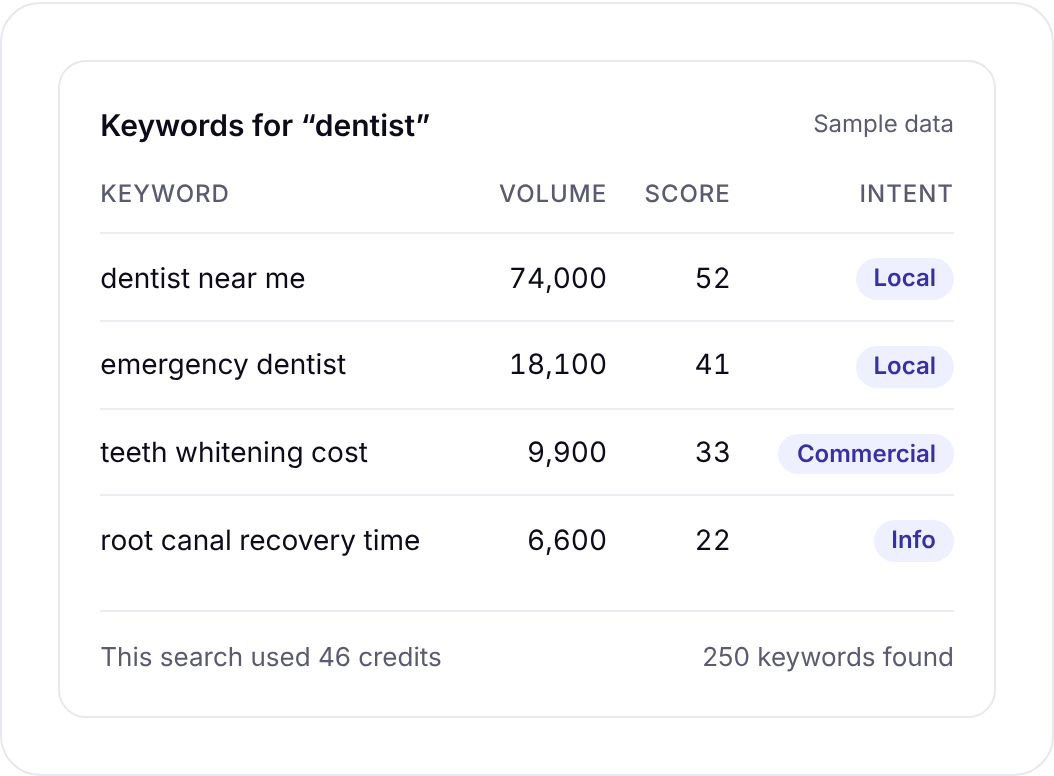
A field note: the intent column saves more time than people expect. If a keyword is mostly informational, it wants a guide, not a service page. Knowing that before you write is the difference between a page that ranks and one that sits on page four.
46 credits a search. No daily report limits, no plan to keep paying for.
What keyword research costs without a plan
Let’s put the numbers side by side. One search is 46 credits.
| What you buy | Credits | Keyword searches it covers |
|---|---|---|
| $2.99 trial | 1,000 | about 21 |
| $19 pack | 6,000 | about 130 |
| $49 pack | 16,500 | about 358 |
| ₹549 + GST pack (India) | 2,900 | about 63 |
Now a realistic year for a small business. Say you’re launching a website for a bakery. You run 30 searches in the launch month, then about 5 a month afterwards to check new product ideas and blog topics. That’s 85 searches in a year, or 3,910 credits.
One $19 pack covers the whole year with credits to spare.
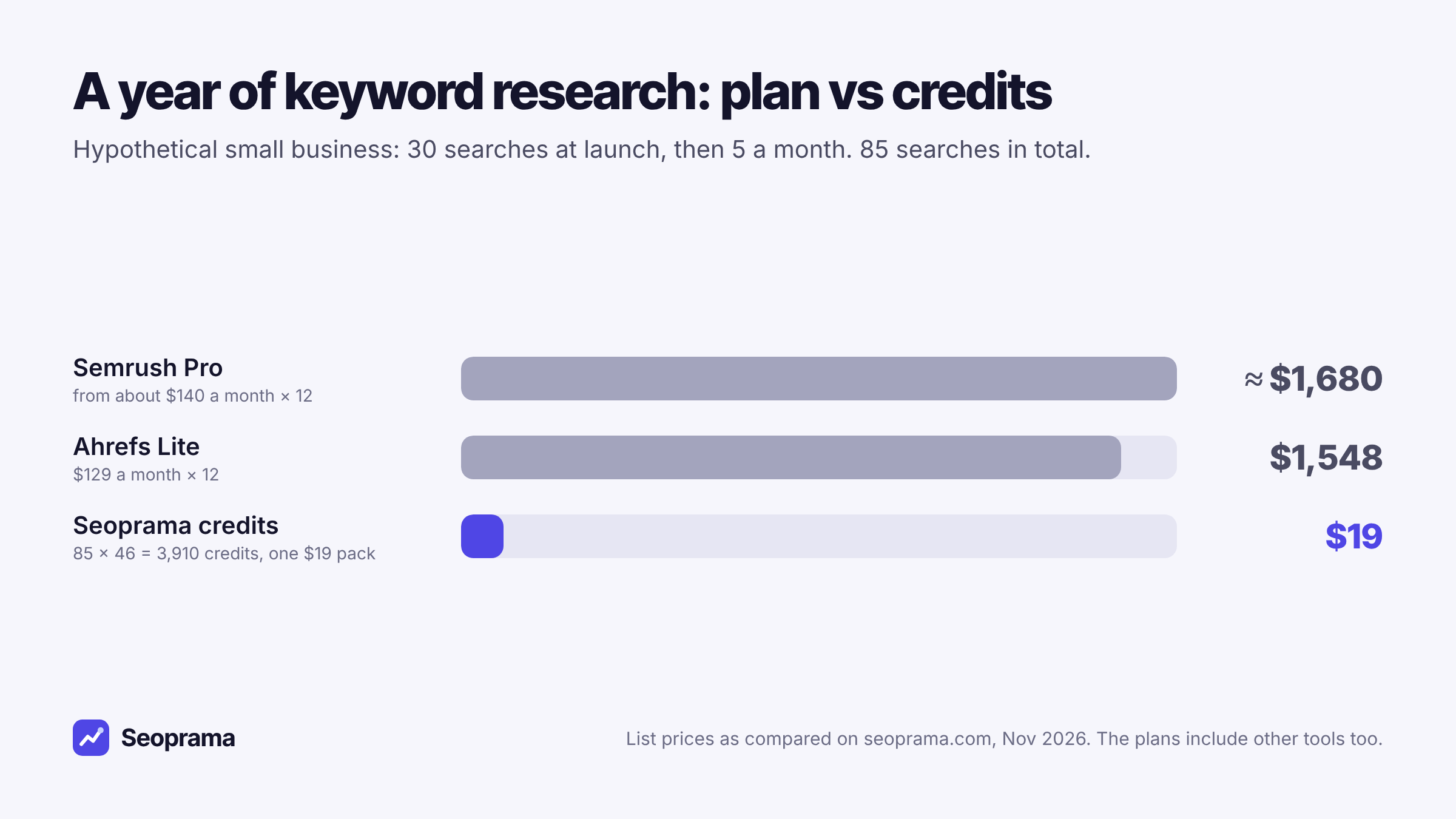
To be fair to Ahrefs and Semrush, those yearly figures buy a lot more than keyword research. They have bigger keyword databases, more metrics, content tools, and a full suite around it.
If you’d use all of that every week, a plan can make sense. But if keyword data is the main thing you’d open the tool for, the gap is hard to ignore.
The point of this maths is your own usage. Count the searches you actually ran last year, multiply by 46, and compare that with the credit packs on the pricing page.
About 21 keyword searches, or a few searches plus a backlink lookup and a week of rank tracking. No monthly plan, and credits never expire.
A keyword research session, step by step
This is the routine I’d use for a small business site. It takes an hour or two and somewhere between 20 and 40 searches.
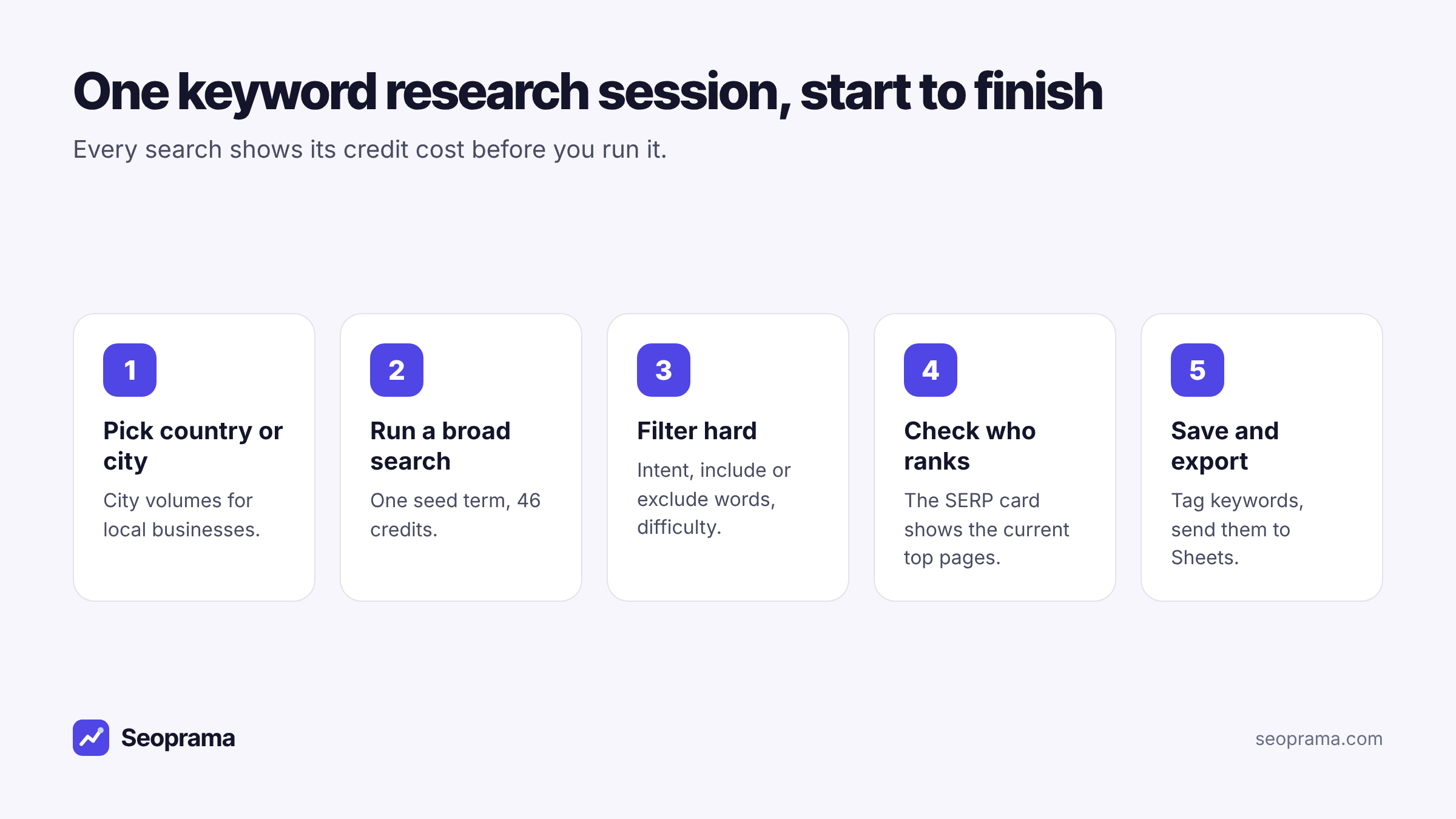
1. Pick the country or city. If your customers are local, switch to city volumes. A plumber in Leeds doesn’t care how many people search “boiler repair” across the whole UK. It costs a bit more per search, so use it for the money keywords, not every idea.
2. Run a broad search on each seed term. One seed per service or product. “Sourdough bread”, “birthday cakes”, “wedding cakes”. Each one returns a list of related keywords with their numbers.
3. Filter hard. Cut anything with the wrong intent, exclude words that don’t fit (“recipe” if you sell cakes rather than teach baking), and sort by volume or difficulty. Most lists shrink by half here, and that’s the point.
4. Check who ranks. Open the SERP card for your top candidates. If the first page is all national brands and directories, a newer site will struggle. If it’s small local businesses and thin pages, you have a real shot.
5. Save and export. Tag the keepers by page (“homepage”, “cakes page”, “blog”) and export to Sheets. That export becomes your content plan.
Here’s what that launch month looks like in credits:
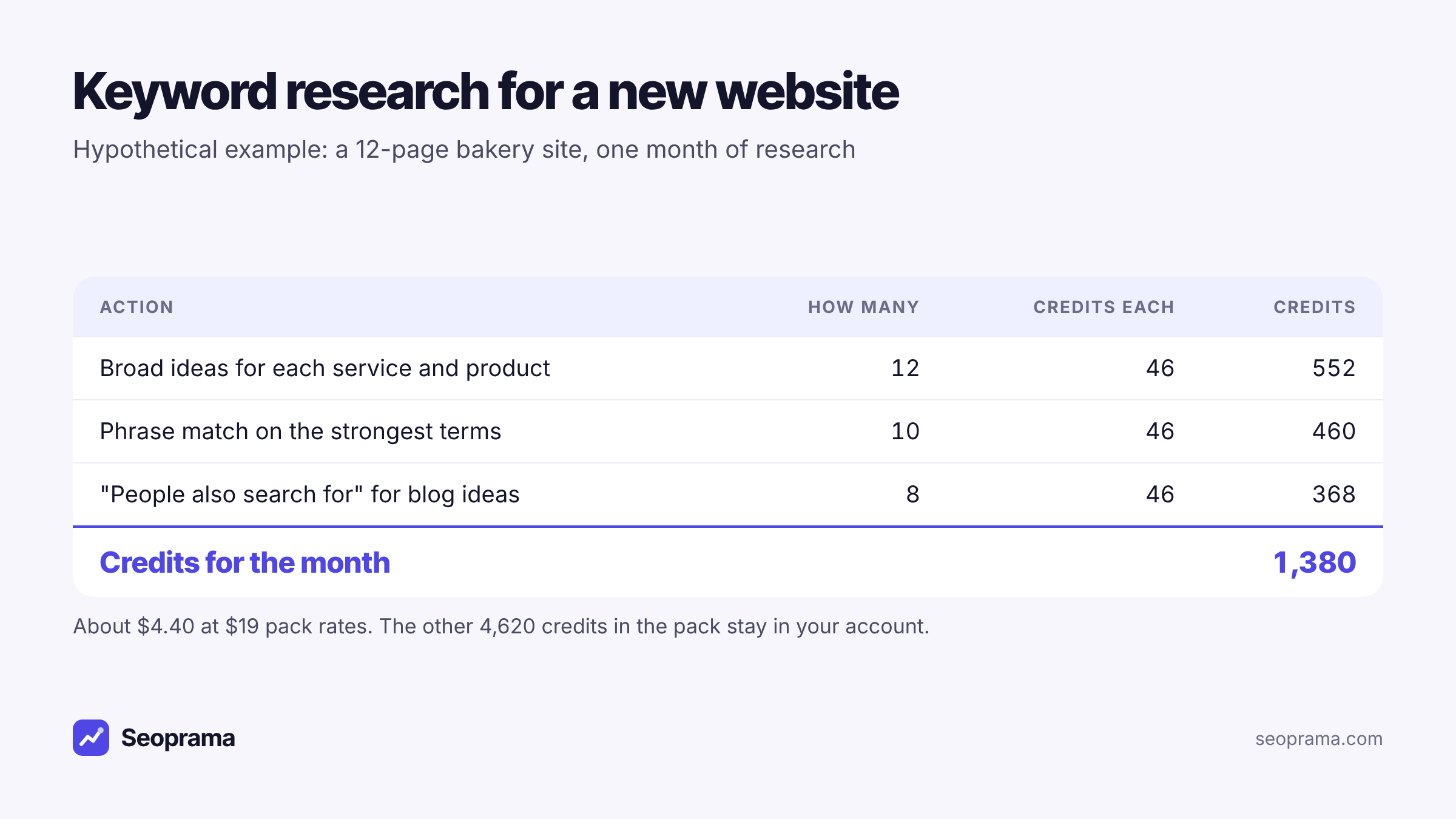
About $4.40 of credits for the research behind a whole site. And if you only get through half of it this month, the rest of the pack waits for you.
How to avoid wasting searches
Credits make you a bit more deliberate, which is a good thing. A few habits keep your searches useful:
Write your seeds first. Spend ten minutes listing the services, products and problems your customers bring to you. Search those. Random searching costs credits and gives you random lists.
Use phrase match for depth, broad for width. Broad ideas show you neighbouring topics. Phrase match gives you every variation of one term, which is what you want once you’ve picked a page.
Use “People also search for” for blog topics. It surfaces the follow-up questions people have, which make good supporting articles.
Don’t re-search what you’ve saved. Check your saved, tagged keywords before running the same seed again. It’s an easy way to spend credits twice.
Pull the right number of results. If you only need the top 50 ideas for a seed, set the result count to match. Big pulls are useful for a content plan, but a small business rarely needs thousands of rows.
Turning a keyword list into pages
A spreadsheet of keywords doesn’t rank anything. The last step is deciding which page each keyword belongs to, and it’s the step most people skip.
Group keywords that mean the same thing. “Birthday cakes near me”, “custom birthday cake” and “order birthday cake” are one page, not three. If you split them, your own pages compete with each other and none of them wins.
Then give every group one home:
- Service or product pages get the commercial keywords, the ones people search when they’re ready to buy.
- Guides and blog posts get the informational ones, like “how long does a sourdough starter last”.
- Your homepage gets the broad brand-plus-service term, and not much else.
Anything left over with low volume and no clear page can wait. You’ve paid for the data, so it’s tempting to use every row. Don’t. A small site with ten well-targeted pages usually beats one with forty thin ones.
When local volumes are worth the extra
Country-level volume can mislead a local business in both directions. A keyword with 1,000 searches a month nationally might have 20 in your city, or 300 if your city is big and the service is common there.
City volumes cost about $0.28 a search instead of about $0.15. For a local business, I’d use them for the 10 or 15 keywords that will sit on your main service pages. Blog topics can stay at country level, because people read guides from anywhere.
If you’re tracking those local keywords afterwards, a rank tracker by city shows where you actually land in your area. We wrote up how that works without a plan in rank tracking without a subscription.
Using a rival’s site as a shortcut
Sometimes the fastest keyword research is to look at who already ranks. If a competitor in your city has the traffic you want, their pages are a ready-made list of what works.
Competitor research shows a site’s estimated organic traffic, the keywords it ranks for (with position, volume, difficulty and CPC) and its top pages. A lookup costs about $0.13. You can scope it to one URL, a folder like /blog/, or the whole domain.
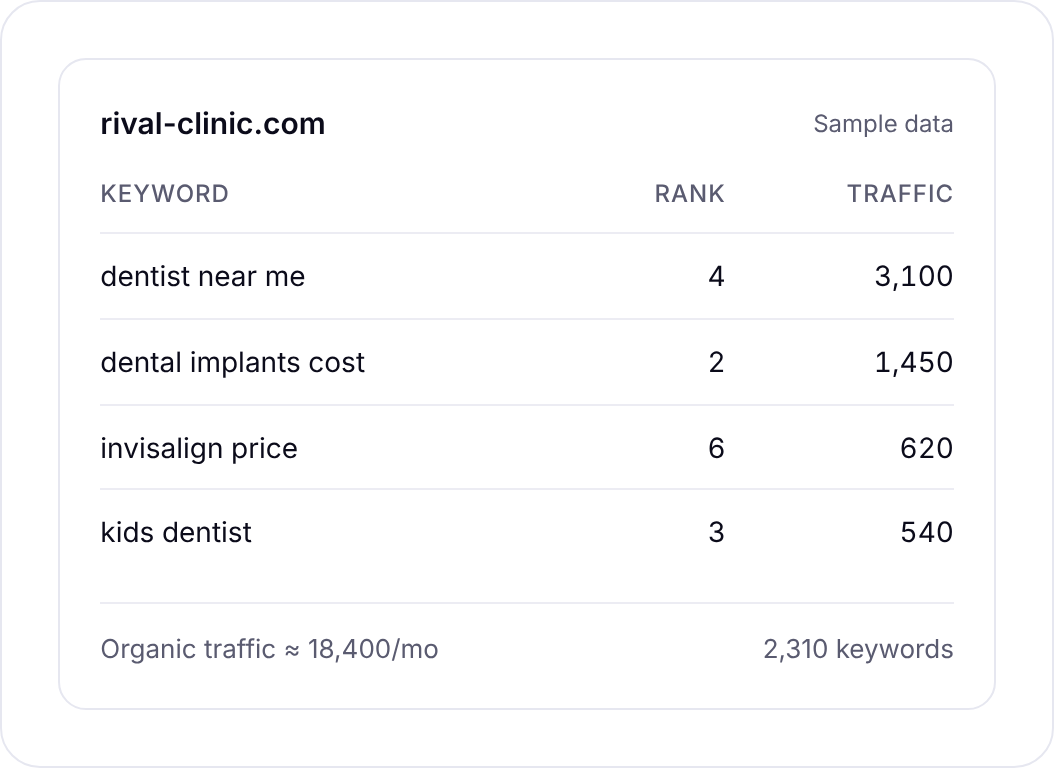
I like doing one competitor lookup before any keyword session. It shows you the topics that bring a real business traffic, and then your own searches can go deeper on the ones you want to own.
When a subscription keyword tool is the better buy
A pay-as-you-go tool isn’t right for everyone, and it’s better to know that upfront.
A subscription can be the smarter choice if you:
- run keyword research every single day, for many sites, as your main job
- need the biggest keyword database you can get, including very long-tail terms in smaller markets
- use the content, writing and reporting tools that come bundled with a suite
Ahrefs and Semrush are strong tools with bigger databases and more features than Seoprama. If you’d use them fully, they earn their price.
But if you research in bursts, for one site or a few clients, paying per search is simpler. You see the cost before each search, you stop when you have enough, and nothing renews next month.
Getting started for $2.99
The trial is $2.99 for 1,000 credits (₹99 + GST for 700 credits in India), once per account. That’s about 21 keyword searches, which is enough to research one small site properly or test the tool on the three or four pages you care about most.
My suggestion for the trial: write five seed terms, run a broad search on each, filter them down, and check the SERP card on your top ten. Export the result. You’ll have a real shortlist in under an hour, and a clear sense of whether the keyword research tool fits how you work.
About 21 keyword searches, or a few searches plus a backlink lookup and a week of rank tracking. No monthly plan, and credits never expire.
Frequently asked questions
Is there a keyword research tool without a monthly subscription?
Yes. Seoprama sells credits instead of plans. A keyword search costs 46 credits, about $0.15, and the credits you buy never expire. There’s no monthly bill unless you choose an optional monthly plan.
How many keyword searches do I get for $19?
The $19 pack gives you 6,000 credits. At 46 credits a search, that’s about 130 searches. Bigger packs give you more credits per dollar.
Are free keyword research tools good enough?
They’re good for collecting ideas. Autocomplete, “People also ask” and Search Console are all worth using. Where they fall short is reliable volume, difficulty and intent for the shortlist you’re about to build pages for.
Can I see keyword volumes for my city?
Yes. You can switch from country volumes to a city, county or region. Those searches cost about $0.28 each instead of about $0.15.
Do unused credits expire?
No. Credits stay in your account until you use them, so a quiet quarter doesn’t waste anything.
Is Seoprama better than Ahrefs or Semrush for keyword research?
Not across the board. Ahrefs and Semrush have bigger databases and more features. Seoprama is cheaper when you research in bursts, because you pay per search instead of paying for a monthly plan you don’t fully use.