How to track your Google rankings without paying a monthly subscription
You want to know where your pages rank every week. You don't want another tool bill that renews whether you used it or not. Here's how to get both.
- Most rank trackers sell keyword tiers on a monthly plan, so you pay the same in quiet months.
- With credits, a keyword checked weekly costs 6 credits a month. That's about $0.02.
- A $19 pack covers 1,000 keywords checked weekly for a month, and unused credits never expire.
- Track by country or city, on desktop and mobile, and choose daily, weekly, monthly or on demand per tracker.
- Start with the $2.99 trial (₹99 + GST in India) and track a small set of keywords first.
Most people who search for a rank tracker without a subscription have already been burned once. You signed up for a plan to watch 40 keywords, used it properly for two months, then got busy. The card kept getting charged anyway.
The good news is you don’t need a plan to track rankings well. You need a tool that charges per check, lets you pick how often it checks, and doesn’t punish you for going quiet. That’s exactly how the keyword rank tracker in Seoprama works, and this guide shows you how to set one up so your monthly cost stays small and predictable.
Why most rank trackers push you into a subscription
Rank tracking is the feature that keeps people on monthly plans. Keyword research you do in bursts. A backlink check you run once a quarter. But rankings change every week, so tools sell them as a running allowance.
The catch is the tier. A typical entry plan includes a fixed number of tracked keywords, say 500 or 750. Go over and you’re nudged to the next plan. Stay under and you’re paying for slots you don’t fill.
Here’s what that looks like for a small business tracking 750 keywords:
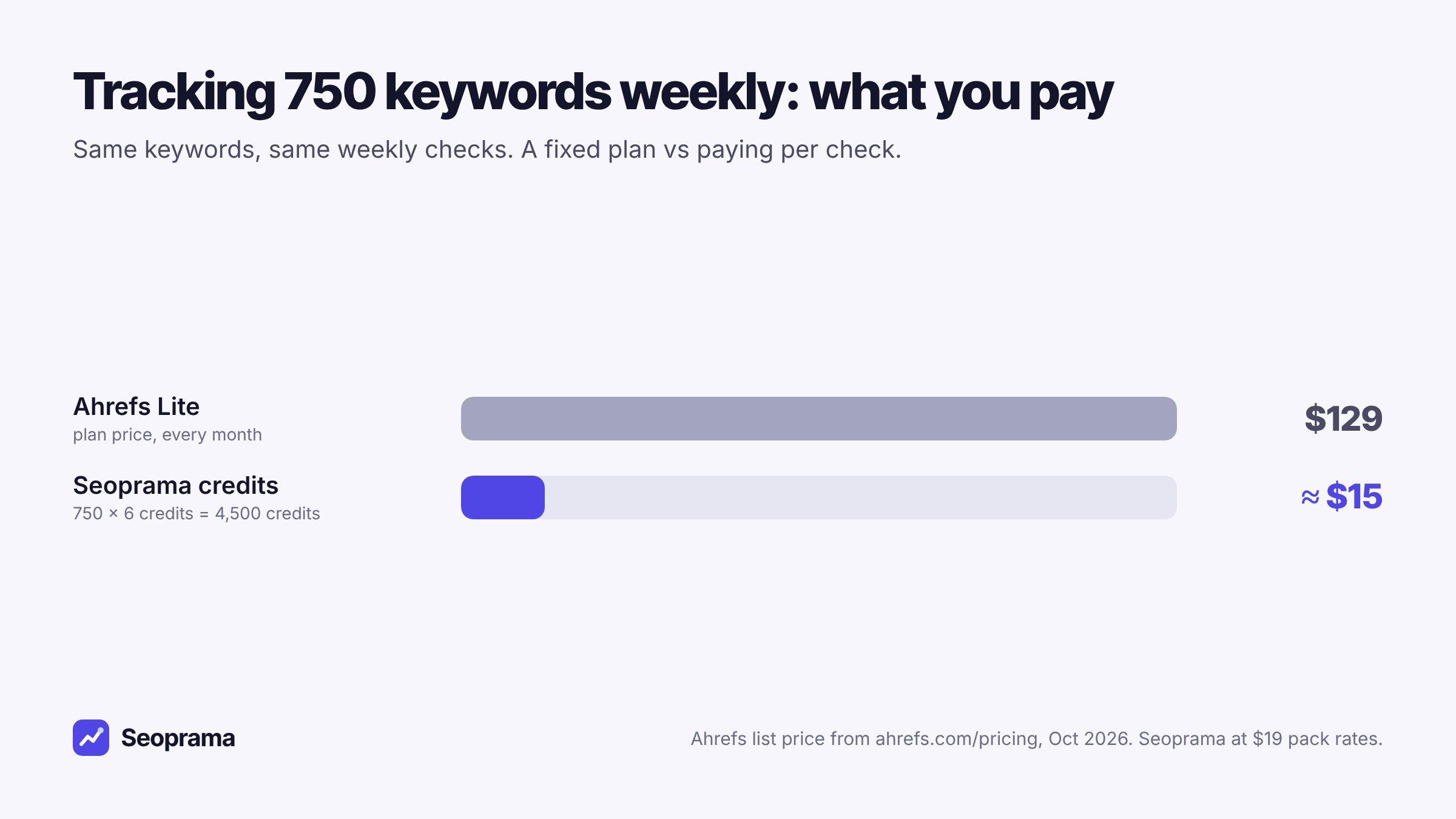
To be fair to the big suites, a plan like Ahrefs Lite includes a lot more than rank tracking. If you use all of it every week, it can be good value. But if rankings are the main thing you open the tool for, you’re paying for a whole suite to use one feature.
How a rank tracker without a subscription actually works
Seoprama runs on credits. You buy a pack once, and every check uses a few credits from your balance. When you’re not running anything, you’re not spending anything.
For rank tracking the maths is simple. One keyword checked weekly in the top 30 uses 6 credits a month. Checked daily, it uses 42. So the same keyword costs a seventh as much if weekly is enough for you, and for most keywords it is.
A few things make this work in practice:
- No tracked-keyword tiers. Track as many keywords as you need, up to 1,000 per tracker. You don’t jump a plan at keyword 751.
- You set the schedule per tracker. Daily, weekly, monthly or on demand, at the time of day you choose.
- Credits never expire. A slow quarter doesn’t waste anything.
- No seat fees. Your team shares one credit balance.
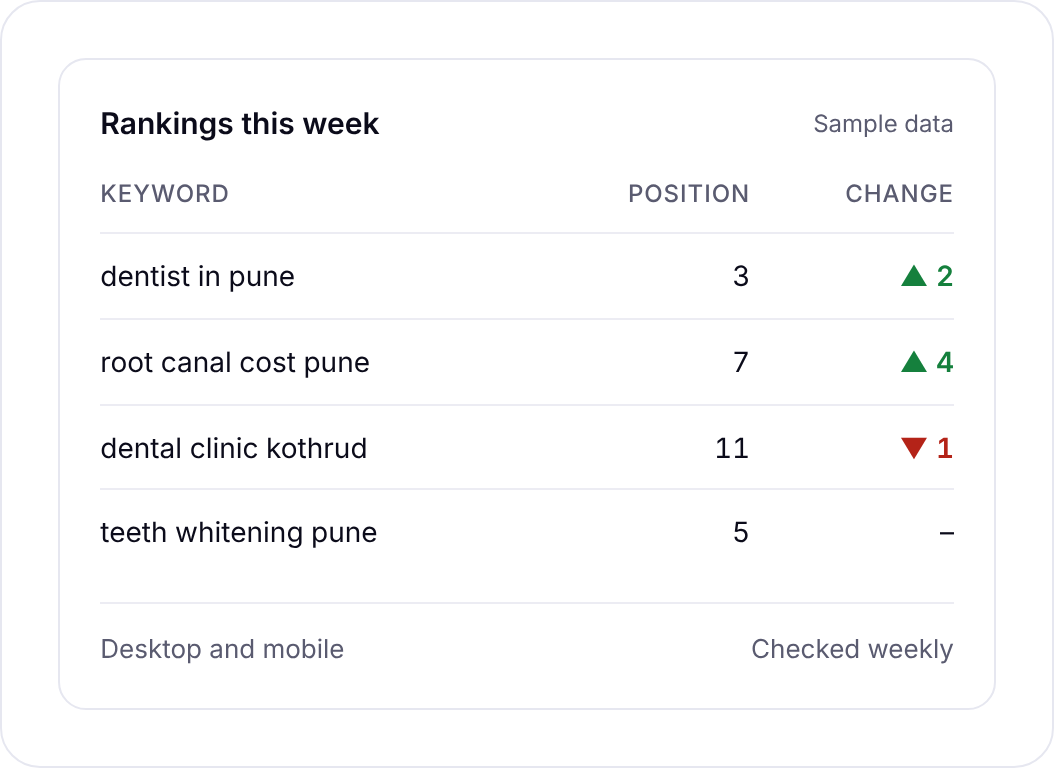
That screenshot is the view you’ll live in. Each keyword shows its position and how it moved since the last check. Open a keyword and you also get the ranking URL, SERP features, search volume, difficulty and cost per click, so you know whether a drop matters before you panic about it.
Up to 1,000 keywords per tracker with no tiers. A keyword checked weekly uses 6 credits a month.
What it costs to track 50, 300 or 1,000 keywords
Let’s put real numbers on it. These use weekly checks in the top 30, which is what most sites need.
| Keywords tracked weekly | Credits a month | Roughly, at $19 pack rates |
|---|---|---|
| 50 | 300 | about $1 |
| 300 | 1,800 | about $6 |
| 1,000 | 6,000 | $19 |
So a single $19 pack covers 1,000 keywords for a full month. In India, the ₹549 + GST pack gives you 2,900 credits, which covers about 480 keywords checked weekly for a month.
Now a fuller example. Say you’re a freelancer looking after three small clients: a clinic, a CA firm and a local gym. Each gets 100 keywords checked weekly, and the clinic also gets 10 money keywords checked daily because it’s mid-redesign.
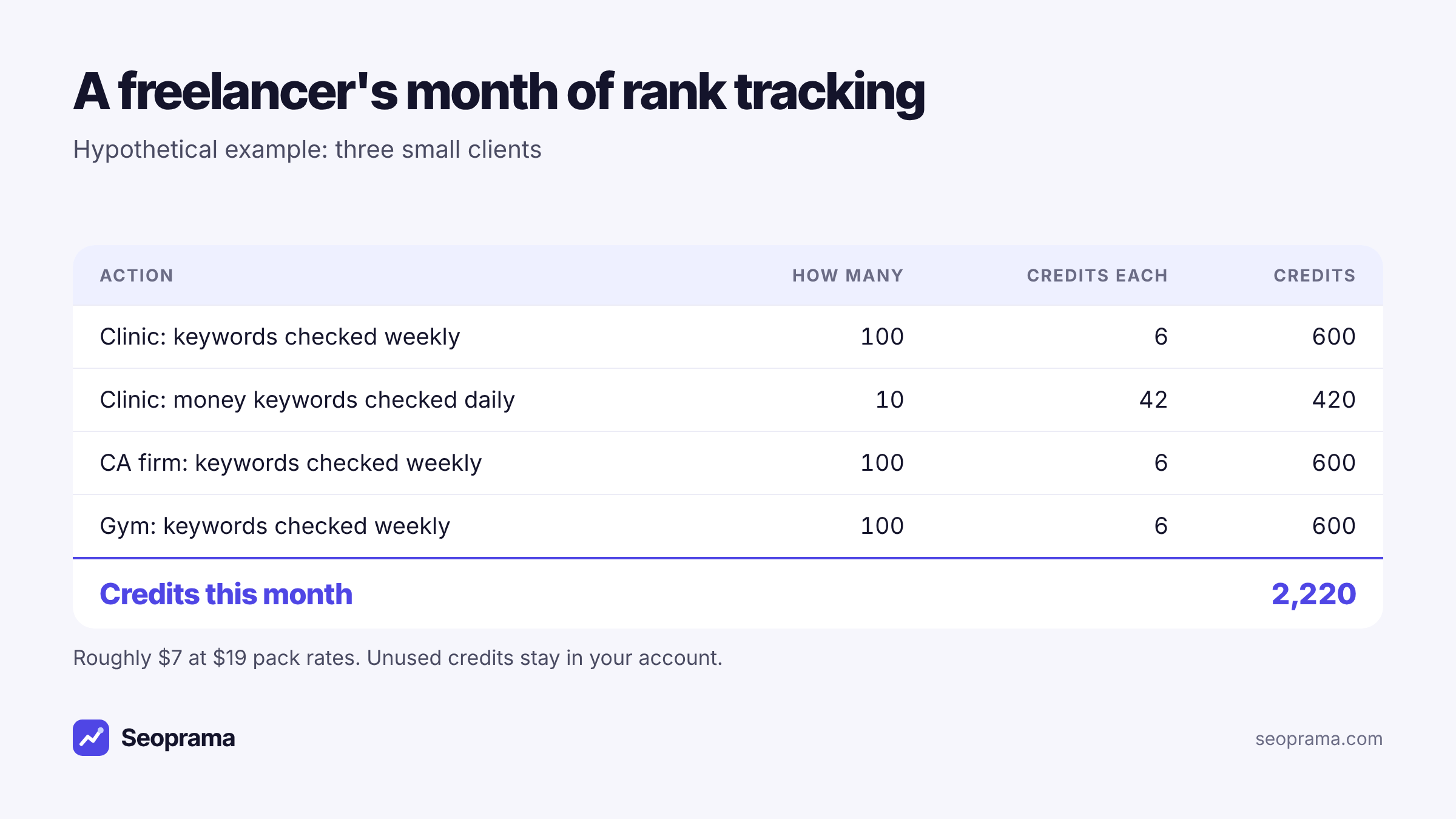
That’s three clients tracked properly for about $7 of credits. If one client pauses for a month, you simply stop their tracker and the cost drops with it.
And if you move a few keywords to daily checks, you’ll see the cost before you run anything. The app shows each tracker’s credit cost up front, so a big setup never surprises you at the end of the month.
About 21 keyword searches, or a few searches plus a backlink lookup and a week of rank tracking. No monthly plan, and credits never expire.
Setting up your first tracker (it takes about five minutes)
Here’s the setup I’d use for a small business or a single client site.
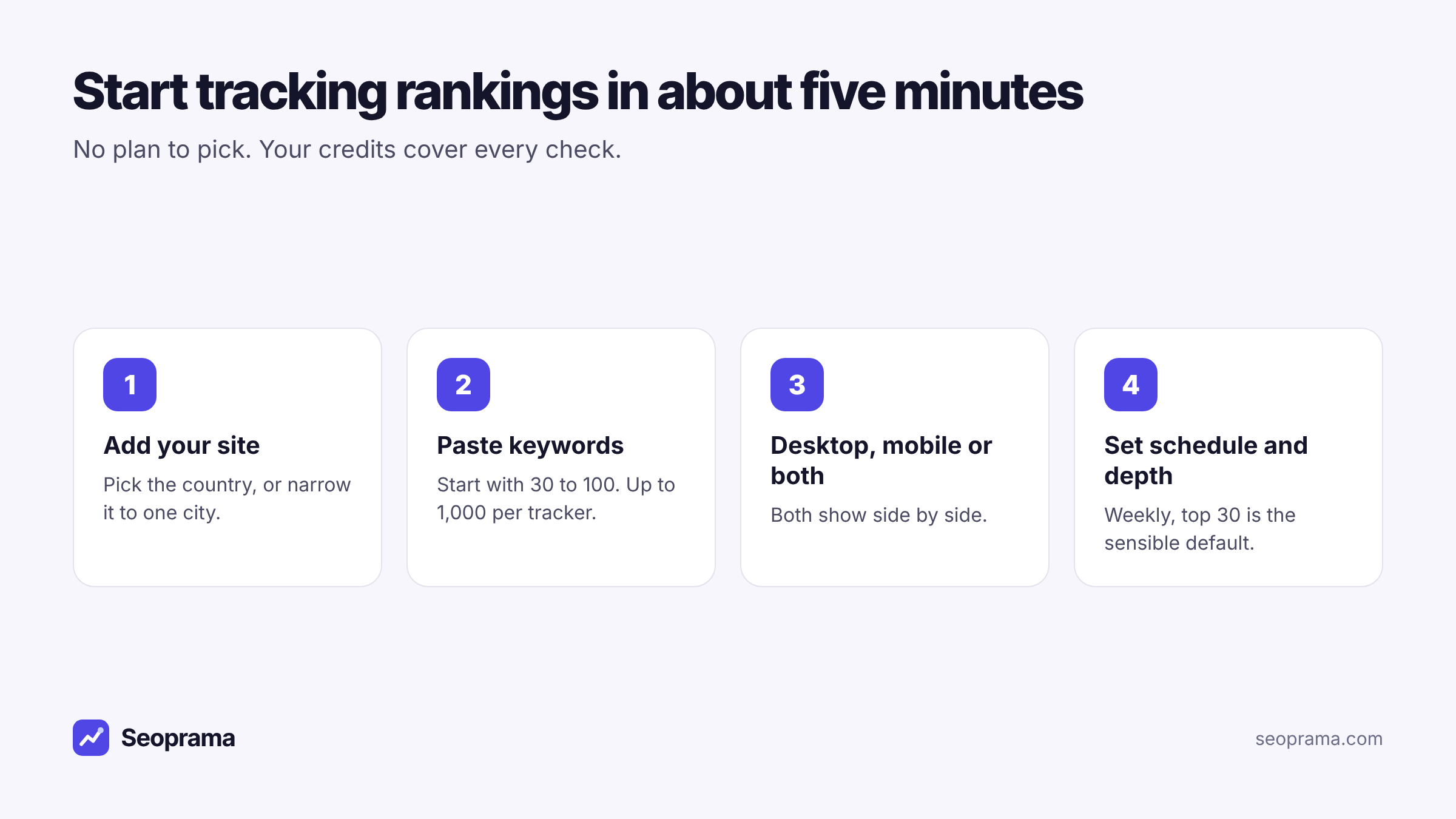
1. Add the site and pick where to check. Choose the country, or narrow it to a city if your customers are local. A dental clinic in Pune cares about Pune results, not national ones.
2. Paste your keywords. Start with 30 to 100 terms you’d genuinely act on. Product and service pages first, then the blog posts that bring in leads. You can add more later, up to 1,000 per tracker.
3. Choose desktop, mobile or both. If most of your traffic comes from phones, track mobile at least. Both devices show side by side, which is handy when a page ranks well on one and poorly on the other.
4. Pick a schedule and depth. Weekly in the top 30 is the sensible default. Go deeper, up to the top 100, if you’re tracking newer pages that haven’t cracked page three yet.
That’s it. The first check runs at the time you set, and the history builds from there.
When daily tracking is worth paying for
Daily checks cost seven times as much as weekly, so use them on purpose. In my experience they earn their keep in three situations:
- A launch or migration. For the first two or three weeks after you move a site or launch a big page, daily data tells you fast if something broke.
- Keywords that drive real money. If one term brings in most of your leads, daily is cheap insurance.
- A competitor fight. When you and a rival keep swapping positions on a valuable term, daily shows you the pattern.
For everything else, weekly is plenty. Rankings wobble day to day for reasons that have nothing to do with you, and staring at daily noise mostly creates anxiety.
A setup I like for small sites: one daily tracker with 10 money keywords, and one weekly tracker with everything else. Ten keywords daily use 420 credits a month. Two hundred weekly use 1,200. You’re tracking 210 keywords for about $5 a month.
What actually makes rank data accurate
Cheap shouldn’t mean sloppy. When people worry about a low-cost tracker, what they’re really asking is whether the numbers match what a customer sees. That comes down to a few settings, and none of them depend on how you pay.
Location. Google’s results change from city to city. A tracker that only checks nationally will tell a Mumbai bakery it ranks fifth when, in Mumbai, it’s actually in the map pack at the top. Set the location to where your customers search from.
Device. Mobile and desktop results differ more than most people expect, especially for local and shopping searches. If your analytics say 70% of visitors are on phones, mobile rankings are the ones that matter.
Depth. If you only check the top 10, every keyword sitting on page two shows up as “not ranking”. That hides progress. Checking the top 30 (the default) or deeper lets you see a page climbing from 24 to 14 before it reaches page one.
Consistency. Checking at the same time of day, on the same schedule, makes week-to-week comparisons fair. You set the time when you create the tracker.
Get those four right and your data is as trustworthy as any tracker’s. You can see the whole flow in the product tour below.
Switching from a subscription tracker without losing your place
If you’re already paying for a tracker, you don’t have to rip it out in one go. Here’s a calm way to move.
- Export your keyword list from the old tool before the next renewal date. Most tools let you download it as a CSV.
- Trim it. Old lists collect junk: keywords for pages you deleted, terms you added out of curiosity, near-duplicates. Cut anything you wouldn’t act on. Most lists shrink by a third, and every keyword you remove is credits you don’t spend.
- Rebuild the trackers by purpose. One for money keywords (daily), one for everything else (weekly), and one per city if you’re local.
- Run both tools for one cycle if you want reassurance. Compare a handful of positions, then cancel the old plan.
- Keep your old exports. Your new history starts on day one, so the old CSVs are your record of where you were before.
You’ll lose nothing important, and from then on you only pay for checks you actually run.
Tracking by city without paying for a local add-on
Plenty of trackers charge extra for local results. That’s a problem if you’re a local business, because national rankings can look great while your own city tells a different story.
In Seoprama, city-level tracking is part of every tracker. Pick the city when you set it up and every check runs from there.
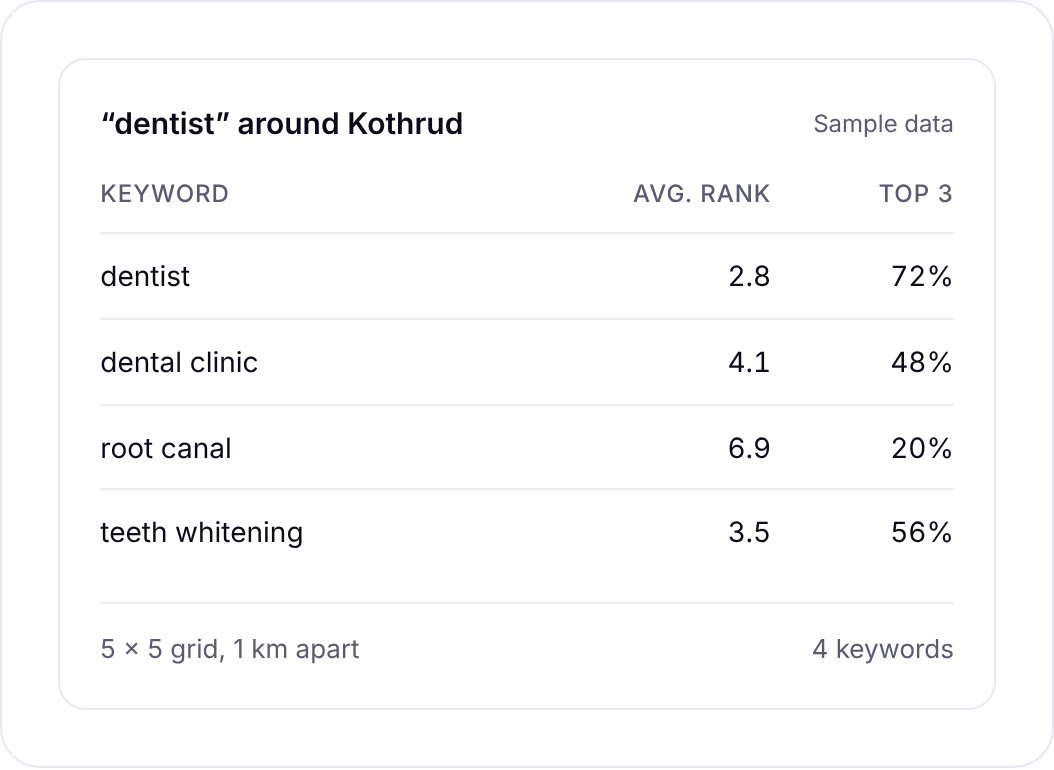
If you serve several cities, create one tracker per city with the same keyword list. You’ll quickly see where you’re strong and where a competitor owns the map. Pair that with the local SEO tools when you start working on Google Business Profile listings and city pages.
Reading your rankings so you actually act on them
A rank tracker is only useful if it changes what you do on Monday morning. Three habits help:
Check the biggest movers, not every keyword. The changes list shows what jumped or dropped since the last check. Start there.
Look at the ranking URL. When a keyword drops, check whether Google switched to a different page on your site. That usually means two pages are competing for the same term, and the fix is to merge or re-target one of them.
Watch SERP features. If a featured snippet or a local pack appears for your keyword, your position number can stay the same while clicks fall. The tracker records SERP features for this reason.
When you need to share results, export to Google Sheets or CSV. Many freelancers drop the export straight into their client report.
Tick the tools you use, enter how much, and get a monthly number in your currency before you spend anything.
Is a pay-as-you-go rank tracker right for you?
It’s a good fit if you:
- track a few hundred keywords or fewer, for yourself or a handful of clients
- have busy and quiet months
- don’t want to pay for seats every time someone on your team logs in
- want local results without an add-on
A big suite might suit you better if you use its full toolset every single day: huge keyword databases, content tools, and every report they offer. That’s a real use case, and it’s worth paying for.
But if you mostly want to know where you rank, the simplest move is to buy credits once and track what matters. Try it on your own site for $2.99 (₹99 + GST in India), see your first weekly report, and decide from real data. You can compare credit packs on the pricing page whenever you’re ready to track more.
About 21 keyword searches, or a few searches plus a backlink lookup and a week of rank tracking. No monthly plan, and credits never expire.
Frequently asked questions
Can I track keyword rankings without a monthly subscription?
Yes. Seoprama sells credits instead of plans. Each keyword checked weekly uses 6 credits a month, and the credits you buy never expire, so there’s no monthly bill unless you choose a monthly plan.
How much does it cost to track 100 keywords?
Checked weekly in the top 30, 100 keywords use 600 credits a month. That’s roughly $2 at the $19 pack rate. Daily checks cost seven times as much, so most people keep daily for a handful of important terms.
Is pay-as-you-go rank tracking accurate?
Accuracy depends on how and where the check is run, not on how you pay for it. Seoprama checks Google for the country or city you choose, on desktop or mobile, and records the ranking URL and SERP features for each keyword.
Can I track rankings for a single city?
Yes. City-level tracking is part of every tracker, not a paid add-on, so a local business can see the results its own customers see.
What happens to my credits if I stop tracking for a few months?
Nothing. Credits don’t expire, so they sit in your account until you start a tracker again.