How to check your Google Maps ranking without paying a monthly subscription
You want to see where your business shows on Google Maps once in a while, not pay a monthly fee for it. Here's how to check properly and pay per check.
- Your Google Maps position changes street by street, so one search from your shop tells you very little.
- A grid check searches from many points around you and shows your rank at each one.
- In Seoprama a 5×5 grid check is about 50 credits a keyword, a 3×3 grid costs less, and there's no per-location add-on.
- Checking 5 keywords once a month for a year uses 3,000 credits, half of a $19 pack. Credits never expire.
- If you scan many keywords every week, a dedicated grid tool on a monthly plan can work out cheaper. For occasional checks, paying per check wins.
Most small business owners check their Google Maps ranking the same way. They type “dentist near me” into their phone at the front desk, see themselves in the top three, and feel fine. Then a patient from two kilometres away says they couldn’t find you.
Both things are true. Your Maps position depends on where the searcher is standing, so a check from your own front desk is the most flattering view you’ll ever get. To see the real picture you need to check from lots of spots around you, and most tools that do that want a monthly subscription.
You don’t need one if you only check now and then. This guide shows how to run a proper Google Maps ranking check, what it costs per check, and how often a small business really needs to look.
Why your Google Maps ranking looks different from every street
Google ranks local businesses on three broad things: how relevant your listing is to the search, how prominent your business is (reviews, links, how well known it is), and distance from the searcher. That last one changes with every step the searcher takes.
So a bakery can be first on Maps for “cake shop” on its own street, fourth a kilometre north and missing entirely across the river. The listing didn’t change. The searcher moved.
That’s why checking from your phone doesn’t work. Google also knows your search history and often your location, so you get a personal result. Incognito mode helps with history, but not with location. You’re still one person at one spot.
A grid check fixes this. The tool places a grid of points around your business, runs the same search as if someone were standing at each point, and colours each point by your position. A 5×5 grid gives you 25 readings. A 3×3 grid gives you 9.
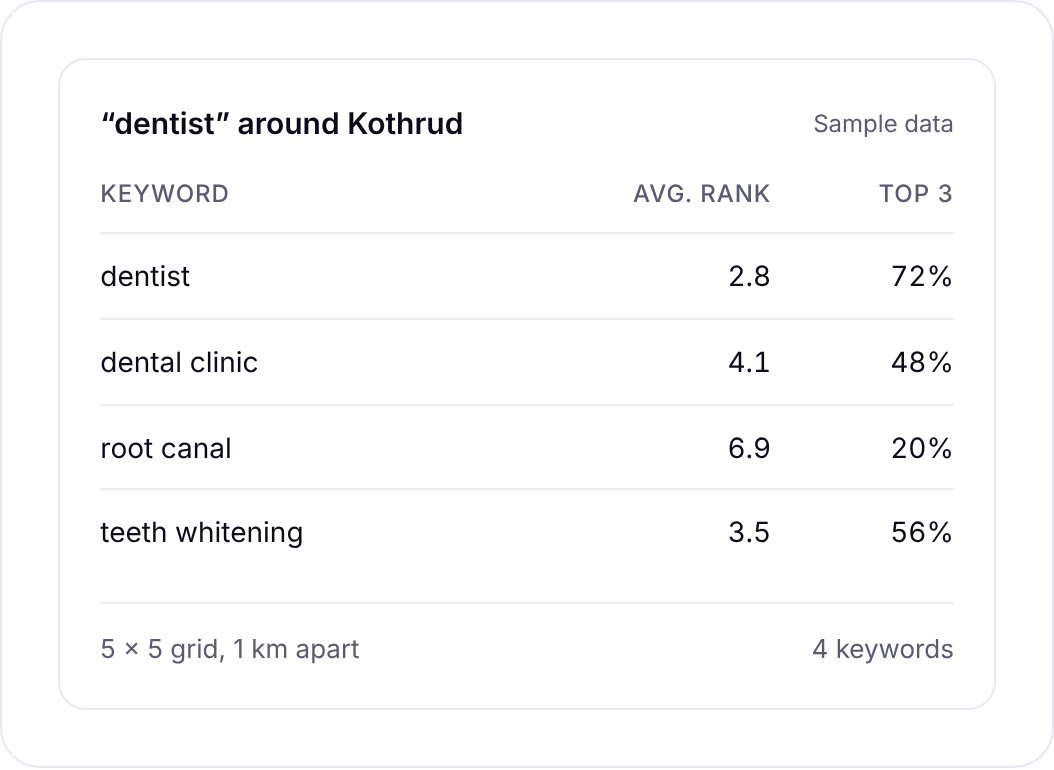
Look at a grid once and you’ll stop trusting the front-desk search. You’ll usually see a strong patch close to the shop that fades as you move out, and a direction where a competitor takes over.
What a Google Maps ranking check costs without a subscription
Most local rank grid tools sell a monthly plan with a credit allowance. That’s fine if you scan every week. If you check a handful of keywords every month or two, most of what you pay for goes unused.
In Seoprama, the Google Maps rank grid uses credits from the same balance as everything else. A 5×5 grid costs about 50 credits per keyword. A 3×3 grid costs less. You can check up to 20 keywords in one go, and there’s no per-location add-on, so checking a second branch costs the same as the first.
Here’s the maths for typical setups. Dollar figures are at $19 pack rates (6,000 credits for $19).
| What you check | Credits | Roughly |
|---|---|---|
| 1 keyword, 5×5 grid | 50 | $0.16 |
| 5 keywords, 5×5 grid | 250 | $0.79 |
| 20 keywords, 5×5 grid | 1,000 | $3.17 |
| 5 keywords monthly for a year | 3,000 | $9.50 |
So one $19 pack covers 5 keywords checked monthly for two years. And the $2.99 trial (1,000 credits) is enough for 20 keyword checks on a 5×5 grid, which is a proper first look at your area.
In India, the ₹549 + GST pack gives you 2,900 credits, which is 58 keyword checks on a 5×5 grid. The ₹99 + GST trial gives 700 credits, enough for 14.
The app shows the credit cost before each check runs, so you’ll never set off a 20-keyword check by accident.
Local rankings and checks built for businesses with local customers.
Subscription grid tools vs paying per check
Dedicated grid tools are good at what they do, and some are cheap. Whitespark’s Local Ranking Grids, for example, start at $10 a month for 2,000 credits, where each grid point costs one credit per scan. Unused credits expire at the end of each billing period (from whitespark.ca, checked November 2026).
If you scan a lot every week, that’s good value. A 5×5 scan there uses 25 credits, so per scan it can work out cheaper than Seoprama. Tools like that also run scans on a schedule, plot competitors on the map and show Google Business Profile details per pin. If local rankings are your whole job, look at them seriously.
The sums change when you check occasionally. Say you look at 5 keywords once a month. Keep the cheapest plan all year and you pay $120. Pay per check and it’s about $9.50.
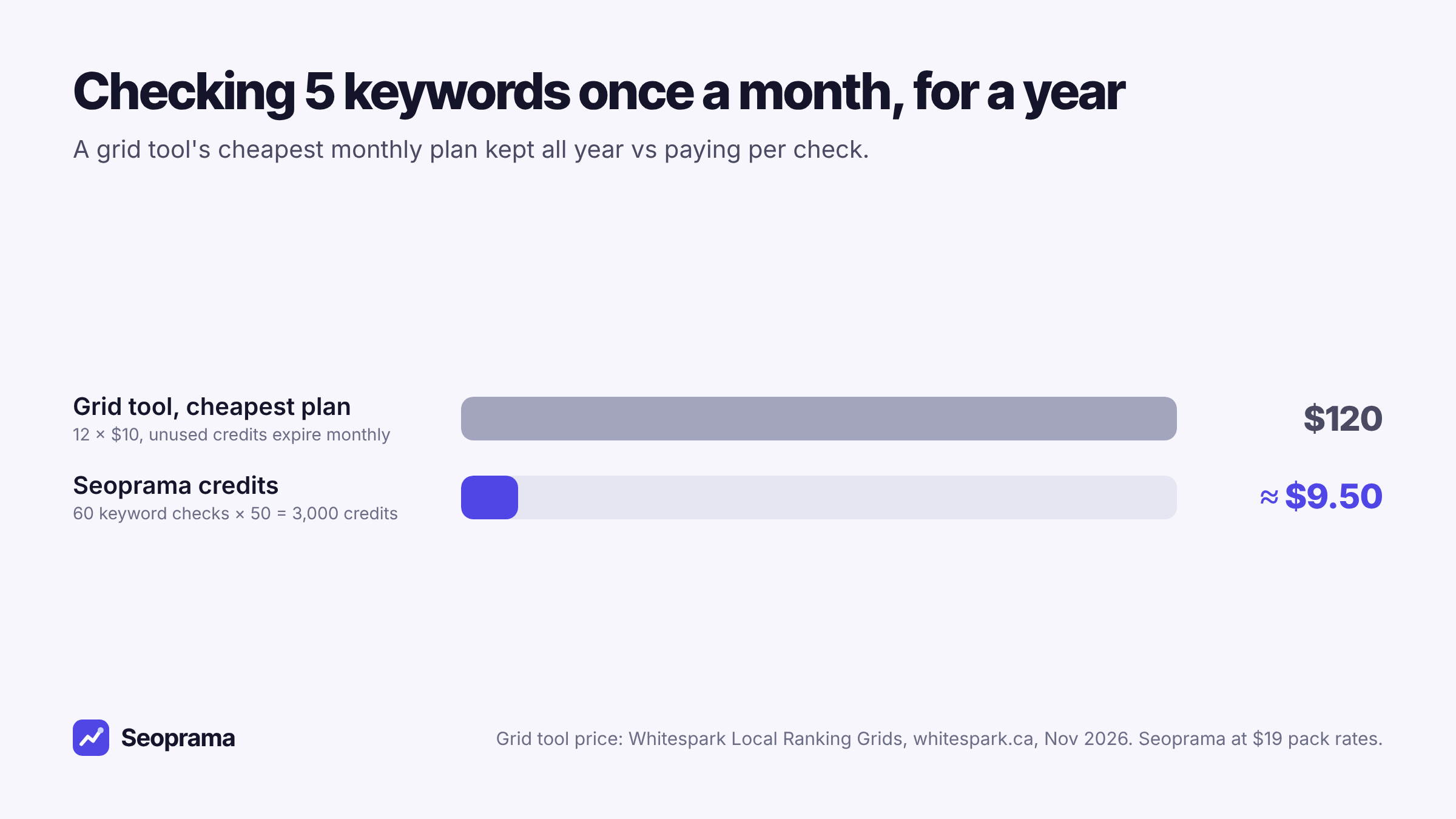
You could cancel and resubscribe around your checks, of course. Most people don’t, because they forget, and the expiring credits mean a quiet month is money gone.
One honest limit on our side: grid checks in Seoprama run when you start them. There’s no automatic schedule for grids yet. For occasional checks that’s the point, but if you want a scan every Monday without lifting a finger, a scheduled grid tool fits better.
How often should a small business check its Maps ranking?
Less often than you think. Local rankings move, but rarely in a way that needs a reaction within a week.
Here’s the rhythm I’d suggest for a single-location business:
- Once a month for your main 3 to 5 service keywords. That’s enough to spot a trend.
- Two to four weeks after a change. New photos, a category change, a burst of new reviews, a new service page. Check once before and once after so you can see whether it moved anything.
- When something feels off. Calls drop, or a customer mentions a competitor you hadn’t heard of. A check tells you whether it’s a ranking problem or something else.
Weekly scans make sense for agencies running active local campaigns or businesses in very competitive categories. For a clinic, salon, gym or trades business, monthly is plenty. Rankings wobble a position or two from week to week for no reason you can act on, and watching that noise mostly causes stress.
Here’s how a year of that looks for one clinic, with organic city rankings tracked alongside.
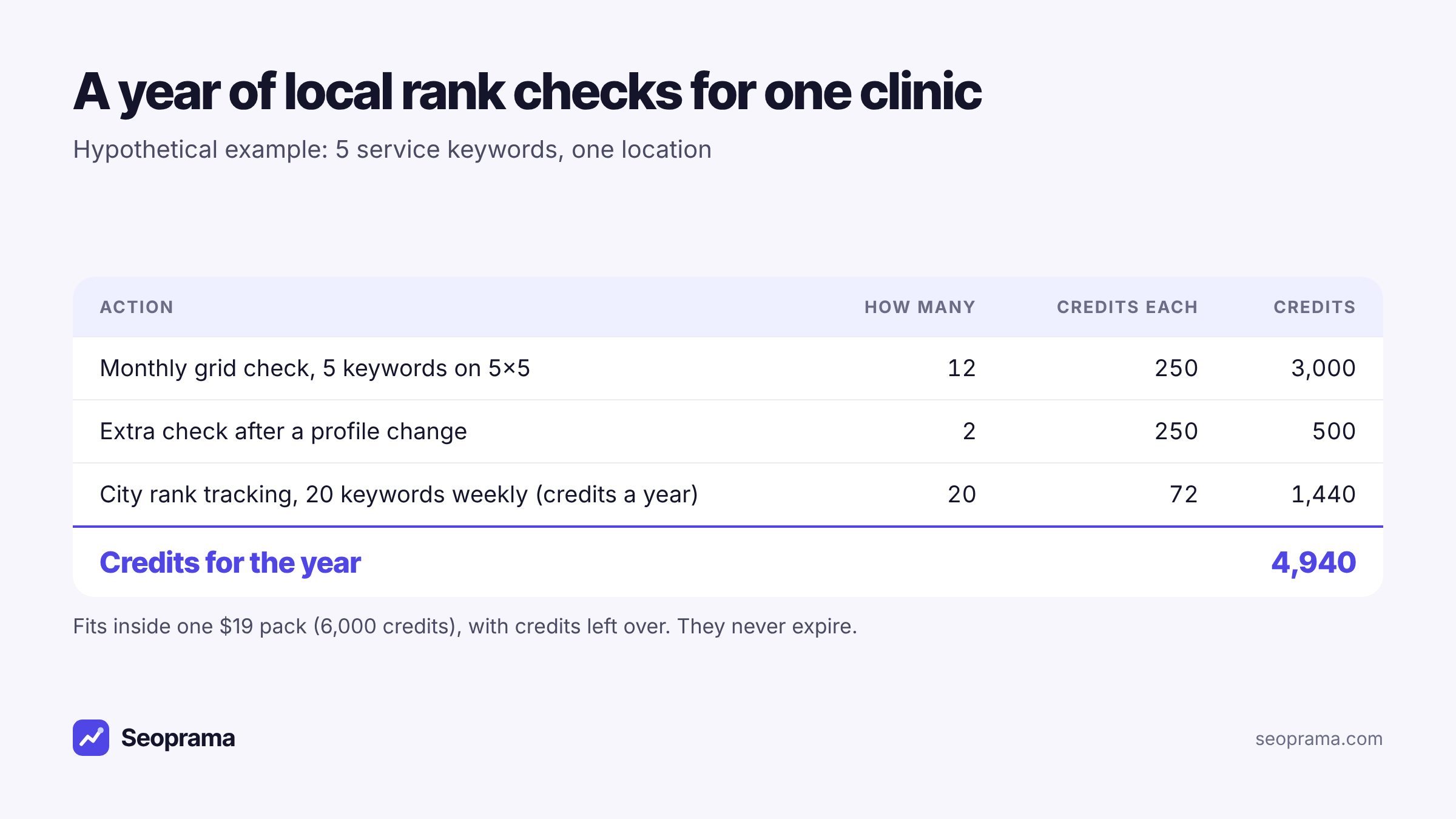
About 21 keyword searches, or a few searches plus a backlink lookup and a week of rank tracking. No monthly plan, and credits never expire.
Running your first grid check in Seoprama
The whole thing takes a few minutes.
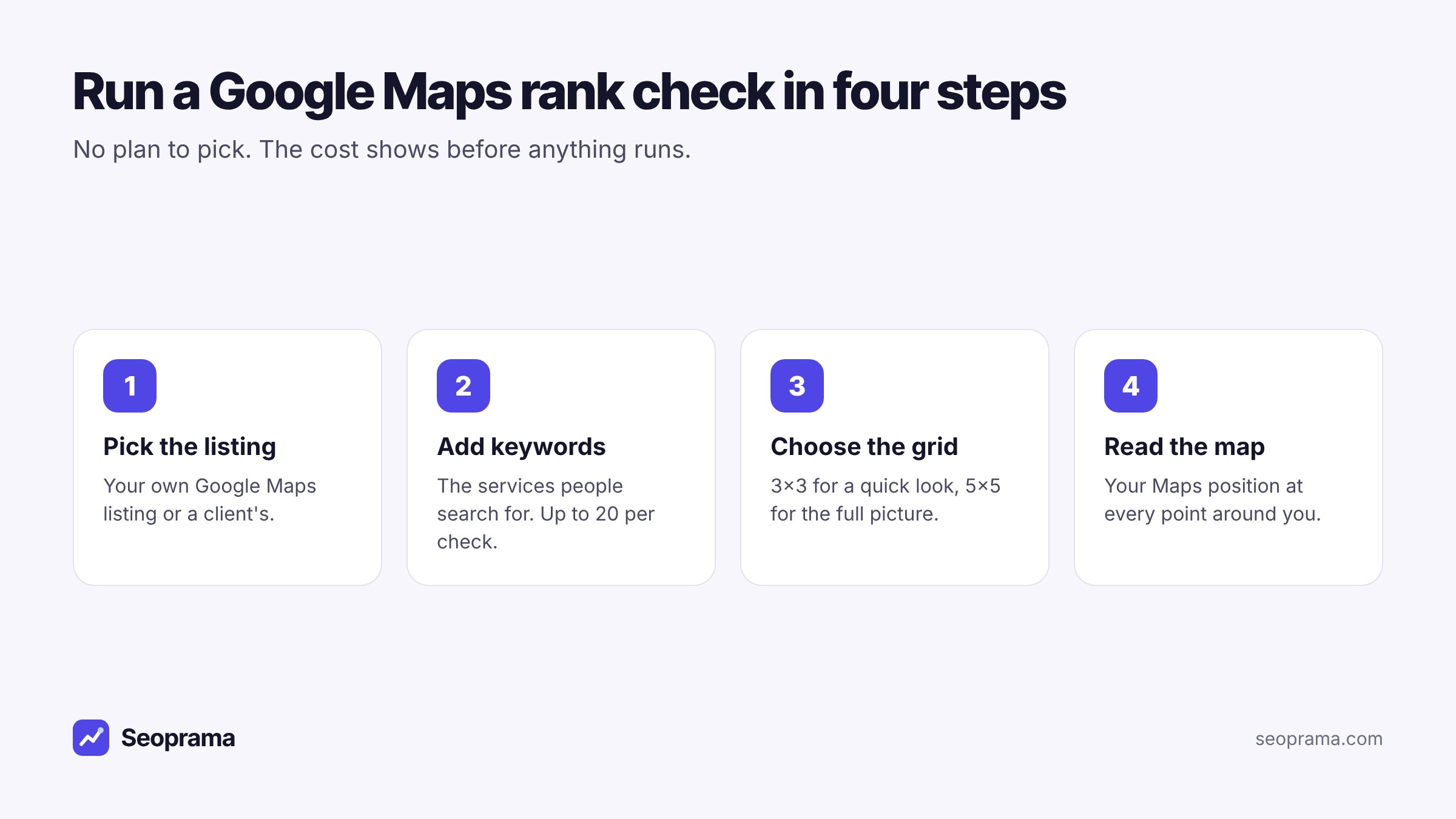
1. Pick the listing. Choose your Google Maps listing, or a client’s if you look after other businesses.
2. Add the keywords people actually search. Use service words, not your brand name. A physio clinic would check “physiotherapist”, “sports massage” and “back pain treatment”, not “Smith Physio”. You can add up to 20 per check, but start with 3 to 5.
3. Choose the grid. A 3×3 grid is a cheaper quick look. A 5×5 grid gives you the full picture and is what I’d use for the first check. Set the spacing to match how far your customers really travel. A café’s grid should be tight. A plumber who drives across the city needs a wider one.
4. Read the map. Each point shows your Maps position from that spot. Earlier checks stay in your history, so next month you can compare the two.
If you’re not sure which keywords to check, run a keyword search with city volumes first. The keyword research tool shows how many people in your city search each term, so you check the services that bring in customers.
Reading the grid and deciding what to do
A grid is only useful if it changes what you do next. These are the patterns you’ll see most often.
Strong near you, weak further out. Normal. Distance is part of the algorithm. To stretch your reach, work on prominence: more genuine reviews, a complete profile, local links and city pages on your website.
Weak everywhere, even next door. Usually a relevance problem. Check your primary category, your services list and whether your website’s main page clearly says what you do and where.
Strong in one direction, weak in another. Look at who ranks where you’re weak. Often a competitor is closer to that side or has more reviews. You can’t move your shop, but you can make your listing the better answer.
One keyword fine, another missing. Google doesn’t connect that service to you. Add it to your services, write a page about it on your site and mention it naturally in replies to reviews.
Grid checks measure where you rank. They don’t manage your Google Business Profile or your reviews for you, so you’ll still do that work in Google’s own dashboard.
Mistakes that make a Maps ranking check misleading
A grid check is only as good as the way you set it up. These are the slips I see most.
Checking your brand name. You’ll rank first for your own name almost everywhere. It tells you nothing about new customers. Check the services people search for when they don’t know you yet.
A grid that’s too big. If your grid stretches far past where customers would ever travel from, the outer points will always look bad, and you’ll chase a problem that doesn’t matter. Match the grid to your real service area.
Comparing different setups. If this month’s check uses a 3×3 grid and last month’s used a 5×5, the averages won’t line up. Pick a setup for each keyword and keep it.
Reacting to one check. One weak month can be noise. Two or three in a row is a pattern worth acting on.
Forgetting the “near me” version. People often add “near me” or a suburb name. If those searches matter in your trade, check them as separate keywords. You’ll sometimes find you rank well for one wording and poorly for the other.
Don’t forget your organic rankings in the same city
The map pack is only part of the results page. Below it sit the normal organic results, and for many searches those bring in plenty of clicks too.
Seoprama’s keyword rank tracker checks organic rankings for the city you choose, on desktop and mobile. City-level tracking is included, not an add-on. A keyword checked weekly costs 6 credits a month, so 20 keywords cost 120 credits a month.
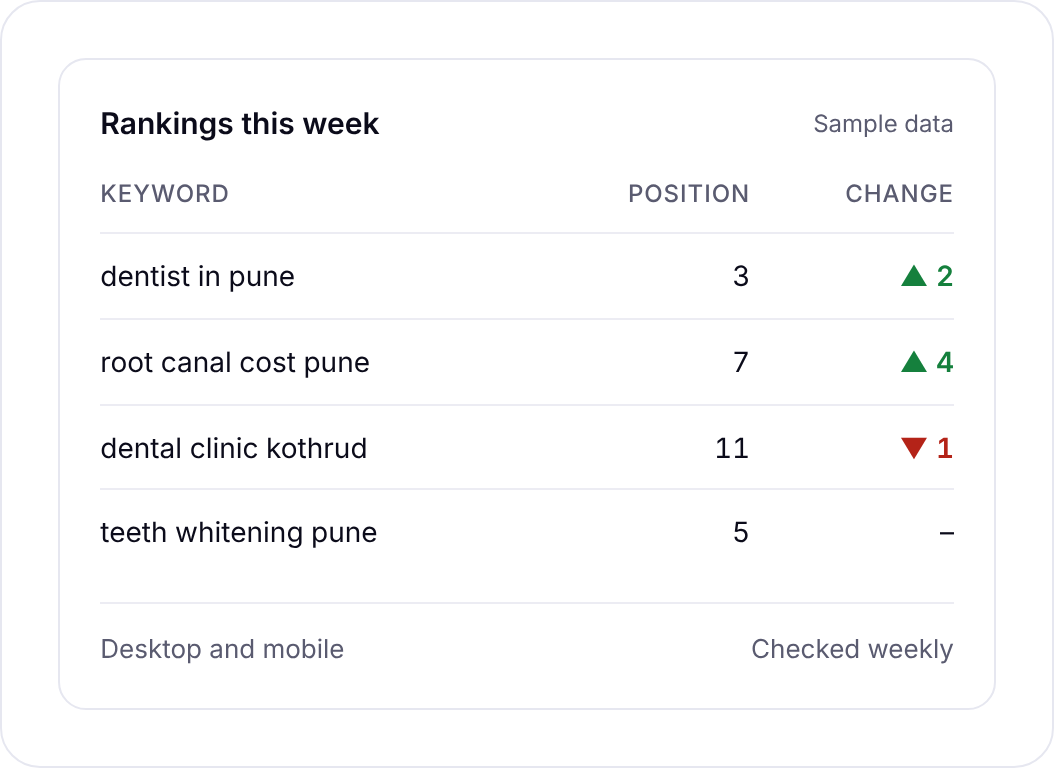
Put the two together and you get the whole picture for a local business: where your listing shows on the map, and where your website ranks underneath it. If you’re curious how the tracking side works without a plan, there’s a full guide on tracking rankings without a subscription.
Who should pay per check, and who shouldn’t
Paying per check suits you if:
- you run one or two locations and check monthly or after changes
- you’re a freelancer who checks a few clients’ Maps rankings each month
- you want local checks in the same account as your keyword research and rank tracking
- you’d rather not have another card charge that renews whether you looked or not
A monthly grid tool suits you better if you run weekly scans across many locations, need scans to run automatically, or want competitor pins and profile data on every map.
For most small businesses, the first option is the honest fit. Start with the local SEO grid on the trial, check your five most important services, and see what your area really looks like. When you want more, the pricing page lists every pack.
Buy credits once and spend them only when you run something. Bigger packs give more credits per dollar.
Frequently asked questions
How can I check my Google Maps ranking for free?
You can search on your phone, but you’ll only see the result for your own spot and search history. To see your ranking across your area, you need a grid check. Seoprama’s $2.99 trial covers 20 keyword checks on a 5×5 grid.
Why is my Google Maps ranking different in different places?
Distance from the searcher is one of the main things Google uses to rank local businesses. As the searcher moves, the businesses closest to them get a boost, so your position changes street by street.
How much does a Google Maps rank check cost?
In Seoprama a 5×5 grid check costs about 50 credits per keyword, which is roughly $0.16 at $19 pack rates. A 3×3 grid costs less, and there’s no per-location add-on.
How often should I check my local rankings?
For most small businesses, once a month for your main service keywords, plus a check a few weeks after any big change to your profile or website. Weekly scans suit agencies running active campaigns.
Can I check rankings for more than one location?
Yes. Each check is priced per keyword, and there’s no per-location fee, so a second branch costs the same as the first.