What does an SEO competitor analysis cost per site?
Quoting a client for a competitor analysis? Here's what the data costs per competitor, how the maths works, and how to see the price before you run it.

- In Seoprama a competitor analysis costs about 250 credits per competitor, plus about 140 for your own site once a run.
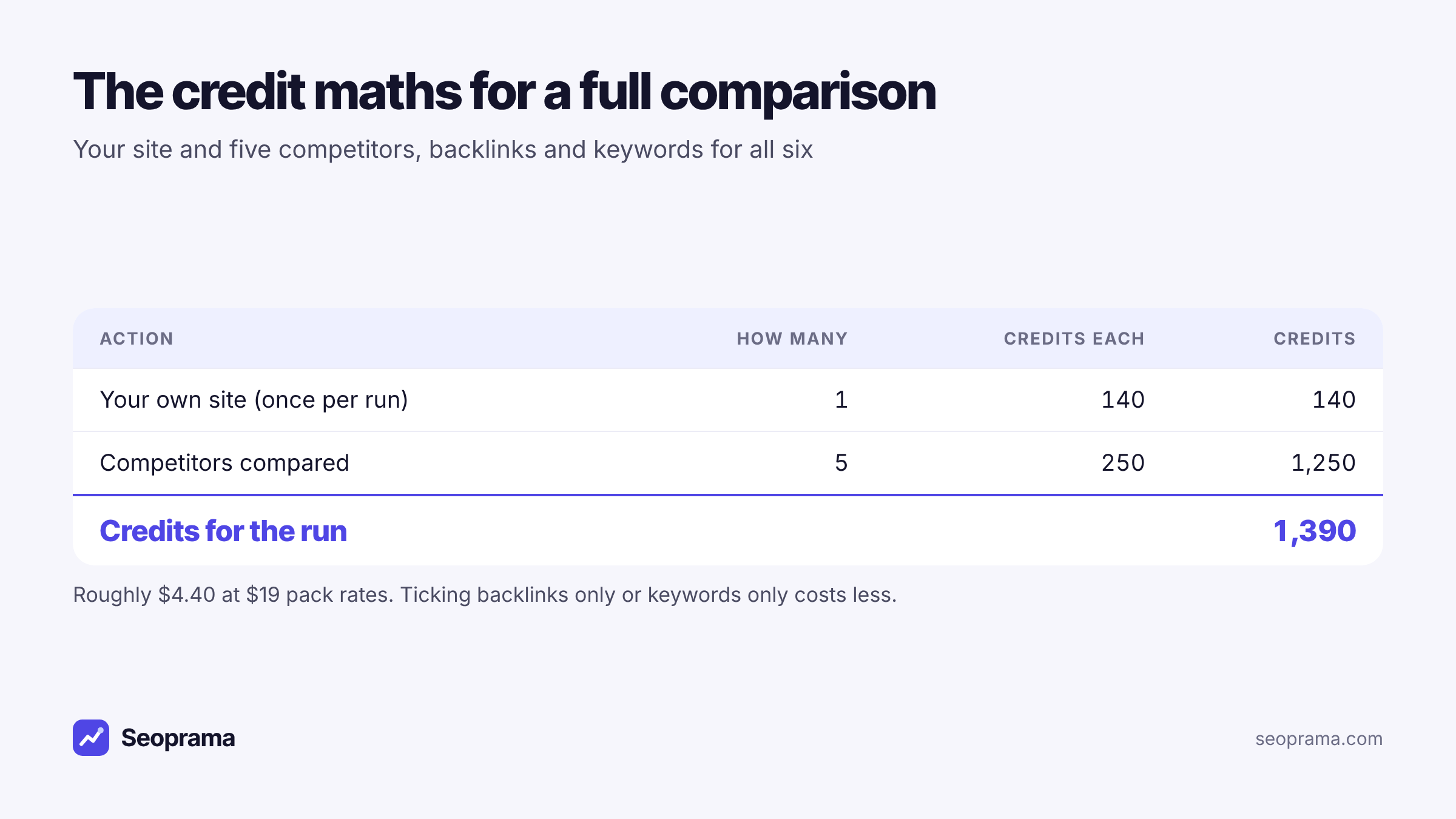
- You plus 5 competitors comes to about 1,390 credits, roughly $4.40 at $19 pack rates.
- Pulling backlinks only or keywords only for a competitor costs less, and the app shows the cost before the run starts.
- The data is the cheap part. Your time reading it and turning it into a plan is what the client is really paying for.
- Start with the $2.99 trial (1,000 credits), which covers a run of your site plus 3 competitors.
A client asks you to “look at the competition”. Before you can quote, you need to know two things: how long it’ll take you, and what the data will cost. The first one you can guess. The second one most tools make oddly hard to answer, because the price is buried inside a monthly plan.
So here’s the straight answer for Seoprama’s competitor analysis tool, worked out per site, plus how to keep the cost down and how to price the job to a client.
The short answer: about 250 credits per competitor
A competitor analysis in Seoprama puts your site and up to 5 competitors side by side. It pulls backlinks and keywords for each one, then shows the gaps.
The cost has two parts:
- About 250 credits per competitor compared, for its backlinks and keywords.
- About 140 credits for your own site, charged once per run however many competitors you add.
So the formula is simple: 140 + (250 × the number of competitors). Here’s what that looks like.
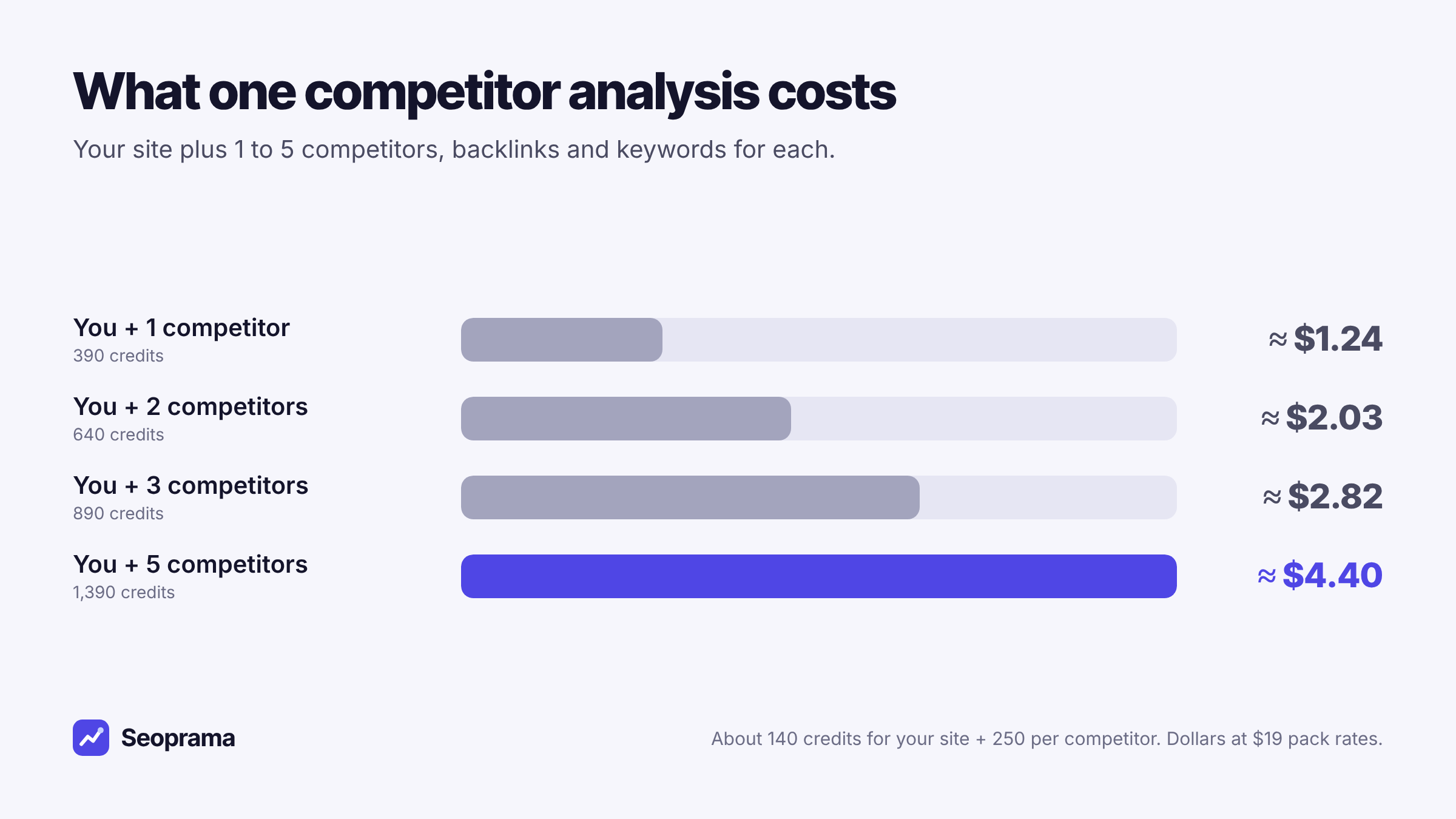
| Comparison | Credits | Roughly, at $19 pack rates |
|---|---|---|
| You + 1 competitor | 390 | $1.24 |
| You + 2 competitors | 640 | $2.03 |
| You + 3 competitors | 890 | $2.82 |
| You + 4 competitors | 1,140 | $3.61 |
| You + 5 competitors | 1,390 | $4.40 |
Bigger packs give you more credits per dollar, so the dollar figure drops a little if you buy a larger pack.
In India, the ₹549 + GST pack has 2,900 credits. That covers two full runs of you plus 5 competitors (2,780 credits), with a little left over.
How the app shows the cost before you run it
You don’t have to do this maths yourself every time. When you add competitors, Seoprama shows the credit cost of the run before you start it. Add a sixth domain and the number goes up. Untick keywords for one competitor and it goes down.
This matters more than it sounds. With a plan, you never know what one analysis “cost”, so you can’t quote it accurately. With a visible price per run, you can put a real data line into a proposal and know it’s right.
Credits never expire either. If you buy a pack for one client job and only use half, the rest sits there for the next one.
What you get for those credits
The cost only makes sense next to what comes back. A run of the competitor analysis tool gives you:
- An overview of referring domains, backlinks, organic keywords and traffic for you and every competitor, in one view.
- Backlink gap. Sites that link to your competitors but not to you.
- Lost backlinks. Links your competitors recently lost. Those sites already link to the topic, which makes them a warm outreach target.
- 404 opportunities. Broken competitor pages that still have links pointing at them. Publish a better page on the topic and you’ve got a reason to ask for the link.
- Keyword gap. Keywords your competitors rank for and you don’t.
- Keyword clusters. Gap keywords grouped into topics, so you plan pages instead of staring at rows.
Everything exports to Excel with one sheet per tab. That’s handy when the outreach list goes to one person and the content plan to another.
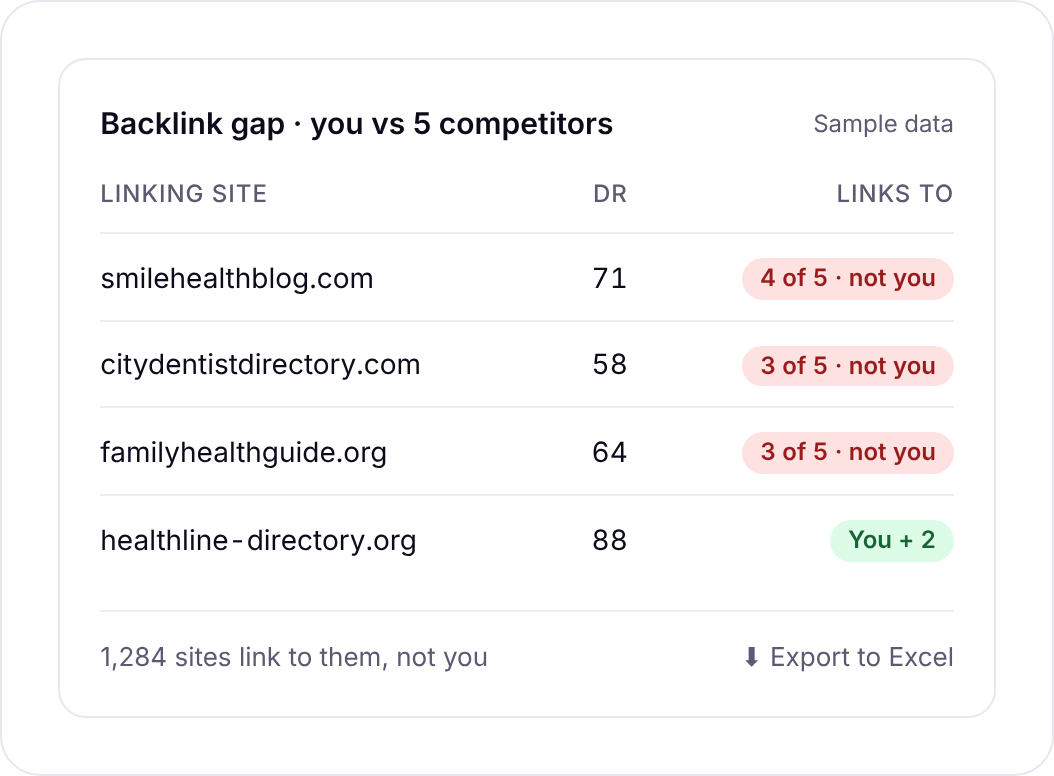
If you don’t know who the competitors are, Seoprama can suggest rivals for you. That’s often more useful than the client’s own list, which tends to name the business down the road rather than the sites actually ranking.
Backlink gap, lost links, 404 opportunities, keyword gap and clusters, exported to Excel.
Cheaper ways to run it when you don’t need everything
Not every job needs backlinks and keywords for six domains. A few ways to spend less:
Pull only what you need. When you add a competitor you can tick backlinks only or keywords only, and either costs less than both. Doing a content plan? Keywords alone may be enough. Planning link building? Backlinks only.
Compare fewer rivals. Three well-chosen competitors often tell you as much as five. You plus 3 competitors is 890 credits.
Use a single-site lookup for a quick look. If you just want to see what one rival ranks for, competitor research shows a single site’s keywords, estimated traffic and top pages for about 40 credits. It’s the right tool for “what’s this site doing?”, and the full analysis is the right tool for “where are we behind?”.
Check one backlink profile. For a single site’s links, a backlink profile costs about 62 credits.
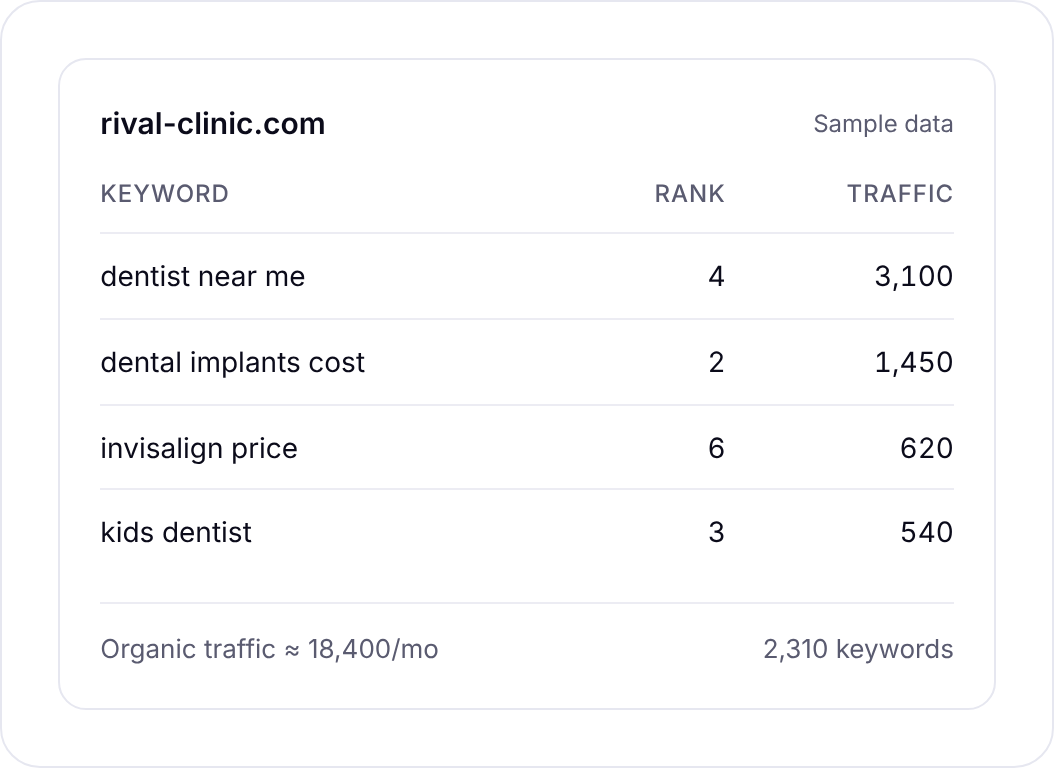
You could also build the comparison yourself from single lookups. Five competitor lookups and six backlink profiles come to 572 credits, cheaper than the 1,390 for a full run.
But then you’re matching domains and keywords by hand in a spreadsheet, and that’s the afternoon the full analysis saves you. For a quick check, go piece by piece. For a deliverable, run the comparison.
About 21 keyword searches, or a few searches plus a backlink lookup and a week of rank tracking. No monthly plan, and credits never expire.
Choosing the competitors worth paying for
Since every competitor costs credits, it pays to pick them carefully. Five random rivals give you a messy gap report. Five good ones give you a plan.
Start from the search results, not the client’s list. Search the client’s three or four most valuable keywords and note who keeps showing up. Those are your real competitors in search, even if the client has never heard of them.
Mix sizes. One market leader shows you the ceiling. Two or three sites roughly your size show you what’s realistic in the next six months. A site much bigger than yours will swamp the keyword gap with terms you can’t win yet.
Skip the giants that rank for everything. Marketplaces, directories and big media sites often appear for local and commercial terms. They tell you little about what to do, because you’ll never copy their link profile. Leave them out and save the credits.
Match the business model. If your client sells a service in one city, compare with other service businesses, not a national blog that happens to rank.
If you’re unsure, let Seoprama suggest competitors and then remove the ones that don’t fit before you run it. The cost updates as you add and remove domains.
Running a competitor analysis step by step
Here’s the flow, start to finish.
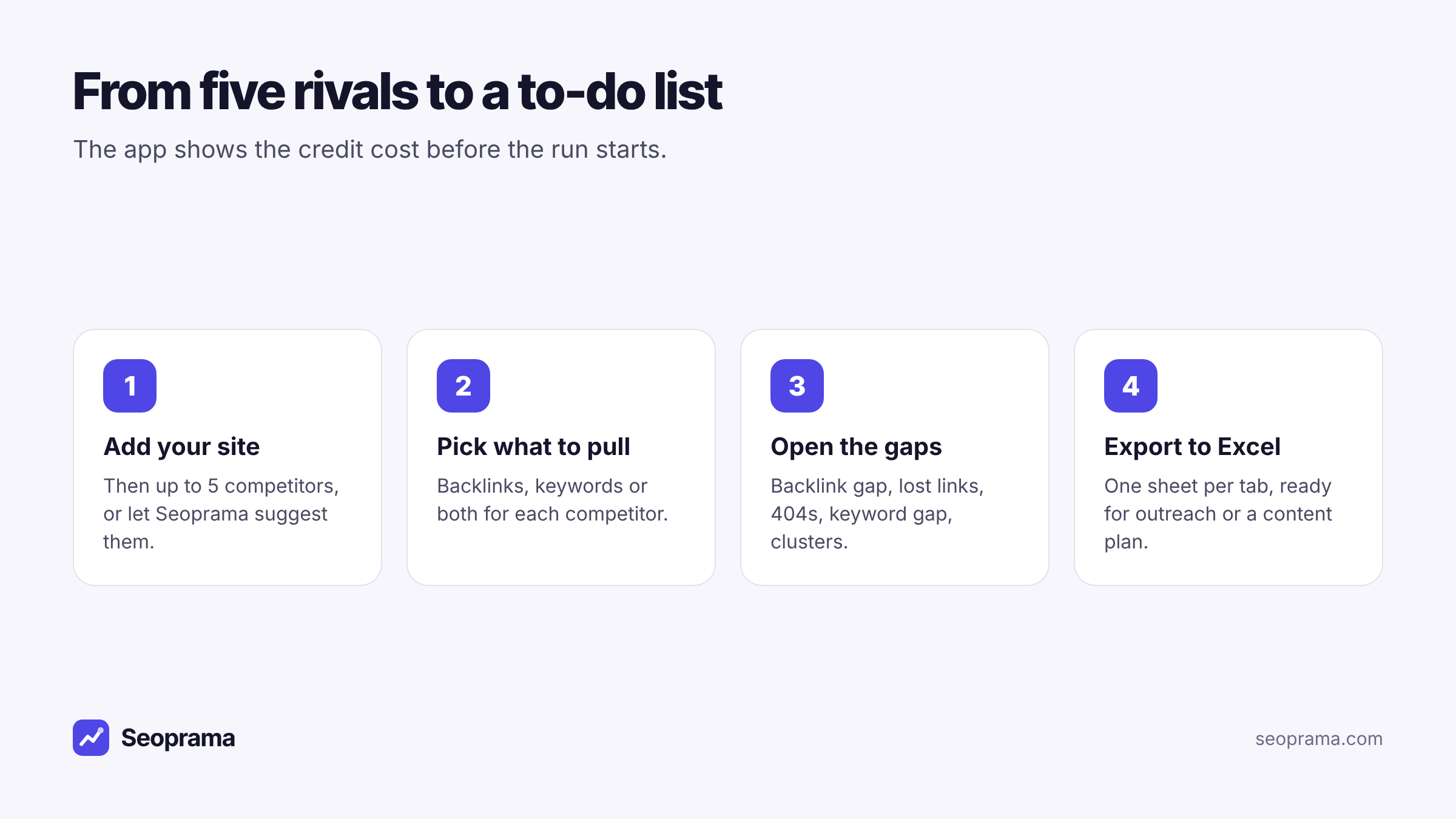
1. Add your site, then the competitors. Type up to 5 domains or take Seoprama’s suggestions. I’d pick the sites that rank for your client’s money keywords, not the ones the client complains about most.
2. Pick what to pull for each. Backlinks, keywords or both. Watch the cost update as you go.
3. Open the gap you need. Start with keyword clusters for a content plan, or the backlink gap filtered to sites linking to two or more competitors for outreach. Sites that link to several rivals but not you are usually the easiest wins.
4. Export. One Excel file, one sheet per tab. Trim it down to the 20 or 30 actions you’d actually take before it goes anywhere near a client.
This short video shows the same run in the app.
What to do with the results in the first week
A gap report is long. Here’s how I’d turn one run into work a client can see.
Day one: the backlink gap. Filter to sites that link to two or more competitors but not you. That list is usually short and high quality. Sort it by how relevant each site is to the client, then pick ten to contact.
Day two: lost links and 404 pages. Lost backlinks and broken competitor pages with links are the warmest outreach you’ll ever do. The linking site already cared about the topic. If your client has a page on it, or can write one, send a short note.
Days three and four: keyword clusters. Pick the two or three clusters closest to what the client sells. Each cluster becomes a page or an update to an existing page. Ignore clusters the client can’t credibly write about.
Day five: the summary. Write one page for the client: where they’re behind, the three things you’ll do first, and what you expect to see in the next quarter. Attach the Excel file for anyone who wants the detail.
That’s a week of real work from a run that cost a few dollars in data. It’s also why the data cost barely moves your price.
How to price a competitor analysis for a client
Here’s the part freelancers actually ask about. The data for a full run costs a few dollars. The value you sell is the reading of it: which gaps matter, which links are realistic, which topics fit the client’s business.
So don’t price the job off the data cost. Price it off your time, and treat the credits as a small, known expense. A few practical notes:
- Put the data cost in your head, not on the invoice. At roughly $4.40 for a full run, it’s not worth a line item. It’s worth knowing so you never lose money on a job.
- Quote repeats as a retainer. Competitors change. A quarterly re-run shows new gaps and the links rivals lost since last time.
- Agree the competitor list up front. Five named domains stops scope creep.
And the maths for a retainer is friendly. Say you look after four clients and run a full comparison for each every quarter. That’s 4 × 1,390 = 5,560 credits a quarter, which fits inside a single $19 pack. A hypothetical example, but a common setup.
If you send clients a regular report, the report builder puts rankings, traffic and AI mentions in one report, exported to PDF or Excel. It’s free for the first 3 months, then part of the Premium add-on at $10 a month.
How often to re-run a competitor analysis
You don’t need fresh data every week. Competitors’ link profiles and rankings shift slowly for most small markets.
For most clients, once a quarter is the sweet spot. It’s often enough to catch the links rivals lost and the new pages they published, and rare enough that each run gives you something new to act on.
Re-run sooner after a big event: a competitor relaunches its site, a new rival appears for the client’s main keywords, or rankings drop and you want to know who took the spot.
Each re-run costs the same as the first, so a quarterly rhythm for one client with 5 competitors is 1,390 credits every three months.
How this compares with an Ahrefs or Semrush plan
To be fair to the big suites: Ahrefs and Semrush have competitor reports too, with larger backlink and keyword databases. If you’re doing competitor research every day for a big client list, a plan may suit you.
But they charge by the month, not by the analysis. Ahrefs Lite is $129 a month and includes 30 competitor lookups and 30 backlink profiles, according to the plan comparison on seoprama.com. Semrush plans start from about $140 a month.
Run two analyses in a month on those plans and each one effectively costs you half the plan price. Run none and you still pay.
With credits, the cost of each multi-competitor SEO analysis is the same whether it’s your first this year or your tenth this week. That’s easier to quote and easier to live with in quiet months. You can compare packs and plans on the pricing page.
Buy credits once and spend them only when you run something. Bigger packs give more credits per dollar.
Frequently asked questions
How much does an SEO competitor analysis cost per site?
In Seoprama, about 250 credits per competitor, plus about 140 credits for your own site once per run. A full comparison of you and 5 competitors is about 1,390 credits, roughly $4.40 at $19 pack rates.
Can I see the cost before I run the analysis?
Yes. The app shows the credit cost of the run as you add competitors and choose what to pull, before anything runs.
How many competitors can I compare at once?
Up to 5, plus your own site. Seoprama can also suggest competitors if you’re not sure who they are.
Is it cheaper to analyse only backlinks or only keywords?
Yes. When you add a competitor you can tick backlinks only or keywords only, and either costs less than pulling both.
Can I try a competitor analysis before buying a pack?
Yes. The $2.99 trial gives you 1,000 credits, enough for a run of your site plus 3 competitors. In India the trial is ₹99 + GST for 700 credits, enough for your site plus 2 competitors.