SEO tools without a monthly subscription, and how the pricing actually works
You want keyword data, rankings and backlinks without a plan that bills you every month. Here's how no-subscription SEO tools charge, and what to check.
- SEO tools without a subscription mostly work on credits. You buy a pack once and each search, lookup or check uses a few credits.
- In Seoprama a keyword search is 46 credits (about $0.15) and a keyword tracked weekly is 6 credits a month.
- Packs start at $19 for 6,000 credits (₹549 + GST in India), and credits never expire.
- Before you buy anywhere, check whether credits expire, whether there's a monthly minimum, and whether you see the cost before you run something.
- If you use a big suite every day, a subscription can still be the better deal. Credits win when your usage comes in bursts.
If you’re a founder doing your own SEO, you probably don’t need an SEO tool every day. You need it hard for two weeks while you plan pages, then lightly for months while you watch rankings. A monthly plan charges you the same in both.
That’s why people go looking for SEO tools without a subscription. They exist, and they work well, but the pricing models differ more than the marketing suggests. This post explains how they charge, what a normal month really costs, and where a subscription is still the smarter buy.
What “without a subscription” usually means
Tools that say “no subscription” fall into a few groups. They’re worth separating, because only some of them actually remove the recurring bill.
Free tools. Google Search Console and Google’s Keyword Planner cost nothing. Search Console is excellent for your own site: the queries you show up for, clicks, and indexing problems. But it can’t show you a competitor’s keywords or backlinks, and Keyword Planner gives broad volume ranges unless you run ads.
Lifetime deals. You pay once and get “lifetime” access. Some are fine. Many come with tight monthly caps, and the tool only lives as long as the company does. Treat a lifetime deal as a bet on a small business, priced accordingly.
Raw data APIs. Providers like DataForSEO sell SEO data per request with no plan. It’s the cheapest data you’ll find, but you need to write code to use it, and you get JSON back, not a dashboard.
Credit-based apps. You buy credits once and spend them in a normal app with screens, filters and exports. Each action has a price in credits. This is the model most people mean when they say pay-as-you-go, and it’s how Seoprama works.
Monthly plans you can cancel. Lots of tools say “cancel anytime”. That’s still a subscription. It renews until you remember to stop it, and the allowance resets each month whether you used it or not.
So when you compare tools, ask one plain question: if I don’t touch this tool for three months, what do I pay? For a credit-based tool with non-expiring credits, the answer is nothing.
How credit-based SEO tools charge you
A credit tool works like a prepaid phone. You load a balance, and each action draws on it. The details that matter are the price of each action and whether your balance ever disappears.
Here’s how it works in Seoprama, with the numbers from the pricing page:
| Action | Credits | Roughly |
|---|---|---|
| Keyword search | 46 | $0.15 |
| Competitor lookup | 40 | $0.13 |
| Backlink profile | 62 | $0.20 |
| A keyword tracked weekly, for a month | 6 | $0.02 |
| Site audit | 1 per page | |
| Redirect check | 2 per URL | under $0.01 |
Credit packs start at $19 for 6,000 credits, and bigger packs give you more credits per dollar. In India the first pack is ₹549 + GST for 2,900 credits, and you pay in rupees by UPI or card. You can also pay in pounds or euros.
Three rules make this fair in practice. Credits never expire. There’s no monthly minimum. And the app shows each action’s credit cost before you run it, so you never find out the price after the fact.
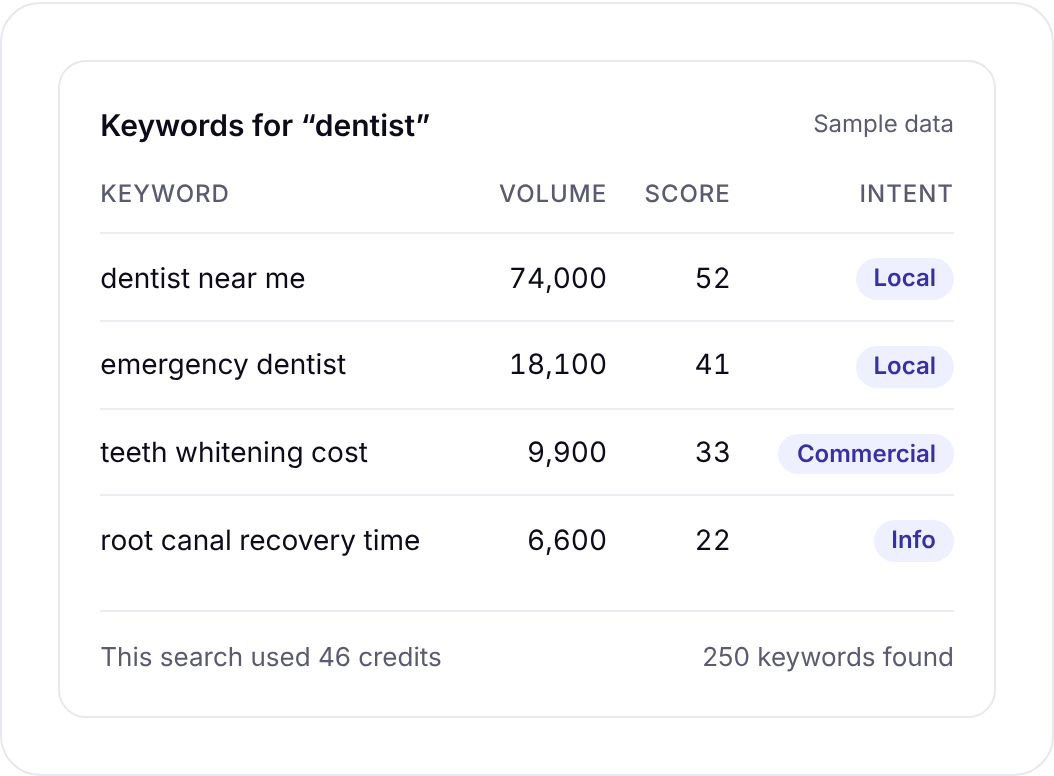
The keyword research tool is where most founders spend their first credits. One search gives you search volume, CPC, competition, a 0 to 100 difficulty score and search intent, plus a card showing who ranks right now. You can pull volumes for a city or region, which matters a lot if you sell locally.
46 credits a search. No daily report limits, no plan to keep paying for.
What a real month costs a founder
Price lists are abstract. Here’s a month that looks like what a lot of founders actually do. Say you run a small SaaS site and you’re planning a batch of new pages.
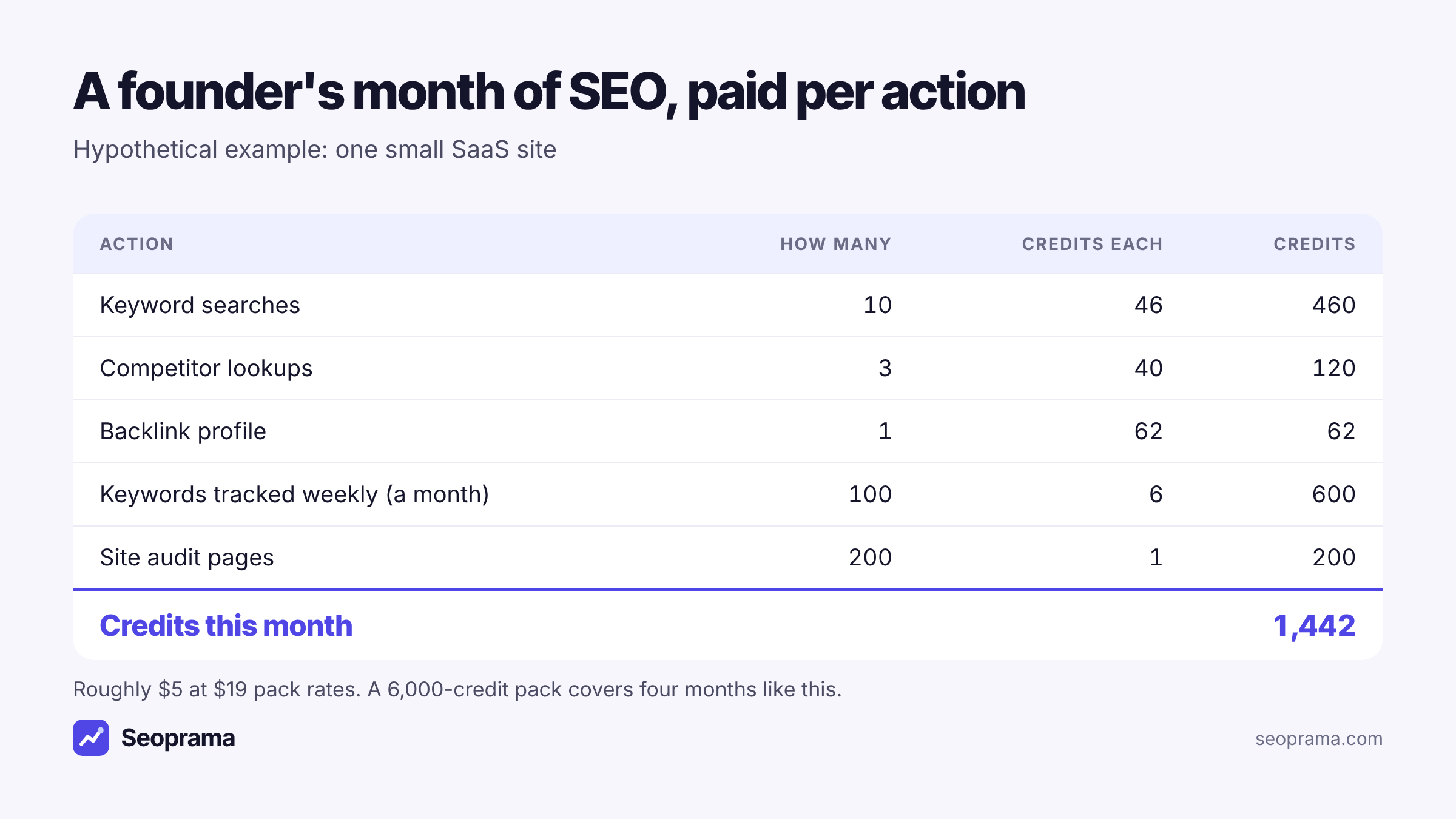
Ten keyword searches, three competitor lookups, one backlink profile, 100 keywords tracked weekly and a 200-page audit come to 1,442 credits. A $19 pack covers about four months of that.
And the quiet months are where the model really pays off. Once the pages are planned, you might only run rank tracking for a while. That’s 600 credits a month for 100 keywords, which is about $2 at $19 pack rates. Nothing else gets charged because nothing else runs.
Most founders I’ve seen overestimate how much research they’ll do. They picture daily keyword sessions. In reality it’s a burst at the start of a quarter and then a few lookups when a competitor does something interesting.
About 21 keyword searches, or a few searches plus a backlink lookup and a week of rank tracking. No monthly plan, and credits never expire.
How this compares with Ahrefs and Semrush
Ahrefs and Semrush are good tools. Their databases are bigger, they have more reports, and if you live inside one of them all day, the plan can be worth every cent. That’s the honest starting point.
The difference is what you pay for. A plan sells you an allowance. Ahrefs Lite, for example, is $129 a month and includes 750 tracked keywords, 10,000 audit pages, 100 keyword searches, 30 competitor lookups and 30 backlink profiles. If you used every one of those allowances in Seoprama, it would come to 22,160 credits, about $65.81.
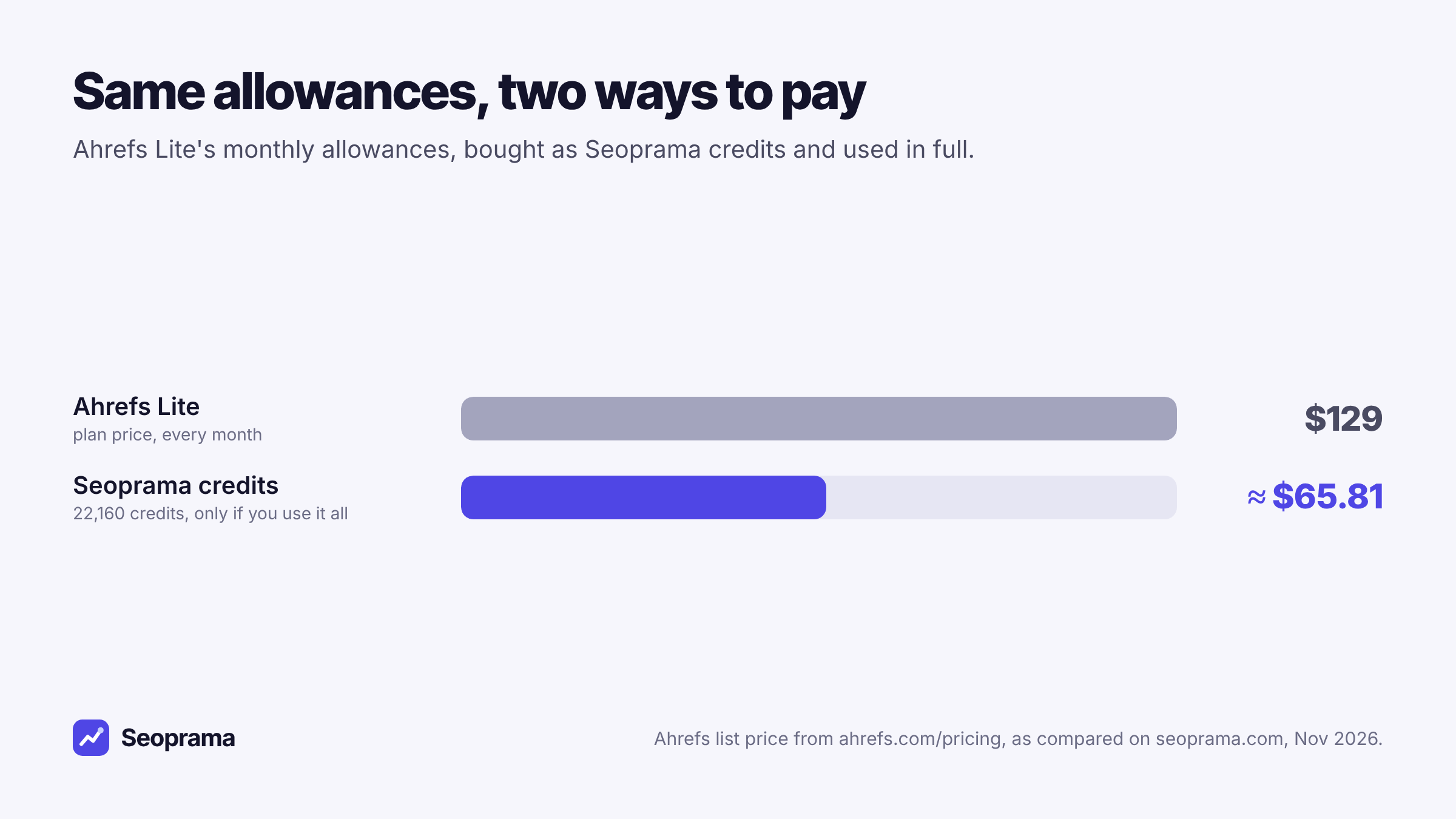
That comparison flatters the plan, by the way. It assumes you use the whole allowance. Most small sites don’t come close, and the unused part of a plan simply vanishes at the end of the month. With credits, the unused part stays in your account.
Semrush works the same way. Plans start from about $140 a month, and seoprama.com estimates typical usage of the Semrush One Starter plan ($199 a month) at about $129 in credits.
Where should you still pick a suite? If you need a very large backlink index for serious link research, if you use content and PPC tools alongside SEO every day, or if you have a team of five doing research full time. Those are real cases. For everyone else, paying per action is usually cheaper and less stressful.
The catches to check before you buy credits anywhere
Credit pricing can hide its own traps. Some tools sell credits that expire after 30 days, which is just a subscription with extra steps. Others make you buy a monthly plan first and sell credits on top.
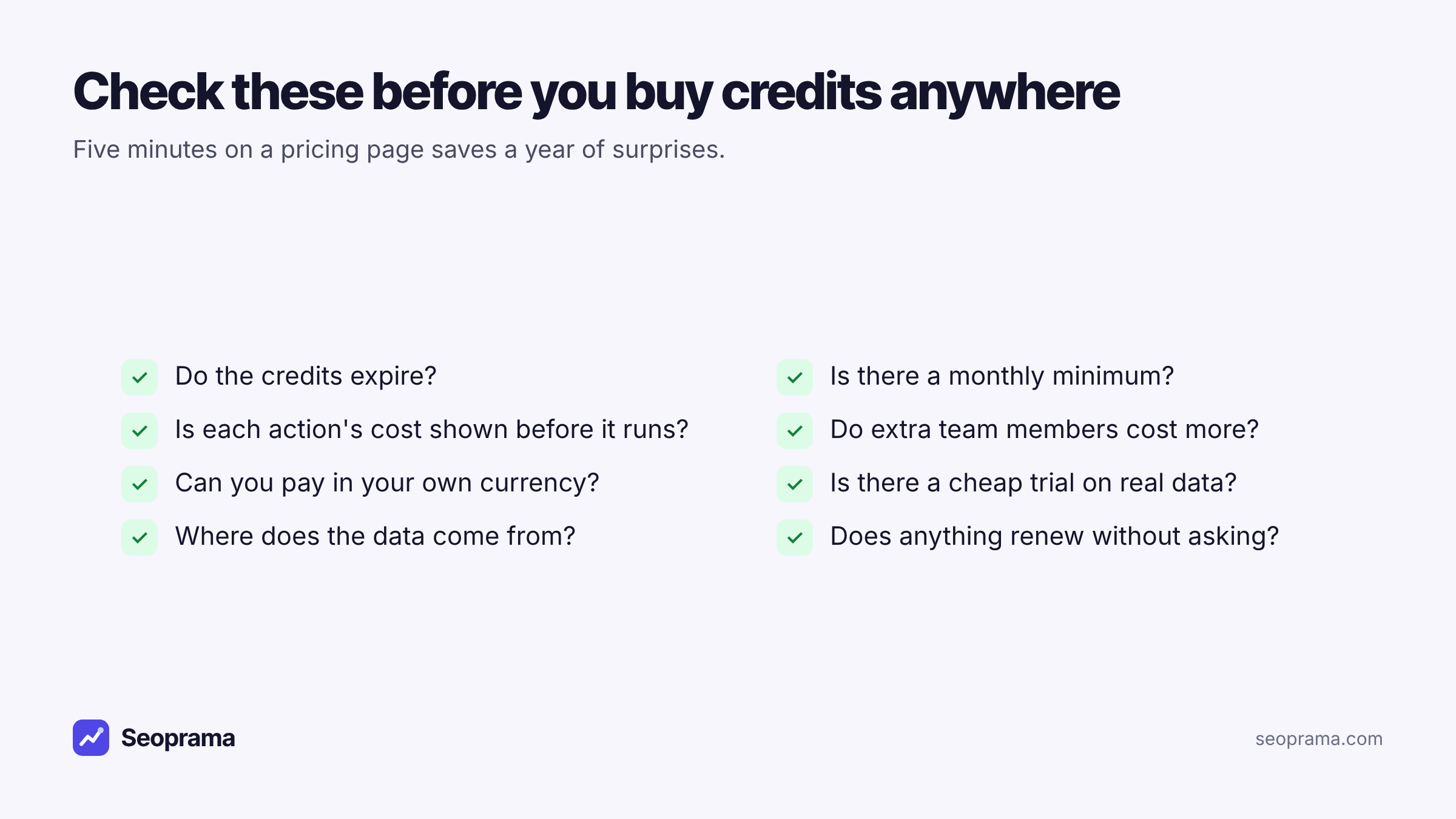
Here’s what each question protects you from:
- Do the credits expire? Expiring credits push you to spend for the sake of it. In Seoprama they don’t expire.
- Is there a monthly minimum? If there is, it’s a subscription. Seoprama has none.
- Is the cost shown before you run something? A big crawl or a long tracker list should never surprise you. Seoprama shows the credit cost first.
- Do extra team members cost more? Seat fees are how a cheap tool turns expensive. Seoprama teams share one credit balance with no seat fees.
- Can you pay in your own currency? Paying in dollars from India means conversion fees on top. Seoprama takes rupees, dollars, pounds and euros.
- Is there a cheap trial on real data? You should be able to test with your own site, not a demo account.
- Where does the data come from? Ask. Seoprama’s competitor research data comes from DataForSEO, a commercial data provider.
- Does anything renew without asking? This one catches people the most.
Do Seoprama’s monthly plans count as a subscription?
Fair question, since Seoprama sells monthly plans too. They’re optional, and packs work on their own.
Outside India, the Basic ($29, 10,000 credits), Pro ($59, 22,000 credits) and Agency ($149, 60,000 credits) plans are paid a month at a time with nothing renewing. You buy a month when you want one. If you don’t come back, nothing gets charged.
In India, the plans renew by UPI AutoPay or card, and you can cancel any month. Basic is ₹1,499 + GST for 7,500 credits, Pro is ₹2,999 + GST for 15,500 and Agency is ₹9,999 + GST for 55,000.
A plan makes sense when you know you’ll use a steady amount every month, because it gives you more credits for the money than the smallest pack. If your usage jumps around, stick with packs. You can price your own mix on the build your package page before spending anything.
Tick the tools you use, enter how much, and get a monthly number in your currency before you spend anything.
Setting up a no-subscription toolkit in an afternoon
Here’s how I’d set things up for a founder starting from scratch.
1. Connect the free tools first. Get Google Search Console set up on your site. It’s free and it’s your own data. In Seoprama, Search Console insights (5 credits) sorts it into quick wins: pages with lots of impressions and few clicks, and queries sitting just off page one.
2. Do one research burst. Spend an hour in keyword research. Pick 10 to 20 seed terms, use the four modes (broad ideas, phrase match, category ideas and “People also search for”) and save the keepers with tags. Export to Sheets if you plan in a spreadsheet.
3. Look at two or three competitors. A competitor lookup at 40 credits shows a rival’s ranking keywords and top pages. That tells you which topics already earn traffic in your market.
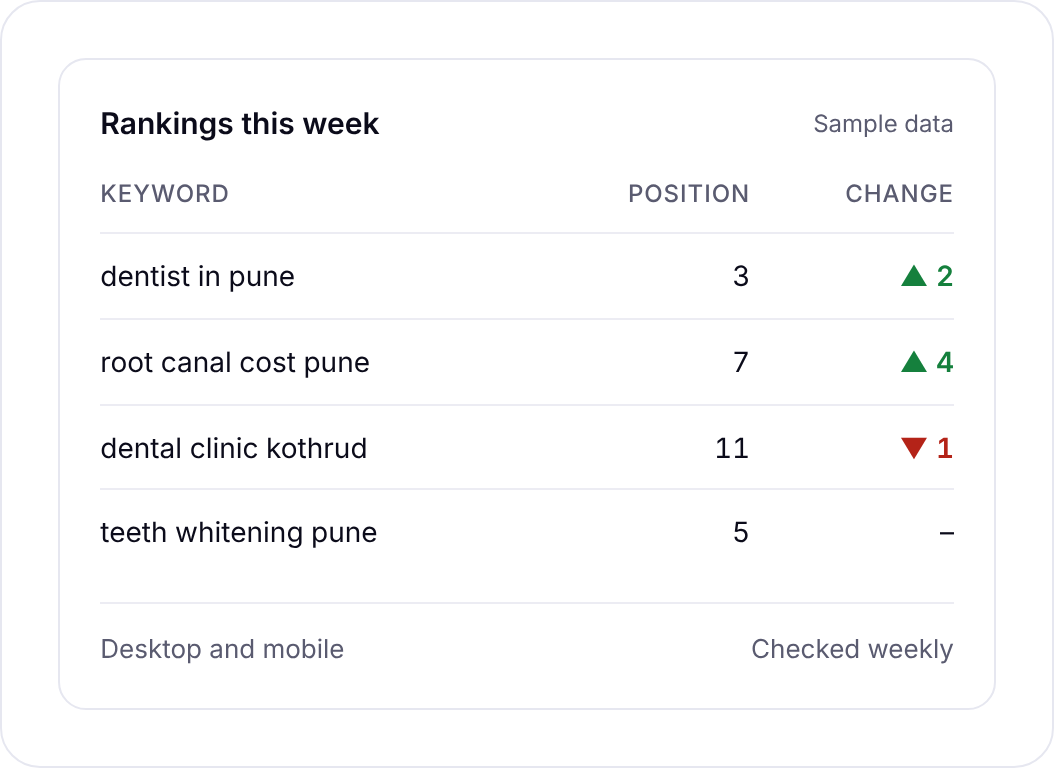
4. Start tracking a small set. Put 30 to 100 keywords in the rank tracker, checked weekly. It costs 6 credits per keyword a month, and you get the ranking URL, SERP features and history for each one.
5. Audit once, then on changes. Run a site audit when you launch and after big changes. At 1 credit per page, a 200-page site costs 200 credits a crawl.
That whole setup fits inside the $2.99 trial for a first look (1,000 credits, about 21 keyword searches or a mix of tools). Once you know what you’ll use, move to a pack.
What you give up when there’s no subscription
Paying per action has trade-offs too, and you should know them before you switch.
You think about cost a little more. With a plan, a search feels free because you’ve already paid. With credits, every search has a visible price. Most people find that useful, since it stops idle clicking, but some find it nagging at first.
Smaller tools have fewer reports. Seoprama covers the jobs most sites need: keyword research, rank tracking, competitor research and analysis, backlinks, site audits, local map rankings, redirects and AI search tracking. A big suite has more niche reports on top. If you rely on one of those, check before you move.
Some things don’t run automatically yet. The redirect checker works one URL at a time, for example. For a whole site, you’d run the audit, which finds redirect chains across every page.
None of these are deal-breakers for a founder. But it’s better to hear them now than after you’ve bought a pack.
When a subscription is still the right call
I’d rather you pick the right tool than the cheapest one. A subscription suits you if:
- you or your team run research every working day and use most of the allowance
- you rely on a very large backlink index, where Ahrefs is known to be strong
- you use content, PPC or social tools from the same suite alongside SEO
Pay-as-you-go suits you if your SEO comes in bursts, you track a few hundred keywords or fewer, you look after a handful of sites, or you simply hate paying for months you didn’t use. That covers most founders, freelancers and small in-house teams.
If you want to see the numbers for your own usage, the Seoprama pricing page lists every pack and plan. Or start with the trial, run a real keyword search on your own market, and decide from there.
About 21 keyword searches, or a few searches plus a backlink lookup and a week of rank tracking. No monthly plan, and credits never expire.
Frequently asked questions
Are there SEO tools with no monthly subscription?
Yes. Credit-based tools like Seoprama let you buy a pack once and spend credits per action. Seoprama packs start at $19 for 6,000 credits (₹549 + GST in India), and the credits never expire.
How much does a pay-as-you-go keyword search cost?
In Seoprama, one keyword search is 46 credits, about $0.15. Searches with city or region volumes come to about $0.28. The app shows the cost before you run the search.
Do pay-as-you-go SEO credits expire?
It depends on the tool, so always check. Seoprama credits never expire, so a quiet quarter doesn’t waste anything you’ve bought.
Is pay-as-you-go cheaper than Ahrefs or Semrush?
For most small sites, yes, because you only pay for what you run. Even using every allowance in Ahrefs Lite ($129 a month) comes to about $65.81 in Seoprama credits. If you use a big suite heavily every day, its plan can still be good value, and its databases are larger.
Can a team share one pay-as-you-go account?
In Seoprama, yes. Teams share one credit balance and there are no seat fees, so adding a colleague doesn’t add a bill.