Local SEO audit checklist: a free template where every check has a way to verify it
A copy-and-paste local SEO audit checklist with 28 checks, what each one means, and the exact tool or free method that tells you pass or fix.
- A local SEO audit covers four things. Your Google Business Profile, where you rank on the map, your website's local pages, and your links and reviews.
- The template below has 28 checks. Copy it into Google Sheets or Excel and mark each row Pass or Fix.
- About half the checks are free and done by hand. The rest need data, such as a map grid check or a site crawl.
- A full audit of a 60-page site with five service keywords uses about 654 credits in Seoprama, roughly $2.07, which fits inside the $2.99 trial.
- Fix relevance problems first (categories, services, service pages), then work on reach (links and reviews).
Most local SEO audit checklists tell you what to check. Very few tell you how. “Make sure you rank well in your area” is a line you’ll find in plenty of them, and it’s useless unless you know where to look and what counts as good.
So this checklist is built the other way round. Every item says how you verify it: by hand in your Google Business Profile, with a free Google tool, or with a specific tool in Seoprama. Copy the template into a spreadsheet, work down it in an afternoon, and you’ll end up with a short, ordered list of fixes instead of a vague feeling that something’s off.
It’s written for a business owner or a freelancer auditing one location. If you look after several branches, run the checklist once per branch.
What a local SEO audit actually covers
A local audit answers one question. When someone nearby searches for what you sell, why do they find you, or why don’t they?
Google has said for years that local results come down to relevance, distance and prominence. Relevance is whether your listing and site match the search. Distance is how far you are from the searcher. Prominence is how well known you are, which shows up in reviews, links and mentions around the web.
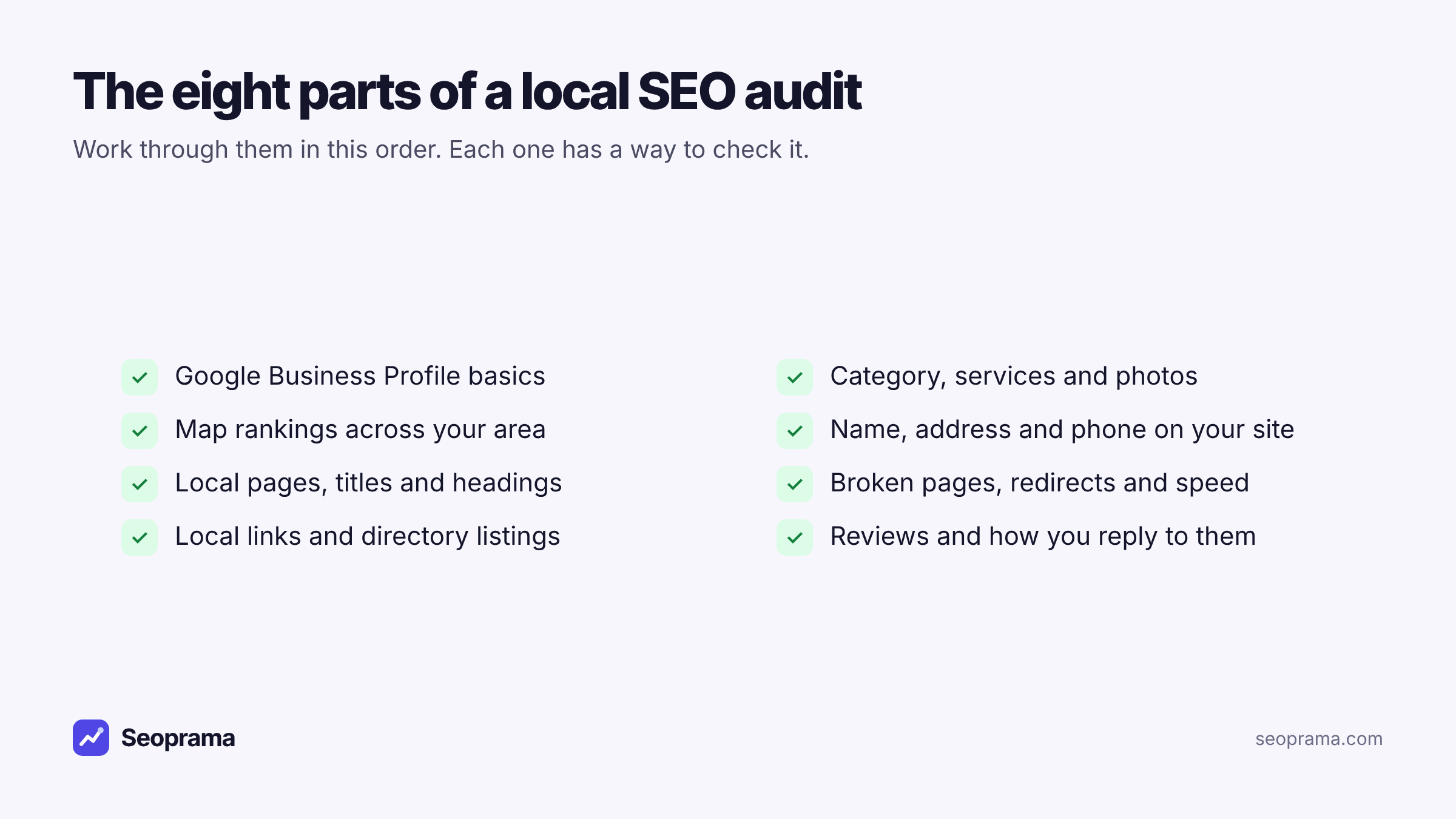
You can’t change distance. Everything in this audit is about the other two, split into four parts:
- Your Google Business Profile. The listing itself: name, categories, services, hours, photos, website link.
- Your map rankings. Where the listing shows across the whole area you serve.
- Your website. Local pages, contact details, technical health and the searches you already get clicks from.
- Links, listings and reviews. The signals of prominence.
What it doesn’t cover is worth saying too. This isn’t a full Google Business Profile optimisation guide or a citation-building plan. The audit finds the problems. Fixing each one can be its own project.
The local SEO audit checklist (copy this template)
Select the table, copy it and paste it into Google Sheets or Excel. Each row becomes a line in your sheet. Fill in the last column as you go, and add a Notes column if you like to keep what you found.
| # | Area | Check | How to verify | Pass or fix |
|---|---|---|---|---|
| 1 | Profile | Profile is verified and you have owner access | Google Business Profile dashboard (free) | |
| 2 | Profile | Business name matches your real signage, with no added keywords | By hand | |
| 3 | Profile | Primary category is the service most customers come for | By hand, compare with the top 3 on Maps | |
| 4 | Profile | Secondary categories and the services list cover what you sell | By hand | |
| 5 | Profile | Hours, holiday hours and phone number are correct | By hand | |
| 6 | Profile | Website link lands on the right page with no redirect chain | Redirect checker | |
| 7 | Profile | Recent photos of the outside, inside, team and work | By hand | |
| 8 | Map | You’re in the top 3 near your address for your main service | Local SEO grid | |
| 9 | Map | Share of grid points in the top 3, per service keyword | Local SEO grid | |
| 10 | Map | No service keyword where you’re missing across most of the grid | Local SEO grid | |
| 11 | Map | The keywords you check are ones people search in your town | Keyword research, city volumes | |
| 12 | Website | Name, address and phone on the site match the profile exactly | By hand: footer, contact page, home page | |
| 13 | Website | One page per main service, naming the town or area you serve | By hand, or the page list in site audit | |
| 14 | Website | No missing or duplicate titles and H1s on service pages | Site audit | |
| 15 | Website | No broken pages (4xx) or server errors | Site audit | |
| 16 | Website | No redirect chains or loops from old URLs | Site audit, then the redirect checker for detail | |
| 17 | Website | Service and location pages aren’t blocked by noindex or a wrong canonical | Site audit | |
| 18 | Website | No thin or near-duplicate area pages | Site audit | |
| 19 | Website | Pages load at a reasonable speed | Site audit (Lighthouse scores on a sample) | |
| 20 | Website | LocalBusiness structured data is present and valid | Google’s Rich Results Test (free) | |
| 21 | Website | Clicks and impressions for “service + town” searches | Search Console insights | |
| 22 | Website | Organic rank in your city for your main service keywords | Rank tracker, city level | |
| 23 | Links | Some links come from local sites (news, associations, suppliers, sponsors) | Backlink checker | |
| 24 | Links | Local links your rivals have and you don’t | Backlink checker on 2 rivals | |
| 25 | Links | Broken pages on your site that still have links pointing at them | Backlink checker, top linked pages | |
| 26 | Listings | Listed on the main directories for your country and trade, with matching details | By hand: search your business name and phone | |
| 27 | Reviews | Review count and rating compared with the top 3 on Maps | By hand | |
| 28 | Reviews | You reply to reviews, good and bad, and new ones arrive steadily | By hand |
Fourteen rows are free and done by hand. The other fourteen need data, and that’s where the tools come in. The sections below explain what “pass” looks like for each group, so you’re not guessing.
Want to fill in the data rows today? For a typical small business they use about 654 credits in Seoprama, which the trial covers. The full maths is further down.
About 21 keyword searches, or a few searches plus a backlink lookup and a week of rank tracking. No monthly plan, and credits never expire.
Part 1: your Google Business Profile (rows 1 to 7)
Start here because it’s free and it’s where the biggest problems hide. Open your profile in Google’s own dashboard and go row by row.
Name (row 2). Your name should be what’s on your sign, your invoices and your website. “Bright Smile Dental” is fine. “Bright Smile Dental Best Dentist Leeds” breaks Google’s guidelines and can get a listing suspended. If a competitor does it and ranks, that’s annoying, but don’t copy them.
Primary category (row 3). This is the single most common miss I see. A physio clinic set as “Medical clinic”, or a cake shop set as “Bakery” when most of its orders are custom cakes. Search your main service on Maps, open the top three listings and see what category they use. If yours is broader, that’s a fix.
Services and secondary categories (row 4). List the services you actually sell, in the words customers use. If you do sports massage and nobody can find it in your profile, Google has little reason to show you for it.
Website link (row 6). Click it. Does it go to your home page, or a page for this location? Paste the URL into the redirect checker too. Old links often point at an http address that redirects twice before it lands. It costs 2 credits a URL, and if you see a 302 temporary redirect or a chain, fix the link at the source.
Honest limit on our side: Seoprama doesn’t manage your Google Business Profile or reviews. These seven checks happen in Google’s dashboard.
Part 2: where you rank on the map (rows 8 to 11)
This is the part most checklists skip, because it needs data. Searching on your own phone shows you the most flattering view you’ll ever get, since you’re standing next to the business. A customer three streets away sees something different.
A grid check fixes that. The local SEO grid searches from a 3×3 or 5×5 grid of points around your business and shows your Maps position at each one, keyword by keyword. You get an average rank, the share of points where you’re in the top 3, and how many points you were found at all.
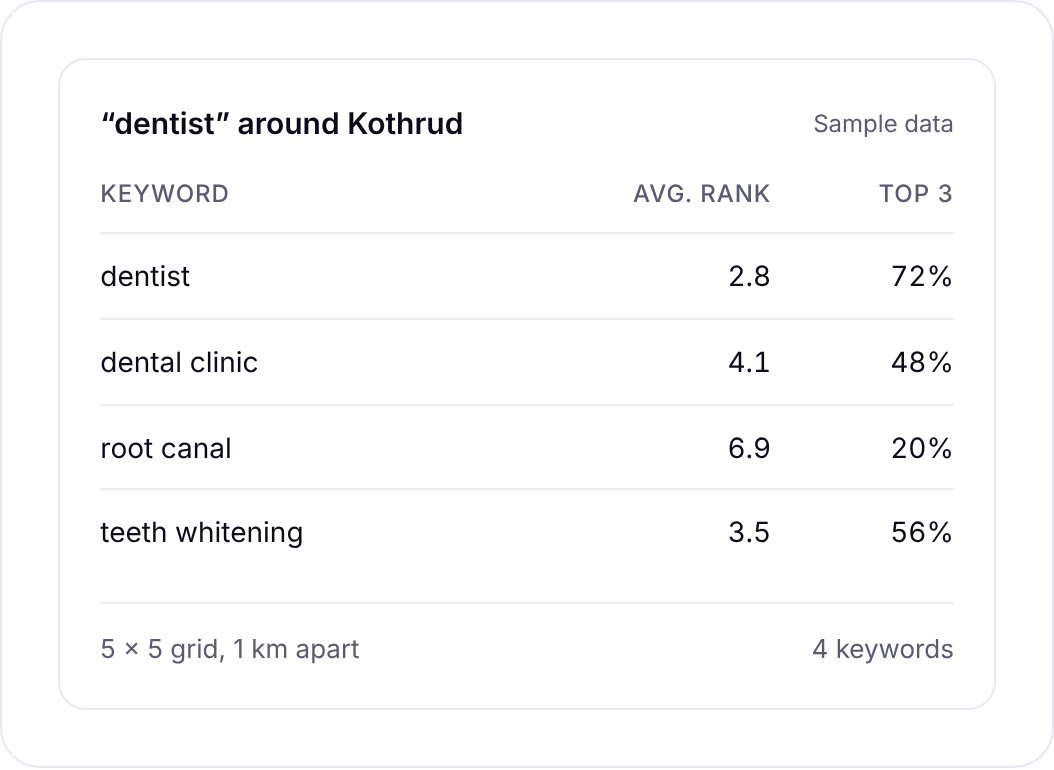
What counts as a pass:
- Row 8. You’re in the top 3 at and around your address for your main service. If you’re not even top 3 next door, the problem is almost always relevance, which sends you back to Part 1.
- Row 9. Write down the share of top-3 points for each keyword. There’s no universal good number. It’s your baseline, and next quarter’s audit shows whether it moved.
- Row 10. Any service where you’re missing from most of the grid is a red flag. Google doesn’t connect that service with you yet.
For row 11, pick the keywords from real demand, not guesswork. The keyword research tool can show volumes for a city or region instead of the whole country, so you check the services people in your town actually search for.
A 5×5 grid check costs about 50 credits per keyword, a 3×3 grid costs less, and the app shows the cost before it runs. If you want more on reading the patterns a grid throws up, there’s a full guide on checking your Google Maps ranking without a subscription.
Local rankings and checks built for businesses with local customers.
Part 3: your website’s local signals (rows 12 to 22)
Your website feeds both the map listing and the normal results underneath it. Here’s where a crawl saves you hours.
Contact details (row 12). Check the footer, contact page and home page by hand. The phone number and address should match the profile character for character. “Unit 4, 12 Mill Road” on the site and “12 Mill Rd” on the profile is fine to a human, but there’s no reason to leave it inconsistent when it takes a minute to fix.
Service pages (row 13). One clear page for each main service, saying what you do and where. A single “Services” page with eight bullet points gives Google very little to match against “sports massage in Headingley”.
The technical rows (14 to 19). Run a site audit. It crawls the site like a search engine and groups what it finds: missing or duplicate titles, missing H1s, broken pages, redirect chains and loops, noindex and canonical problems, thin or duplicate content, and Lighthouse speed scores on a sample of pages. It costs about 1 credit a page, so a 60-page site is about 60 credits. Optional JavaScript rendering and speed tests add a little.
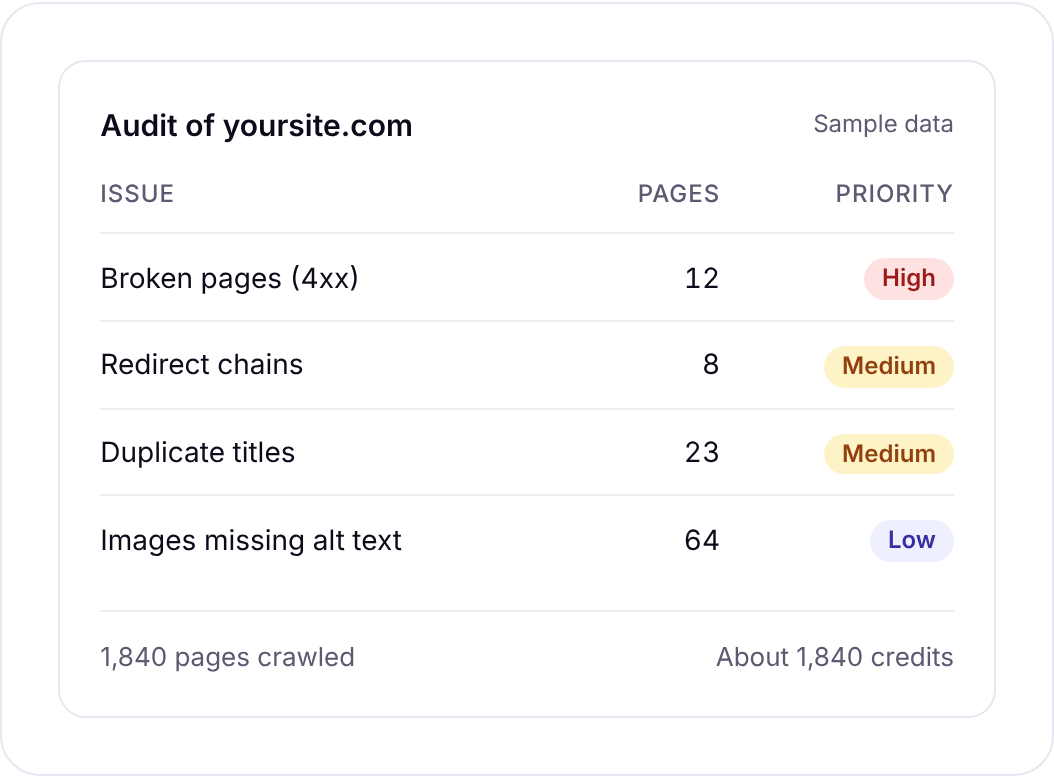
Watch row 18 closely if you’ve ever made “area pages”. Twenty pages that read “We’re the best plumber in [town]” with only the town swapped are thin, and the audit will flag them as near duplicates. Three good area pages beat twenty copies.
Structured data (row 20). Seoprama’s audit doesn’t test schema markup, so use Google’s free Rich Results Test on your home page. You’re looking for valid LocalBusiness (or a more specific type) with the same name, address and phone as everywhere else.
Real search data (rows 21 and 22). Connect Search Console and filter queries by your town’s name. You’ll see which “service + town” searches already bring impressions and clicks. That’s about 5 credits a report. Then add your main service keywords to a city-level rank tracker, which costs 6 credits per keyword a month checked weekly. That’s the organic side of the page, below the map pack, and for many trades it brings as many clicks as the map does.
Part 4: links, listings and reviews (rows 23 to 28)
This is prominence. It’s slower to fix, so audit it last and expect the fixes to take months, not days.
Local links (rows 23 and 24). Run your domain through the backlink checker for local sites and scan the referring domains. Do any of them come from your town? Local news, a business association, a sports club you sponsor, a supplier’s “where to buy” page. Then run your two strongest map rivals. Local sites that link to them and not to you are your outreach list. Each lookup is 62 credits.
If you’d rather see the gap in one view, the competitor analysis tool compares you with up to 5 rivals and lists sites that link to them but not you. That’s about 250 credits per competitor plus about 140 for your site, so for a single-location audit, two plain backlink lookups are usually enough.
Broken pages with links (row 25). The backlink checker’s top linked pages view shows pages on your site that other sites link to but now return an error. Old offers, an old “our team” page, a location you closed. Redirect each one to the closest live page and you recover links you already earned.
Directory listings (row 26). Search your business name and your phone number on Google. Note every directory that lists you and check the details match. Wrong old addresses are the usual find, especially if you’ve moved. You don’t need hundreds of listings. The main directories in your country and your trade are enough.
Reviews (rows 27 and 28). Count your reviews and note your rating, then do the same for the top three on Maps for your main keyword. If they have 200 and you have 30, that’s the gap. Also check that you reply, and that reviews arrive steadily. Twenty reviews in one week and none for a year looks odd to customers, whatever Google makes of it.
What it costs to run the whole audit
Here’s the data cost for a typical small business. Say you run a physio clinic with a 60-page website, five services you want to rank for and two main rivals. A hypothetical example, but a common one.
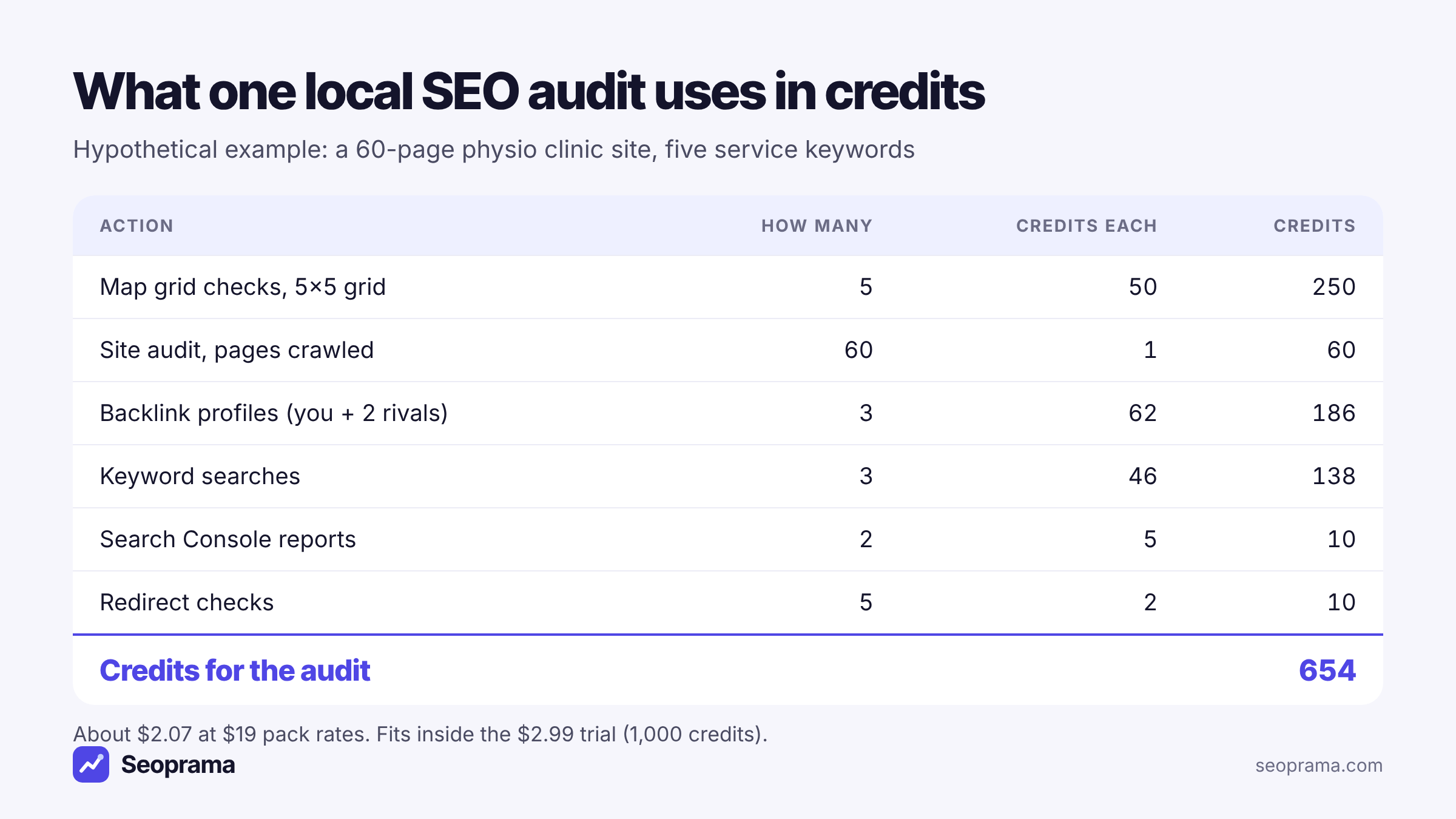
That’s 654 credits. At $19 pack rates (6,000 credits for $19) it’s about $2.07. The $2.99 trial gives you 1,000 credits, so the whole audit fits inside it with 346 to spare. Keyword searches with city-level volumes cost a bit more, about $0.28 each instead of $0.15, which still leaves room.
In India the ₹99 + GST trial has 700 credits, enough for the same audit with 46 credits left. On the ₹549 + GST pack it works out at about ₹124 + GST.
Credits never expire, so whatever’s left sits there for the re-check in three months. If you want to price a different setup, more keywords or a bigger site, the package builder adds it up for you.
Running the audit in one afternoon
You don’t need to do this over a week. Here’s the order I’d use.
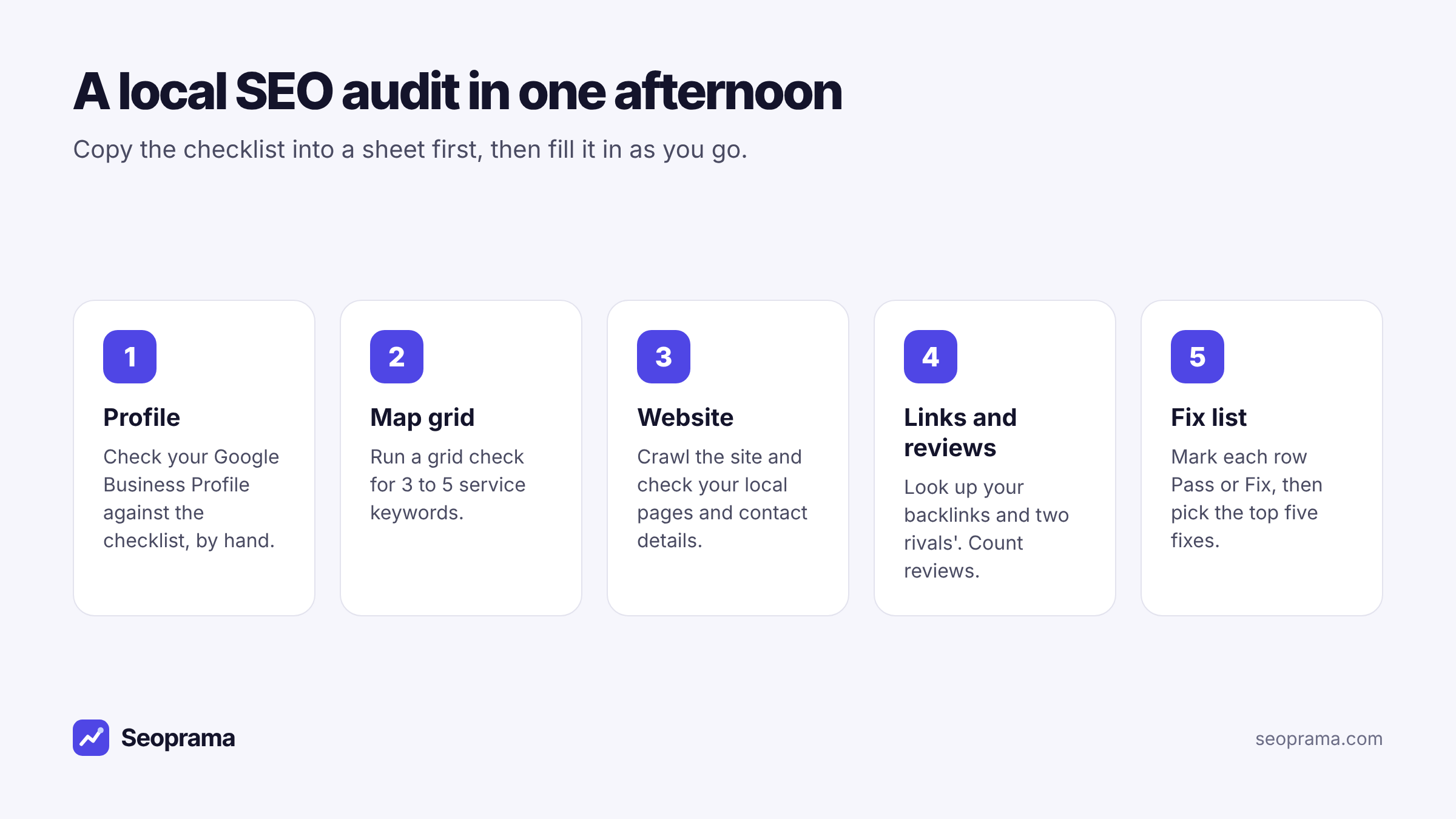
1. Copy the template. Paste it into a sheet, then add a Notes column and the date.
2. Do the profile rows by hand. Twenty minutes in Google’s dashboard covers rows 1 to 7.
3. Start the site audit, then run the grid. The crawl takes a while on a bigger site, so set it going first. While it runs, do the map grid for 3 to 5 service keywords.
4. Work through the website rows. Read the audit results, check your contact details, run the Rich Results Test and pull a Search Console report filtered to your town.
5. Links and reviews last. Three backlink lookups, a search for your name and phone number, and a review count against the top three.
6. Mark every row and pick five. Pass or Fix on each line, then choose the five fixes you’ll do first.
This short tour shows the workspace, including how the cost of each check appears before it runs.
Turning the checklist into a fix list
A sheet with twelve “Fix” rows can feel worse than not knowing. So rank them. My rule of thumb, in this order:
- Anything that breaks the basics. An unverified profile, wrong phone number, website link going to an error page. These cost you customers today.
- Relevance fixes. Wrong primary category, missing services, no page for a main service. They’re quick, and they’re what usually moves a grid that’s weak even next door.
- Technical fixes on pages that matter. Broken pages, redirect chains and noindex on service pages. Ignore low-priority issues on old blog posts for now.
- Reach. Local links, directory clean-up and a steady flow of reviews. Slow, but this is what stretches your top-3 area further from the door.
Field note: most single-location businesses I’ve seen get more from fixing categories and service pages than from any link work, because the relevance gap is bigger than they think. Do the cheap fixes first, then re-run the grid in a month and see what moved before you spend time on outreach.
How often to repeat a local SEO audit
Once a quarter is right for most single-location businesses. That’s often enough to catch a profile edit you didn’t make, a page that broke, or a rival that pulled ahead, and rare enough that each audit shows real change.
Between audits, keep a lighter rhythm. A monthly grid check on your main 3 to 5 keywords, and city-level rank tracking running weekly, cover most of what you need. Re-run the full checklist sooner if you move premises, change your website, add a service or see calls drop.
Each re-run costs about the same as the first. On the example above, four audits a year come to about 2,616 credits, well inside a single $19 pack. You can compare packs and plans on the pricing page.
Buy credits once and spend them only when you run something. Bigger packs give more credits per dollar.
Frequently asked questions
What should a local SEO audit include?
Four areas: your Google Business Profile (name, categories, services, hours, website link, photos), your map rankings across your area, your website’s local pages and technical health, and your links, directory listings and reviews. The template above turns that into 28 checks.
Can I do a local SEO audit for free?
About half of it, yes. The profile, directory and review checks are done by hand, and Google’s Rich Results Test is free. Map rankings across your area, a site crawl and backlink data need a tool. In Seoprama the full audit in this post uses about 654 credits, which fits inside the $2.99 trial.
How long does a local SEO audit take?
For a single location with a small website, an afternoon. The profile checks take about twenty minutes, the site crawl runs while you do the map grid, and the links and reviews checks take another hour or so.
How often should I audit my local SEO?
Once a quarter for most single-location businesses, plus a quick re-check after a move, a website change or a drop in calls. A monthly grid check on your main keywords covers the gaps between audits.
Is there a downloadable local SEO audit template?
The template is the table in this post. Select it, copy it and paste it straight into Google Sheets or Excel, and each check lands on its own row ready for a Pass or Fix.