How to run a one-time SEO audit without signing up for a monthly tool
You need one proper audit of your site, not a monthly plan. Here's how to crawl it once, pay per page, and keep the leftover credits for next time.
- Most audit tools sell crawl allowances on a monthly plan, which is overkill if you need one good audit.
- On Seoprama a site audit costs 1 credit per page crawled. A 2,000-page site is about 2,000 credits.
- The $2.99 trial alone covers a 1,000-page audit (₹99 + GST gives 700 credits in India).
- Leftover credits never expire, so the re-check after your fixes is already paid for.
- For your own verified site, free tools like Google Search Console are worth using alongside.
Most founders need a proper SEO audit at a few specific moments. Before a relaunch. After a developer rebuilt the site and traffic dipped. When an investor or a new marketing hire asks, “is the site technically OK?”
You don’t need a crawler running every week. You need one good crawl, a clear list of what’s broken, and a way to check your fixes worked.
That’s what a one-time SEO audit tool should give you. This guide covers what a good audit checks, what it costs when you pay per page, how to run one in Seoprama, and what to fix first so the audit turns into actual improvements.
Why audit tools sell monthly plans you don’t need
Site audits are usually packaged with a suite. You pay for a monthly plan, and the plan includes a crawl allowance: a set number of pages per month or per project. Ahrefs Lite, for example, includes 10,000 audit pages a month at $129 a month, according to the comparison on seoprama.com.
If you’re an agency auditing client sites every week, that allowance gets used. If you’re a founder with one 600-page site, you use it once, fix things over the next few weeks, and then the plan quietly renews. Plenty of people sign up “for one month”, forget to cancel, and pay for three.
A one-time audit should work like a one-time purchase. You pay for the crawl you run, and that’s it.
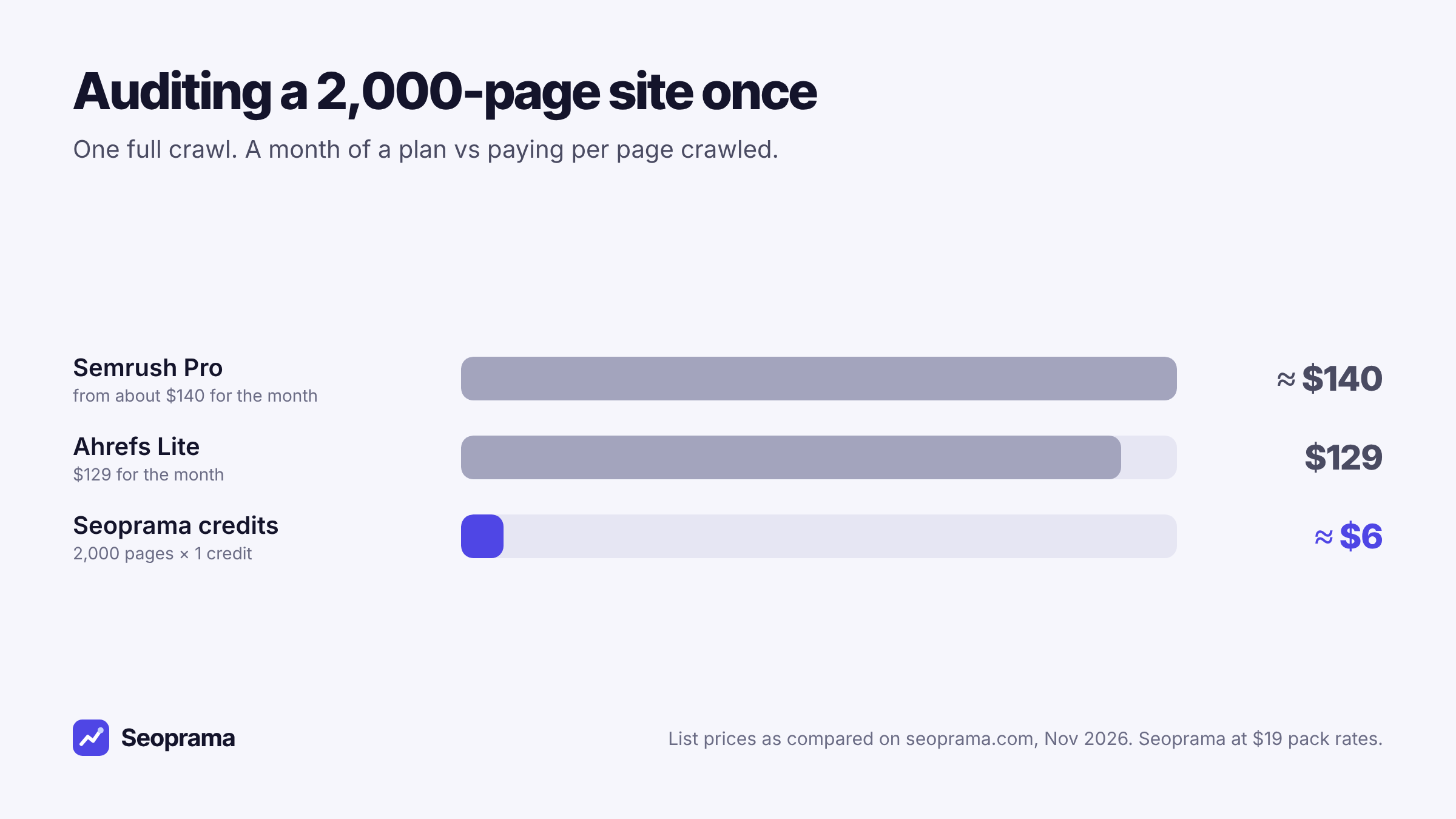
Those plans include a lot more than audits, to be fair. Rank tracking, keyword research, backlinks and much more. If you’d use all of it, the comparison changes. But if the job is “audit my site once”, paying for a month of a full suite is a lot of money for one feature.
What a good one-time SEO audit should check
Whichever tool you use, a proper audit crawls your site the way a search engine does and lists the problems that can stop pages ranking. Here’s what to expect, and what the Seoprama site audit checks:
- Crawl basics. It follows your internal links, reads robots.txt and your sitemaps, and checks every page it finds.
- Broken and redirected pages. Broken pages (4xx), server errors, redirect chains and loops, and slow responses.
- Indexing problems. Canonical conflicts, noindex and blocked pages, pages buried deep in the site, and pages with no outgoing links.
- Titles and headings. Missing, too long or duplicate titles and meta descriptions, missing or multiple H1s, and heading order.
- Content and images. Thin or duplicate content, and images missing alt text.
- Speed and JavaScript. Lighthouse speed scores on a sample of pages, and optional JavaScript rendering for sites built on frameworks that need it.
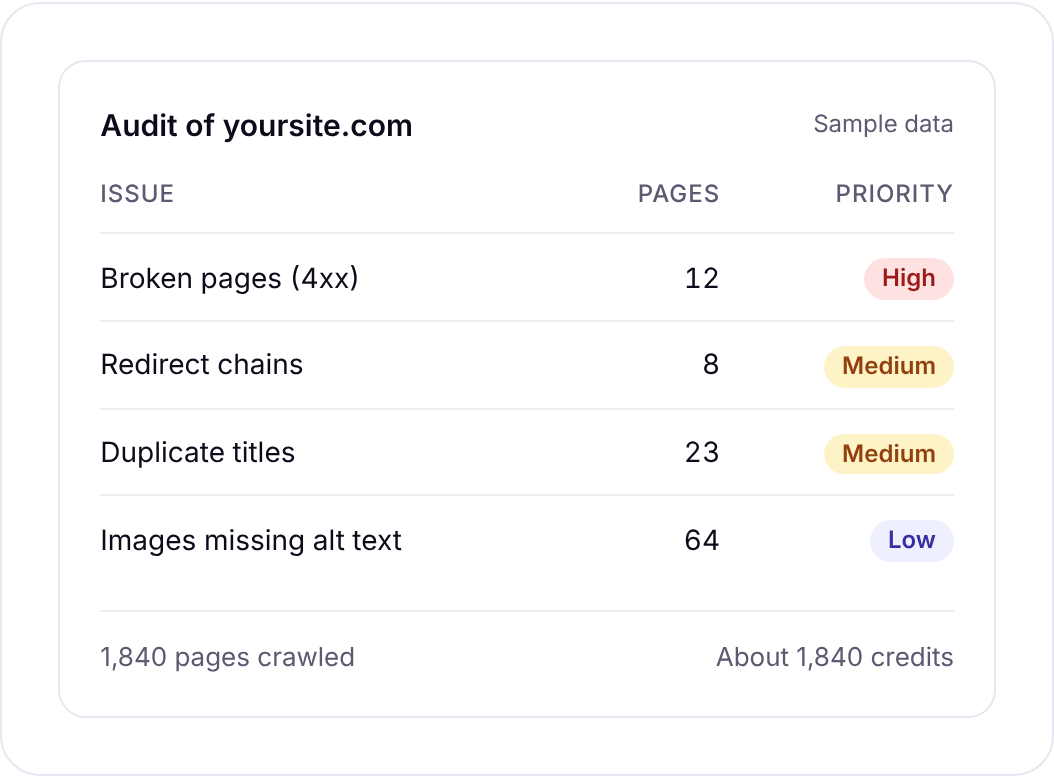
Issues are grouped with a priority and a detail page each, so you can hand a fix list to a developer instead of a raw crawl export. That matters more than it sounds. Most audits fail at the hand-off, when a 400-row spreadsheet lands in someone’s inbox and nobody knows where to start.
1 credit per page crawled, with history so you can compare crawls.
What a one-time audit costs per page
Seoprama charges 1 credit for each page crawled. There’s no audit fee on top. JavaScript rendering and speed tests add a little, and the app shows the credit cost before the crawl starts.
| Site size | Credits | What covers it |
|---|---|---|
| 50-page brochure site | about 50 | the $2.99 trial, with most left over |
| 600-page startup site | about 600 | the $2.99 trial |
| 2,000-page store | about 2,000 | a $19 pack, with 4,000 credits left |
| 10,000-page site | about 10,000 | a $49 pack (16,500 credits) |
In India, the ₹99 + GST trial gives 700 credits, which covers an audit of up to about 700 pages. The ₹549 + GST pack gives 2,900 credits.
A single audit can cover up to 10,000 pages. If your site is bigger than that, audit it in sections, or start with the folders that matter most (your product or service pages, then the blog).
Here’s an honest note for very large sites. A few tools sell a flat price per audit regardless of page count. If you have tens of thousands of pages and need exactly one crawl, compare that against per-page pricing, because a flat fee can come out cheaper at that size. For the sites most founders run, a few hundred to a few thousand pages, paying per page is hard to beat.
Running the audit, step by step
You can have results the same day. The setup takes a couple of minutes.
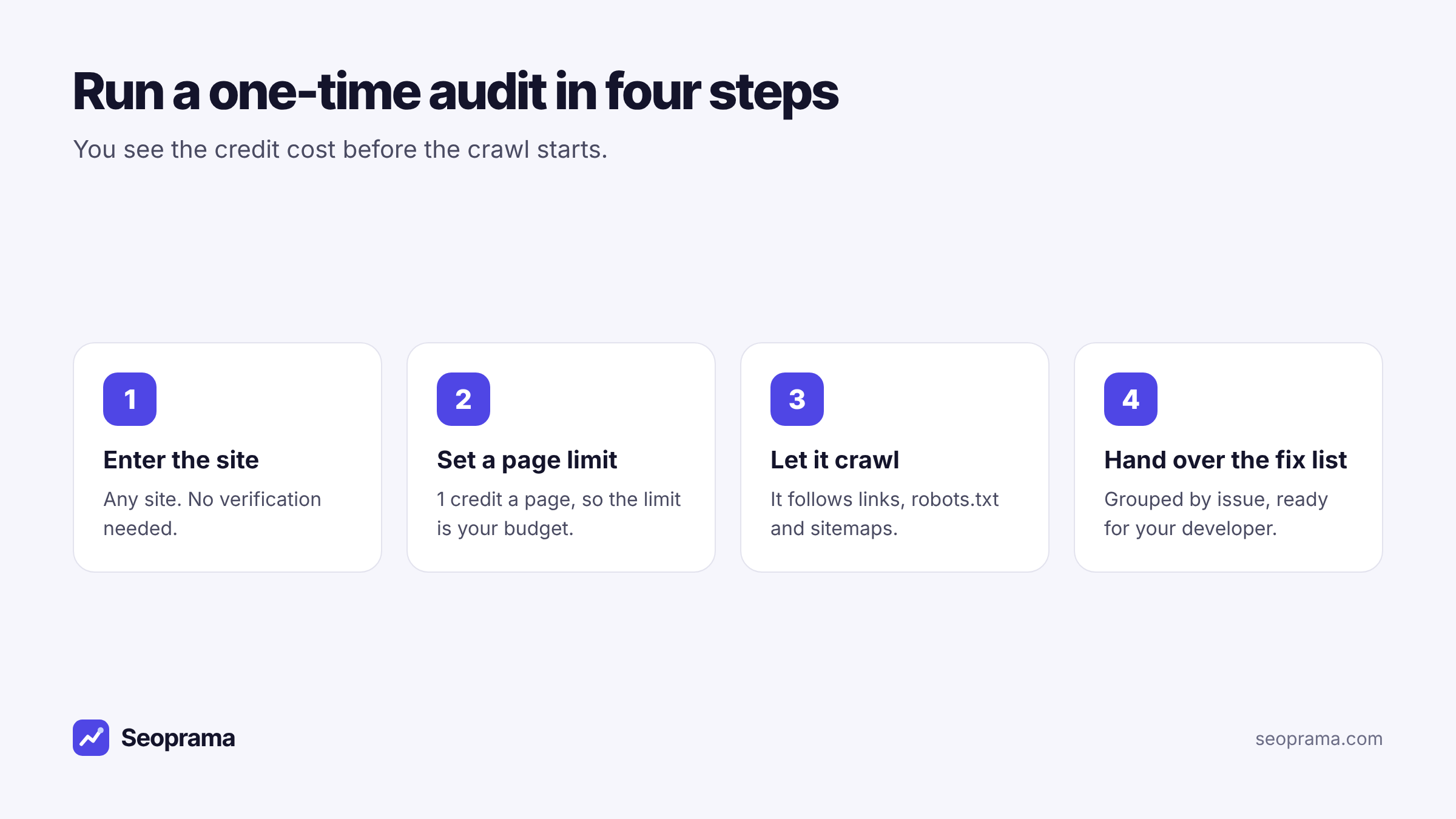
1. Enter the site. Any site, not only one you’ve verified. That’s useful if you’re checking a site you’re about to buy, a competitor, or a client’s before a project starts.
2. Set a page limit. At 1 credit a page, the limit is also your budget. If you’re not sure how big the site is, your sitemap or CMS will usually tell you. Set the limit a little above that.
3. Choose the options you need. Turn on JavaScript rendering if your site is built on a framework that loads content with JavaScript. If you’re not sure, ask your developer. Most simple sites don’t need it.
4. Let it crawl, then read the summary first. Start with the issue groups and their priorities. Don’t open every detail page on day one.
My usual tip for founders: run the audit, then book 30 minutes with your developer to go through the high-priority groups together. That half hour usually saves a week of back-and-forth by email.
About 21 keyword searches, or a few searches plus a backlink lookup and a week of rank tracking. No monthly plan, and credits never expire.
What to fix first after the audit
An audit will almost always find more issues than you have time to fix. That’s normal. Even well-run sites have hundreds of minor flags. The skill is picking the order.
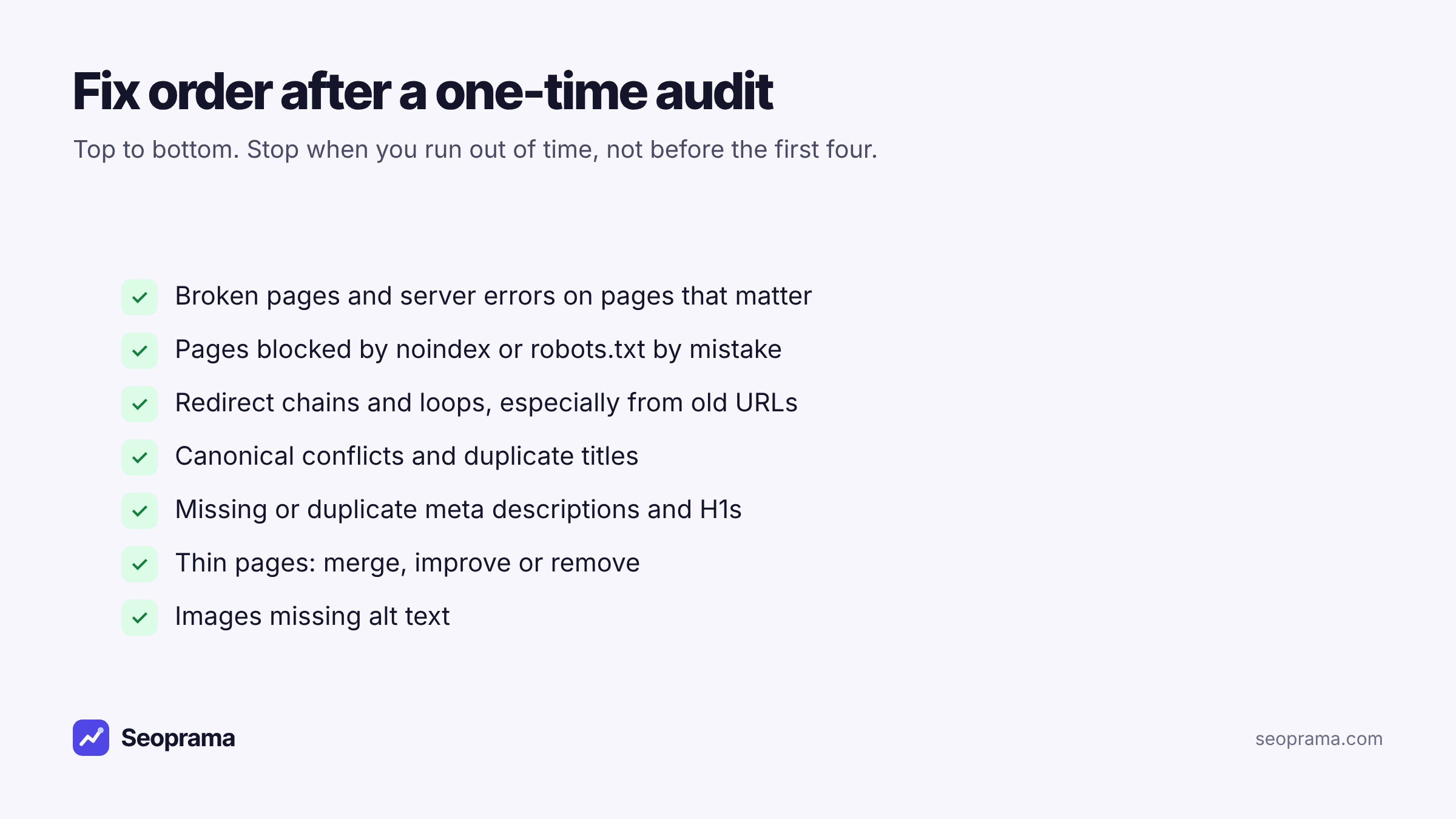
Broken pages and server errors come first, but only on pages that matter. A broken page that gets traffic, has backlinks or sits in your main navigation is urgent. A broken link to an old event page from 2019 isn’t.
Accidental noindex or robots.txt blocks are next. This is the classic relaunch mistake: a staging setting that tells search engines to stay away gets copied to the live site. One line of config can hide a whole site. If the audit flags important pages as noindex or blocked, fix that today.
Redirect chains and loops waste crawl time and leak value, especially after a redesign. Point each old URL straight at its final destination in one hop.
Canonical conflicts and duplicate titles confuse search engines about which page to rank. Common on stores with filtered product URLs.
After that, meta descriptions, H1s, thin pages and alt text are worth cleaning up. They matter, but they’re rarely why a site isn’t ranking.
Checking your fixes without paying for a plan
This is where a one-time audit usually falls apart on a monthly tool. You fix things over three weeks, the plan renews, and you pay another month just to run the check.
With credits, the re-check is simply another crawl. Here’s the full cycle for a hypothetical startup site:
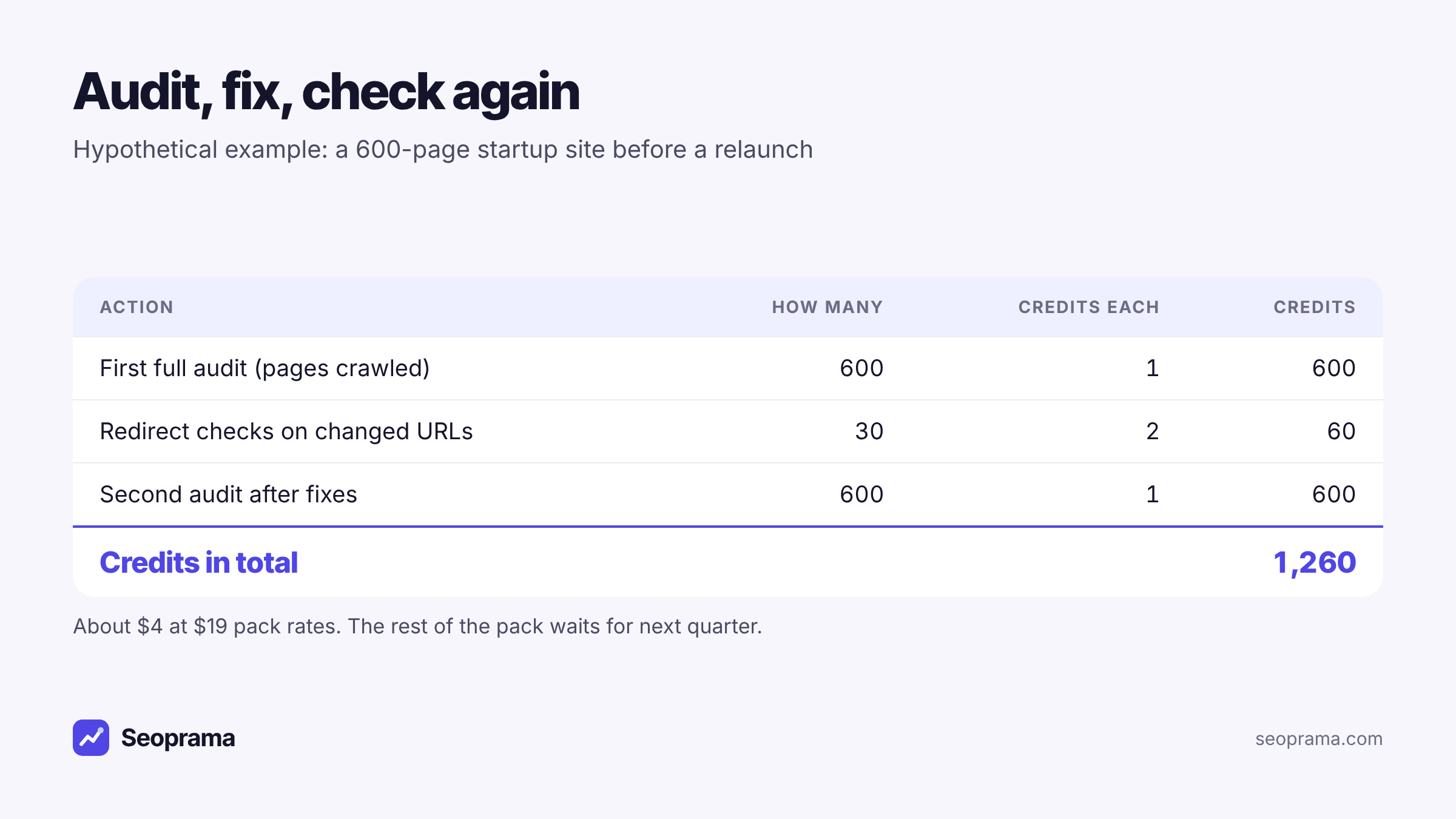
Earlier audits stay in your history, so you can compare the second crawl with the first and see what improved. There’s no scheduled re-crawl yet. You run each one when you’re ready, which for a one-time audit is exactly what you want.
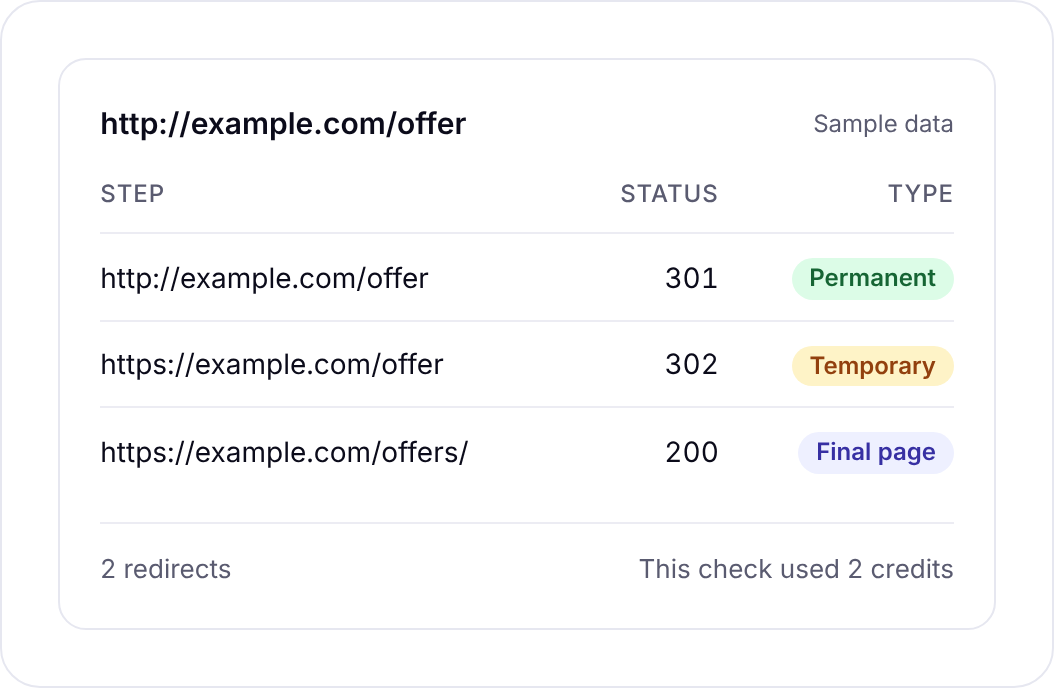
For the URLs you changed, the redirect checker is a quick way to confirm each one. It follows up to 10 hops the way a browser or Googlebot would, labels 301 and 308 as permanent and 302, 303 and 307 as temporary, and warns about temporary redirects or chains that end in an error. It checks one URL at a time, at 2 credits each. For the whole site, the audit already finds redirect chains.
Reading an audit when you’re not technical
A lot of founders open their first audit, see a few hundred flags, and close the tab. You don’t need to understand every line. You need to answer three questions.
Are the pages that make money healthy? Look first at the issues on your homepage, your main product or service pages and your pricing page. If those are clean, the site’s foundation is fine, even with a long list elsewhere.
Is anything stopping search engines from seeing the site? Noindex tags, robots.txt blocks, and canonical tags pointing at the wrong place. These are rare but serious, and they’re the first thing a good developer checks after a relaunch.
Is the problem growing? Compare this audit with the last one in your history. Twelve broken pages that were there last year is old clutter. Twelve broken pages that appeared since the redesign is a signal something in the build process is wrong.
If you answer those three, you know whether you have an emergency, a to-do list, or nothing much to worry about. That’s the real output of a one-time audit, and it’s worth more than the full spreadsheet.
Auditing a site you’re about to buy or hand over
One more use that founders often miss. Because you don’t need to verify the site, you can audit a site before you own it.
Buying a site or a small business. Crawl it before you agree a price. A site with a tidy structure and few errors is worth more than one where half the product pages return errors. It costs a few dollars of credits to find out.
Hiring an agency or freelancer. Run an audit before they start, so you have a baseline. Three months later, run another. You’ll see exactly what changed, in your own account, without relying on their report.
Handing a site to a new developer. Give them the audit on day one. It shows them where the problems are and saves them a week of discovery.
Free audit tools are worth using too
You don’t have to pay for everything, and you shouldn’t. For your own site, there are good free options.
Google Search Console shows which pages Google has indexed, which it excluded and why, and your Core Web Vitals. If you only do one free thing, verify your site there.
Ahrefs Webmaster Tools gives free site audits for sites you can verify as yours. It’s a solid tool, and if you only ever audit your own verified site, it may be all you need.
Where a pay-per-page audit earns its place is everything else. Sites you can’t verify, like a competitor, a site you’re thinking of buying, or a prospect’s site before you quote. And the moment you want a clear, prioritised fix list you can hand to a developer without setting up accounts first.
Once Search Console has a few weeks of data, Seoprama’s Search Console insights is a cheap next step. For 5 credits it sorts your own data into quick wins, like pages with lots of impressions and few clicks, and queries sitting just off page one.
When a monthly audit tool makes more sense
A subscription isn’t always the wrong call. It’s probably better if you:
- need audits on a fixed schedule with alerts, for many sites, every week
- run an agency where audits are a core monthly deliverable for dozens of clients
- want the deeper reporting and integrations that come with a full suite like Ahrefs or Semrush
Those suites are mature and do a lot. For a founder with one site and a relaunch coming up, though, they’re more than you’ll use. Buy credits, crawl once with a pay-per-page site audit, fix what matters, crawl again, and keep the rest of the pack for next quarter. You can compare pack sizes on the pricing page before you buy.
Buy credits once and spend them only when you run something. Bigger packs give more credits per dollar.
Frequently asked questions
Can I run an SEO audit without a subscription?
Yes. Seoprama charges 1 credit per page crawled, with no monthly plan. You buy a credit pack once, and whatever you don’t use stays in your account because credits never expire.
How much does a one-time site audit cost?
About 1 credit a page. A 600-page site is about 600 credits, which the $2.99 trial covers. A 2,000-page site is about 2,000 credits, roughly $6 at $19 pack rates.
How many pages can one audit cover?
Up to 10,000 pages per audit. For bigger sites, audit the most important sections separately.
Can I audit a site I don’t own?
Yes. You don’t need to verify the site, so you can audit a competitor, a prospect or a site you’re thinking of buying.
How often should I run an SEO audit?
For most small sites, before and after any big change (a redesign, a migration, a new CMS) and once or twice a year otherwise. Weekly audits mostly make sense for large or fast-changing sites.
Is a free SEO audit tool good enough?
For your own verified site, Google Search Console and Ahrefs Webmaster Tools are worth using and may cover the basics. A paid audit helps when you need sites you can’t verify, or a prioritised fix list ready for a developer.