A pay-per-use redirect checker that costs under a cent per URL
Check where a URL really ends up without a monthly fee. A redirect checker you pay for per URL, what it costs, and when to use something else.
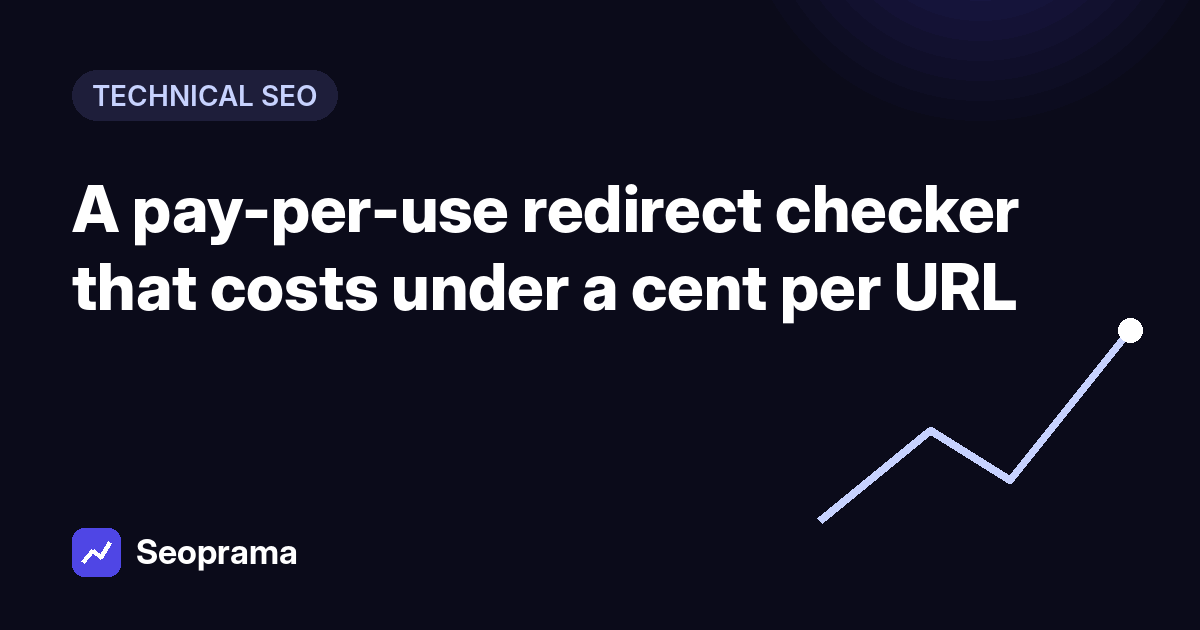
- Seoprama's redirect checker costs 2 credits a URL, which is under a cent at $19 pack rates. No monthly fee, and credits never expire.
- It follows up to 10 hops, shows each URL and status code, and flags temporary redirects and chains that end in errors.
- It checks one URL at a time. For redirect chains across a whole site, run the site audit at 1 credit a page.
- Free single-URL checkers are fine for a one-off. This one is useful when you want checks next to your audits and rankings, without ads.
- The $2.99 trial gives you 1,000 credits, enough for 500 redirect checks.
A client’s old blog post still gets links from three news sites. Since the redesign, nobody’s sure where that URL goes. Maybe it goes straight to the new post. Maybe it goes to the homepage through three hops and a 302 someone left in place in 2023.
You don’t need a monthly subscription to find out. A pay per use redirect checker does the job for a fraction of a cent. This post shows how the redirect checker in Seoprama works, what it costs, what it can’t do yet, and how to pair it with a site audit when one URL at a time isn’t enough.
Why you’d pay for a redirect checker at all
Let’s get the honest part out of the way. Plenty of free redirect checkers exist. Paste a URL into one and you’ll see the chain. For a single check once a month, a free tool is fine, and I’d tell a friend to use one.
So who pays? People who check redirects as part of real work, not curiosity. Freelancers in the middle of a client migration.
Site owners chasing down why a page lost rankings. Anyone who’s already doing their audits and rank tracking in one place and doesn’t want to bounce between a pile of ad-covered utility sites.
The case for paying per use is simple. You get the check inside the same account as your audit and rankings, there are no ads or daily limits to work around, and it costs so little that the price stops mattering. What you don’t want is a monthly plan for something you use in bursts. Redirect work is almost always bursty: nothing for weeks, then two hundred URLs in the week after a launch.
What it costs: the actual numbers
One redirect check costs 2 credits. Here’s what that looks like in money:
| What you buy | Credits | Redirect checks it covers | Cost per check, roughly |
|---|---|---|---|
| $2.99 trial | 1,000 | 500 | under a cent |
| $19 pack | 6,000 | 3,000 | under a cent |
| ₹549 + GST pack (India) | 2,900 | 1,450 | about ₹0.38 |
So a full $19 pack would cover 3,000 redirect checks. Nobody needs that many in a month, which is the point. You’d spend the rest on keyword research, rank tracking or audits, and whatever’s left stays in your account because credits never expire.
No monthly minimum, no seat fees. If your team shares the account, everyone draws from the same balance.
What the redirect checker shows you
Paste a URL and the checker follows it the way a browser or Googlebot would, for up to 10 hops. For every step you see the URL and the status code.
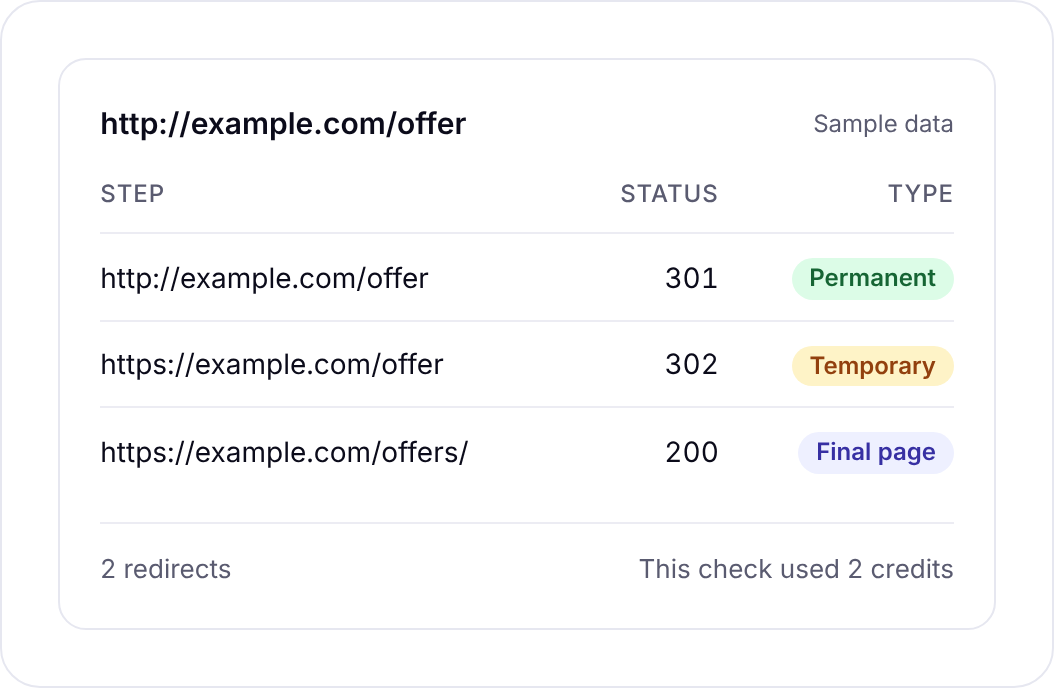
It labels each redirect so you don’t have to remember the codes:
- 301 and 308 are permanent. That’s what you want when a page has moved for good.
- 302, 303 and 307 are temporary. The checker warns you about these, because a temporary redirect on a page that has moved for good is one of the most common leftovers from a redesign.
It also warns you when a chain ends in an error, like a 404 or a server error. That’s the worst case: links and visitors arrive at the old URL, hop along, and land on nothing.
Follows up to 10 hops and flags temporary redirects and chains that end in errors.
What it can’t do (yet)
The redirect checker does one URL at a time. There’s no bulk upload yet. If you paste a list of 500 URLs, you’ll be checking them one by one, and that’s not a good use of your afternoon.
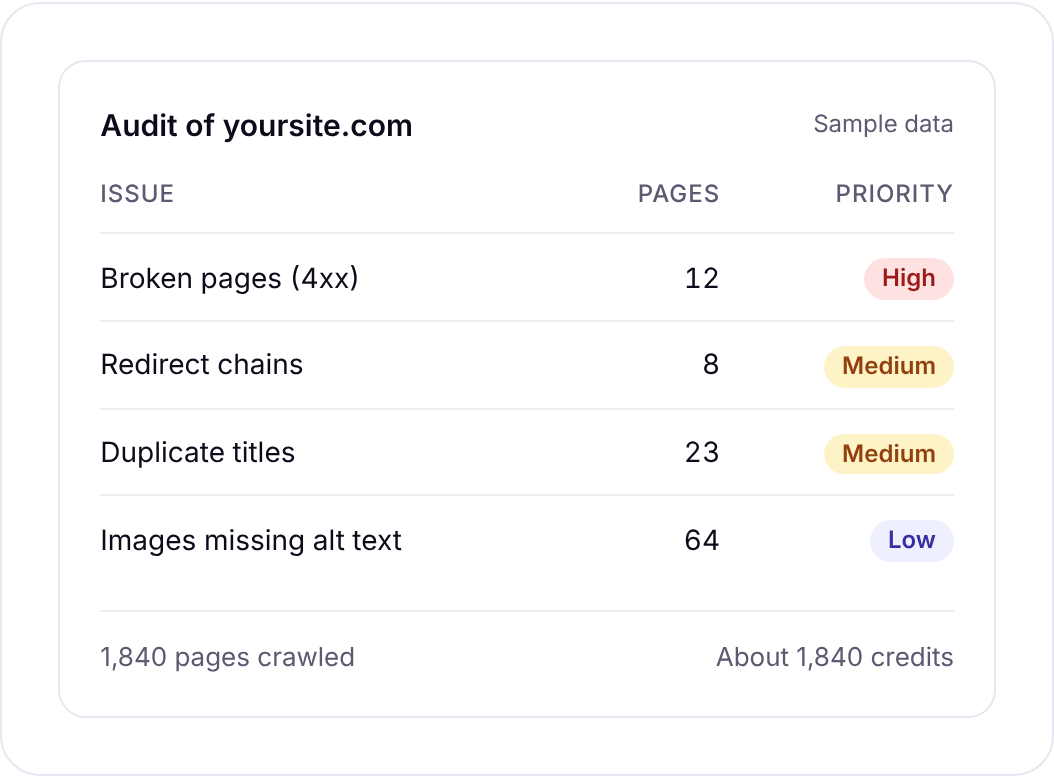
For a whole site, use the site audit instead. It crawls your pages at 1 credit a page and finds redirect chains across the site, along with the other issues an audit picks up. Then use the redirect checker to look at any single chain in detail.
That’s how the two tools are meant to work together: the audit finds the problems in bulk, the checker shows you exactly what one URL does. If what you need is a bulk redirect tool you’ll run on thousands of URLs every week, a desktop crawler or a dedicated bulk checker will suit you better today.
Reading a redirect chain and deciding what to fix
Seeing the chain is the easy part. Knowing what to do about it is where the time goes. Here’s how I read one.
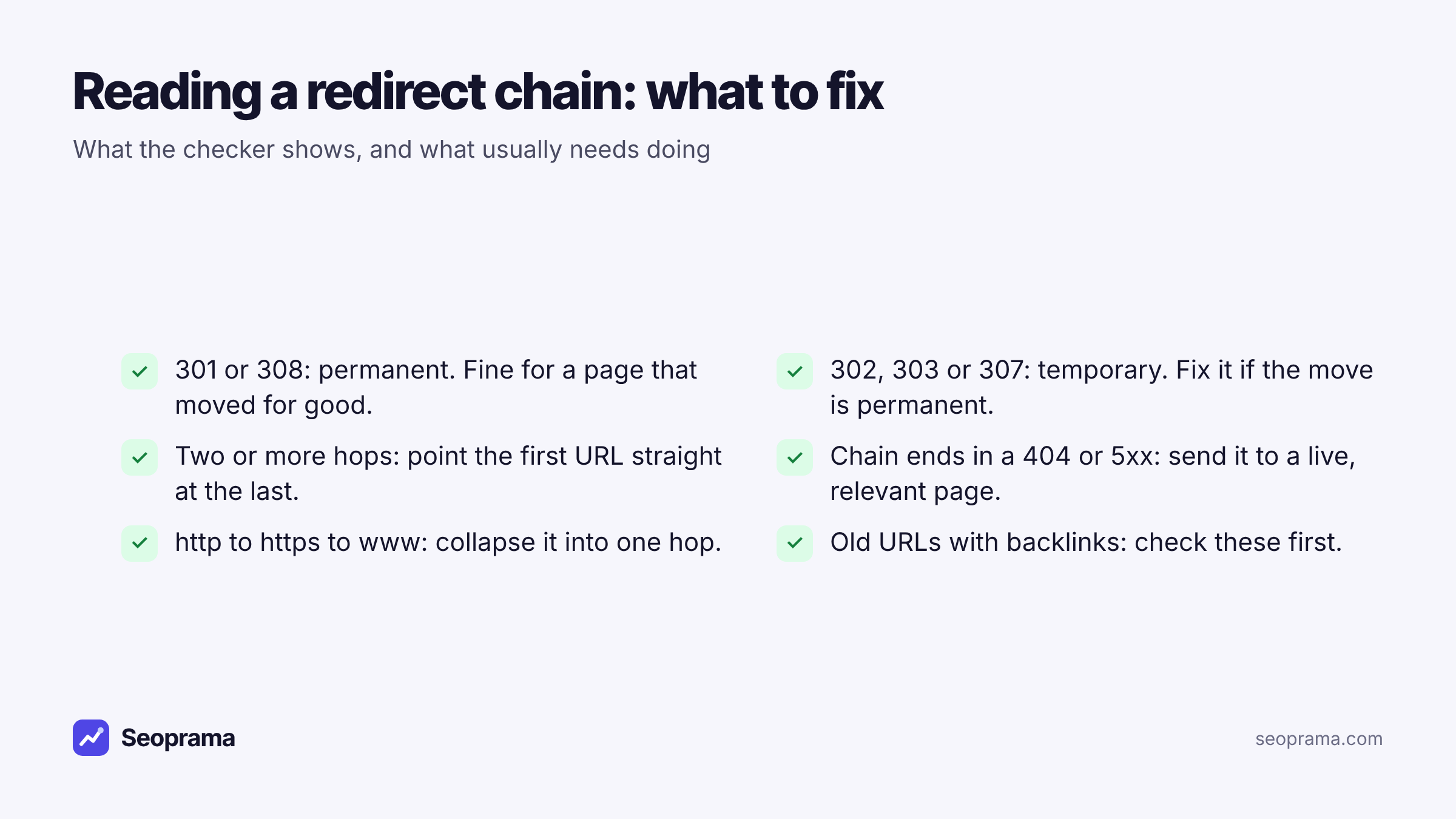
One hop, 301, ends on the right page. Done. Move on.
One hop, 302. Ask whether the move is permanent. If the old page is never coming back, change it to a 301. A temporary redirect left in place for months sends a mixed signal about which URL should rank.
Two or more hops. Typical example: http to https, then non-www to www, then the old slug to the new slug. Each hop is a small delay, and every extra step is another place for something to break later. Point the first URL straight at the final one.
Chain ends in a 404 or 5xx. Fix this first. Send the URL to the closest live page that matches what it used to be about. Not the homepage, unless there’s honestly nothing closer.
Chain hits the 10-hop limit. That usually means a loop. Something in the server rules is fighting itself. That one’s usually a developer job, but now you can show them exactly where it goes wrong.
One field note: the redirects that matter most are the ones with backlinks pointing at them. A broken chain on a URL nobody links to costs you very little. The same broken chain on the URL three news sites link to is worth fixing today.
A worked example: checking redirects after a site move
Say you’ve just moved a 300-page site from http to https and tidied up its URL structure. It’s a hypothetical example, but a very normal job. Here’s a sensible way to check it without checking 300 URLs by hand.
1. Find the old URLs that matter. Run a backlink lookup on the domain. The backlink checker lists your top linked pages, including broken pages that still have links. Those are the URLs you can’t afford to get wrong.
2. Audit the new site. Crawl it with the site audit to catch redirect chains and broken pages across the whole site.
3. Spot-check the important old URLs. Take the 40 most-linked old URLs and run each through the redirect checker. You’re looking for 302s, multi-hop chains and anything ending in an error.
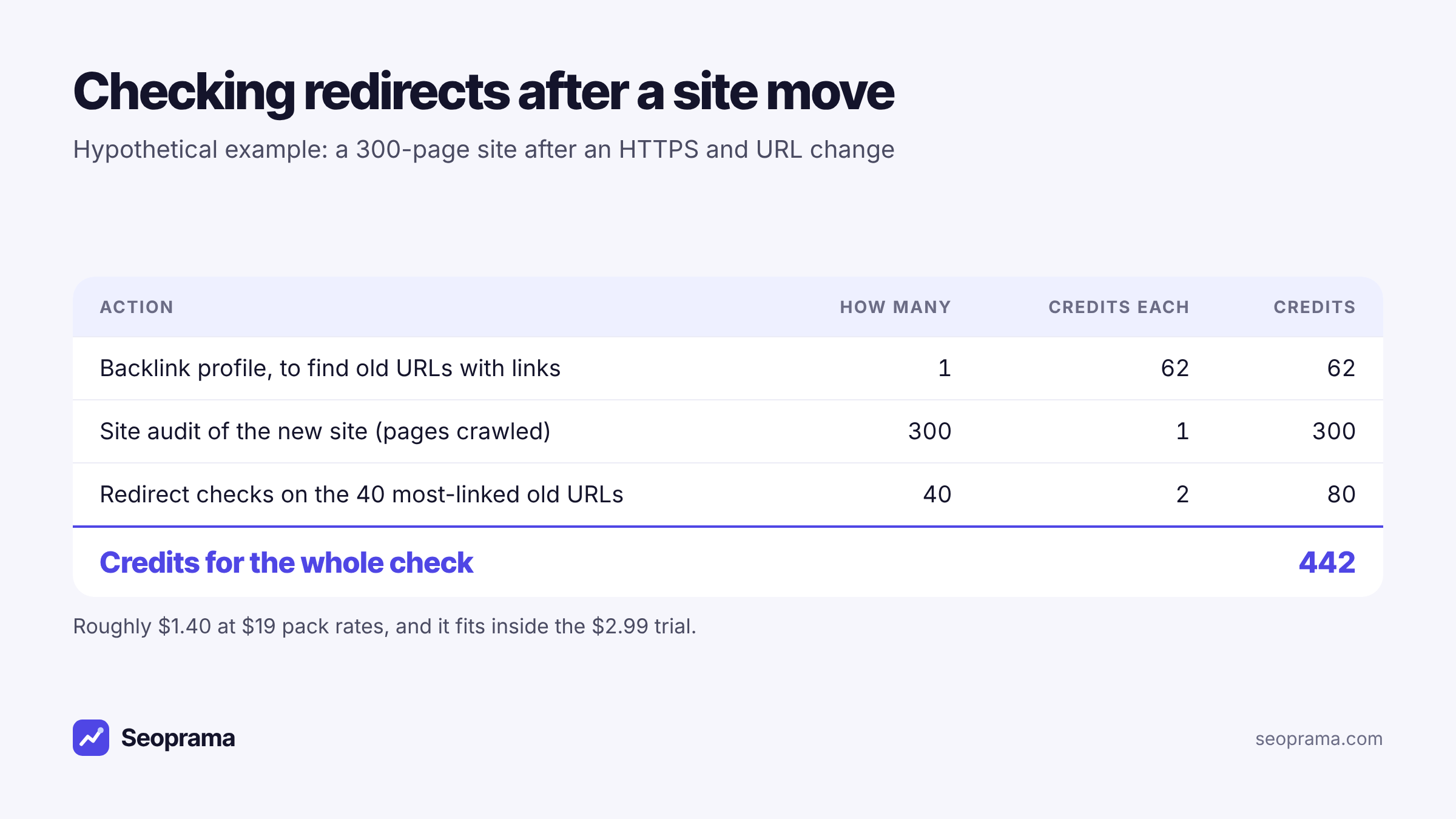
That’s 442 credits for the whole job. It fits inside the $2.99 trial, with room left for a few keyword searches. And if you do this for clients, it’s a check you can run after every launch without thinking about the cost.
About 21 keyword searches, or a few searches plus a backlink lookup and a week of rank tracking. No monthly plan, and credits never expire.
The redirect mistakes I see most after a redesign
Most redirect problems aren’t exotic. They’re the same handful of leftovers, and once you know them you’ll spot them in seconds.
The staging redirect that went live. During the build, someone adds a temporary 302 so testers land on the right page. Launch day comes, nobody changes it, and it sits there for a year.
The stacked rules. Your host forces https. Your CMS forces www. A plugin forces a trailing slash. Each rule is fine alone, but together they turn one hop into three. Ask whoever manages the server to merge them into one rule.
Everything sent to the homepage. When nobody has time to map old URLs to new ones, a catch-all redirect sends them all to the homepage. Visitors who came for a specific article get your homepage instead, and search engines may treat those redirects like missing pages.
Old redirects pointing at pages that later moved. Page A redirected to page B in 2022. Page B redirected to page C in 2024. Now A takes two hops. Every redesign adds another layer unless you update the old rules.
Mixed signals in internal links. Your menu still links to the old URL, so every visitor and crawler takes the redirect. Update internal links to point at the final URL. The audit helps you find these.
None of these needs an expensive tool to find. They need someone to look, which is easy when each look costs 2 credits.
When to check redirects (and when not to bother)
You don’t need to check redirects on a schedule. Check them when something changes:
- After a migration or redesign. The moment the new site goes live, and again a week later once the caches have settled.
- When a page drops in rankings for no obvious reason. Check whether its URL, or the URLs linking to it, now redirect somewhere unexpected.
- Before you build or reclaim links. If you’re asking a site to update a link, check the target URL first so you’re not pointing them at a chain.
- When you change domains, CMS or URL structure. These are the jobs where temporary redirects sneak in.
What I wouldn’t do is check your whole site’s redirects every week. It’s wasted effort. Run a site audit monthly or after big changes, and keep the redirect checker for the specific URLs you’re worried about.
Free checkers, browser extensions and paid crawlers: how this compares
To be fair to the alternatives:
Free web redirect checkers do the single-URL job well. Some have ads, some have daily limits, and none of them sit next to your rankings and audits. If you only check a URL now and then, use one.
Browser extensions that show redirect paths are handy while you browse. They see what your browser sees, which is useful, but they won’t give you a record or a team view.
Desktop crawlers and big SEO suites check redirects in bulk as part of a site audit. If you need to process thousands of URLs from a spreadsheet every week, they’re better at that than a one-at-a-time checker.
Seoprama sits in between. One URL at a time for the detail, the site audit for the whole site, both in one account, and no monthly plan unless you want one. You can see how that adds up for your own usage on the pricing page.
Buy credits once and spend them only when you run something. Bigger packs give more credits per dollar.
Who a pay-per-use redirect checker suits
It’s a good fit if you:
- check redirects in bursts, around launches, migrations and ranking drops
- already use, or want, a site audit and rank tracker in the same place
- don’t want another monthly tool bill for something you open a few times a year
- work with a team or clients and want everyone on one credit balance
It’s a weaker fit if you need to paste in thousands of URLs at once today. Bulk checking isn’t there yet, and I’d rather tell you that than have you find out halfway through a migration.
But for the everyday “where does this URL actually go?” question, paying 2 credits a check is about as cheap as a paid tool gets. Start with the $2.99 trial, check the URLs that worry you, run an audit on the site, and keep the redirect checker for the next time something moves.
Frequently asked questions
How much does a redirect check cost?
2 credits per URL. At $19 pack rates that’s well under a cent a check, and in India it’s about ₹0.38 at ₹549 pack rates. Credits never expire, so you only pay for checks you run.
Can I check many URLs at once?
Not yet. The redirect checker does one URL at a time. To find redirect chains across a whole site, run the site audit, which costs 1 credit a page.
How many redirects does the checker follow?
Up to 10 hops, the way a browser or Googlebot would. It shows each URL and its status code along the way.
What’s the difference between a 301 and a 302 redirect?
A 301 (or 308) is permanent and tells search engines the page has moved for good. A 302, 303 or 307 is temporary. The checker labels each one and warns you about temporary redirects, because a temporary redirect on a page that moved permanently is a common mistake after a redesign.
Is there a free trial for the redirect checker?
The $2.99 trial gives you 1,000 credits, which covers 500 redirect checks, or a mix of checks, keyword searches and a small site audit. In India the trial is ₹99 + GST for 700 credits, about 350 checks.