An SEO report builder with no subscription fee per client
Reporting tools charge per report or per client, every month. Here's how to build white-label SEO reports without that bill growing with each client.
- Most reporting tools charge per report or per client, so the bill grows every time you sign someone new.
- Seoprama's report builder is free for your first 3 months, then part of the Premium add-on at $10 a month (₹500 + GST in India), for all your reports.
- Building and exporting reports uses no credits. You only spend credits when a tool fetches new data, like a rank check.
- Data credits never expire, so a light month costs little and nothing goes to waste.
- Export to PDF for the client or Excel with the numbers, with white label on Premium.
The worst part of freelance SEO isn’t the SEO. It’s the last two days of the month, when you pull numbers from four tools, screenshot charts, paste them into slides and do it again for the next client.
So you look for an SEO report builder, and find that most of them want a monthly subscription that scales with your client list. This post shows what client reporting usually costs, how the SEO report builder in Seoprama is priced instead, and how to set up a report you can reuse every month. I’ll be straight about where the money goes, including the part that isn’t free.
Why reporting tools charge you more as you grow
Reporting is priced differently from most SEO tools. Keyword research charges for searches. Rank tracking charges for keywords. Reporting tools tend to charge for clients or reports, which means the price climbs with the one number you want to grow.
Two examples, as compared on seoprama.com’s report builder page from each vendor’s 2026 pricing (both change often, so check before you buy):
- Semrush My Reports: $20 a month per white-label (Pro) report, on top of a Semrush plan.
- AgencyAnalytics: about $25 per client a month on monthly billing.
Those are good tools. AgencyAnalytics in particular connects to a long list of marketing platforms, far more than an SEO tool does, and if you report on paid ads, social and email in one dashboard, that breadth is worth paying for.
But if your reports are mostly rankings, traffic, links and site health, here’s what five clients look like:
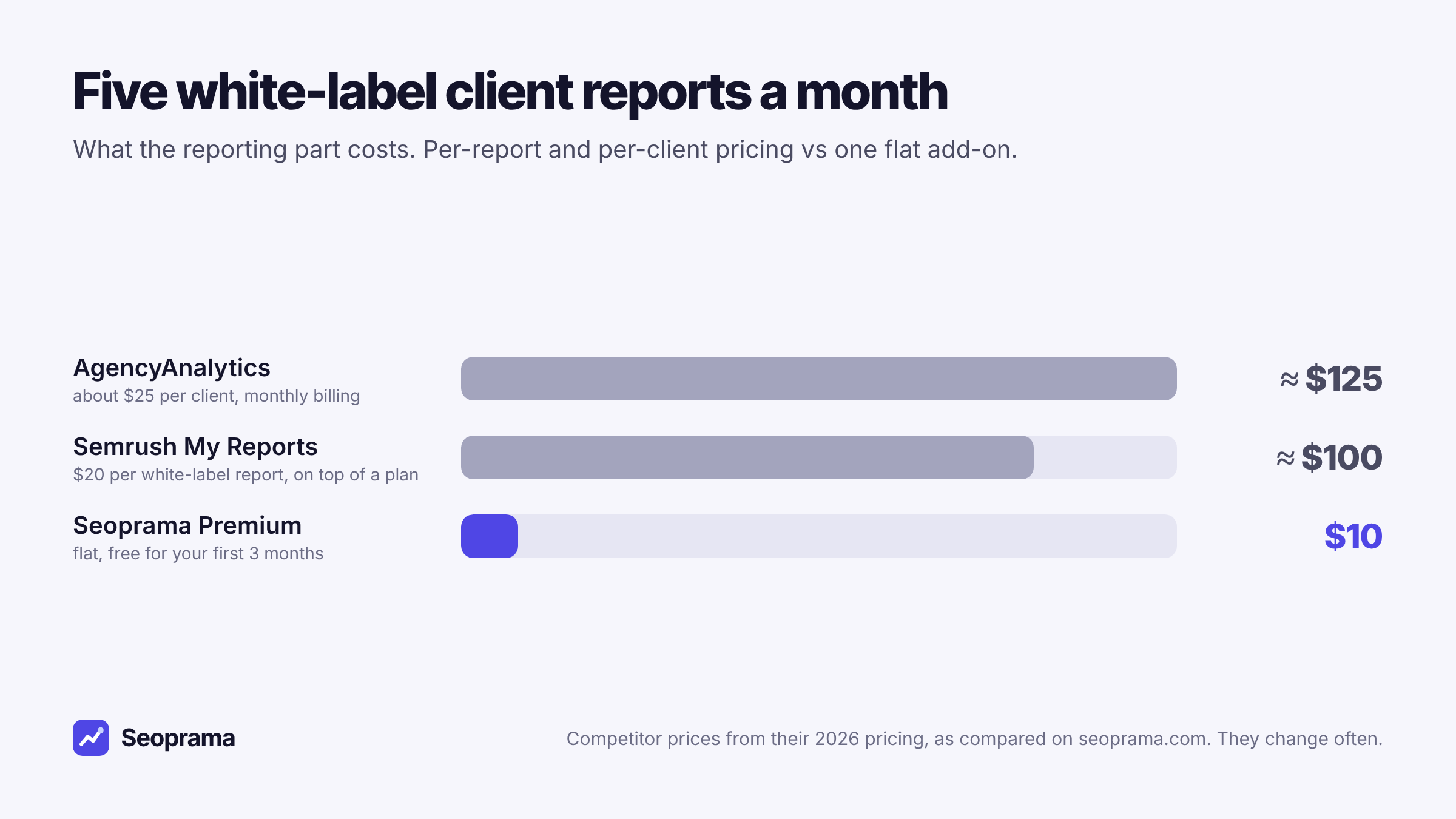
Five clients becomes ten, and the per-client models double. A flat add-on doesn’t move.
How Seoprama prices the report builder
Here’s the plain version.
- Free for your first 3 months. Build your templates, send real reports, export PDFs, all without paying for the builder.
- After that, it’s part of Premium. The Premium add-on is $10 a month (£8, €10, or ₹500 + GST in India). That covers every client report you make. No fee per report, no fee per client.
- Building a report uses no credits. Reports use data you’ve already collected. Credits are only spent when a tool fetches new data.
- Cancel any month. Premium is a monthly add-on, not an annual contract.
So “no subscription” needs one honest footnote. After the free months, white-label reporting does cost $10 a month. What you avoid is the subscription that scales: the per-client or per-report pricing that turns your fifth client into a bigger bill than your first.
Premium also keeps your full ranking and AI prompt history. Without it, Seoprama keeps the last 14 days, so a report can show the last two weeks. That matters if your clients want to see March against October, and most do eventually.
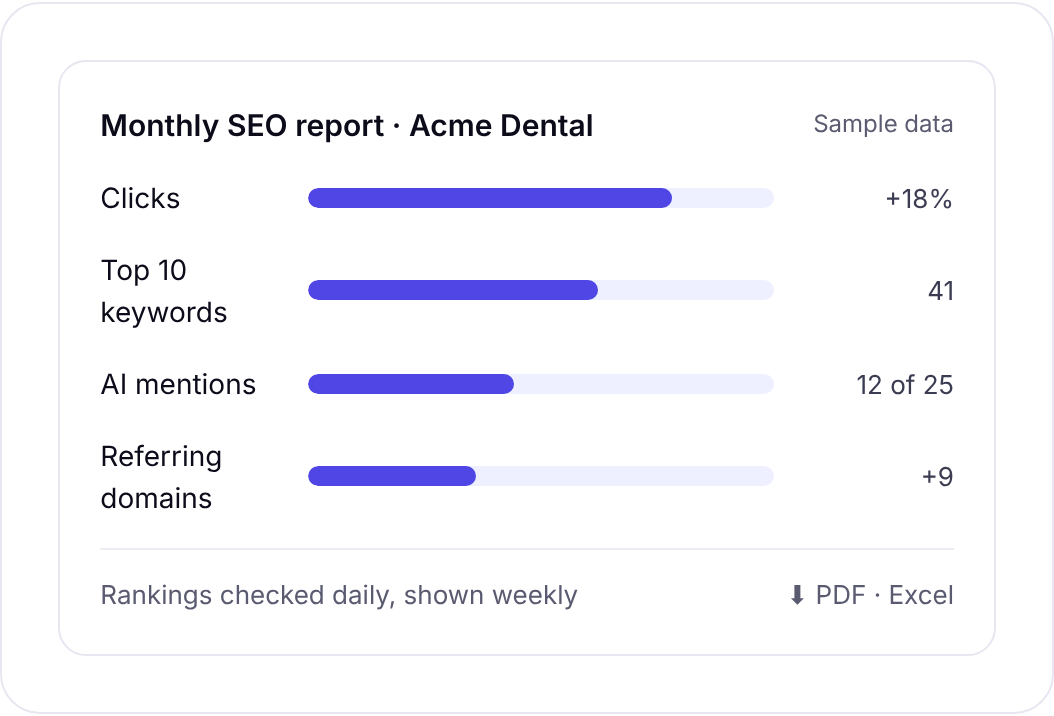
Rankings, traffic and AI mentions in one report, exported to PDF or Excel.
What actually goes into a client report
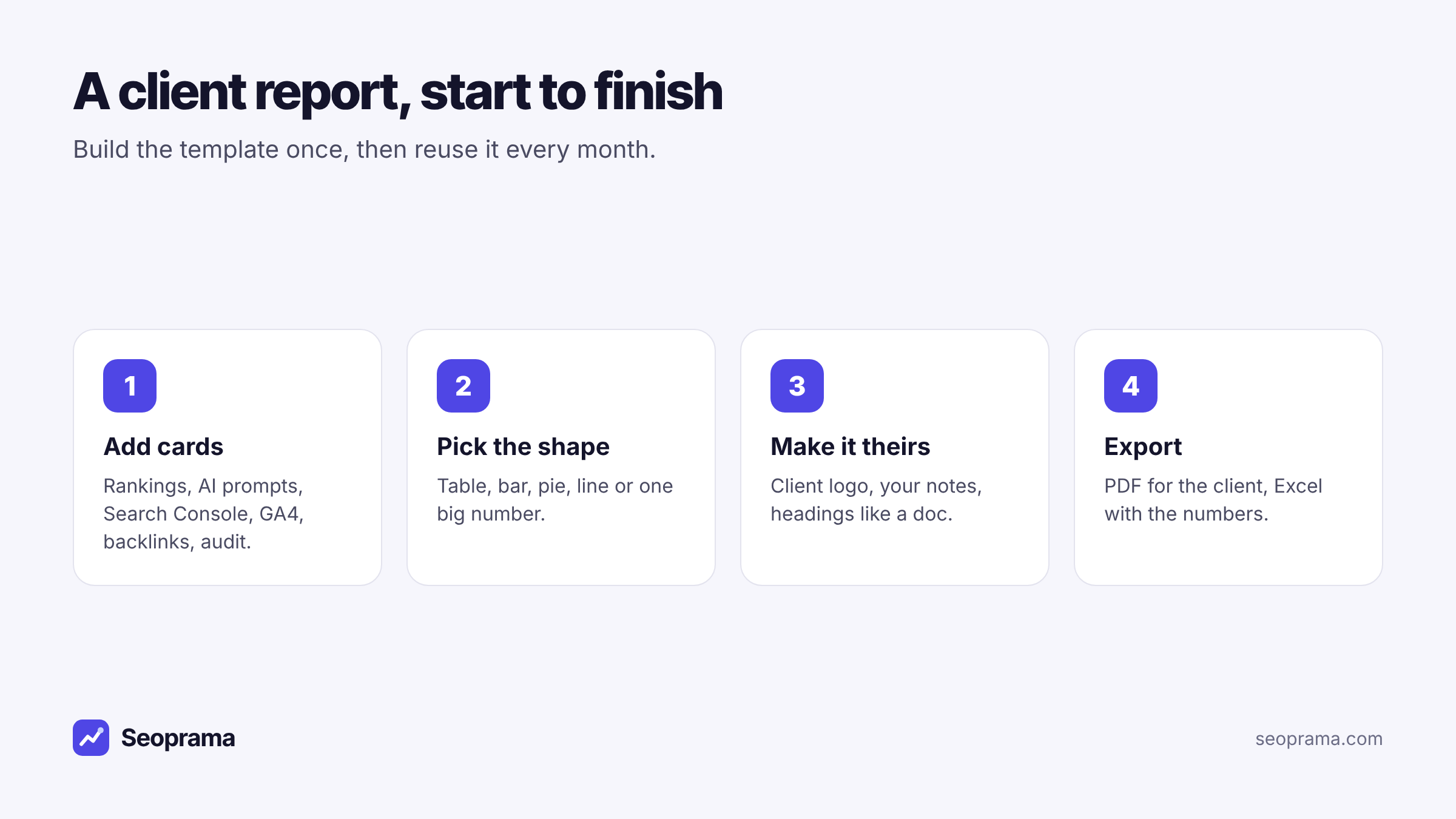
The report builder pulls from tools you’re already using. You add cards, and each card shows live data from one source:
- Tracked keyword rankings, from the rank tracker
- AI prompt tracking, so you can show whether ChatGPT or Gemini mention the client
- Search Console, with real clicks, impressions and queries
- GA4, for site traffic
- Backlinks, including new and lost links
- Site audit results, for the technical health check
Every card can be a table, bar chart, pie chart, line chart or one big number. You can rename it, resize it, hide it or duplicate it. Text works like a document, with headings, fonts, bold and colour, so you can write the “what we did this month” section right in the report.
My advice on what to include: less than you think. A good monthly report has maybe six cards.
- Clicks from Search Console
- Top 10 keyword count
- Biggest ranking moves
- New referring domains
- One audit number, like pages with errors
- A short paragraph saying what you did and what’s next
Clients mostly read the first page and the notes. The rest is there for when they ask.
What a month of reporting really costs
The report itself is free to build, but the data in it isn’t. Rank checks, backlink lookups and audits use credits. Here’s a realistic month for a freelancer with five small clients. It’s a hypothetical example.
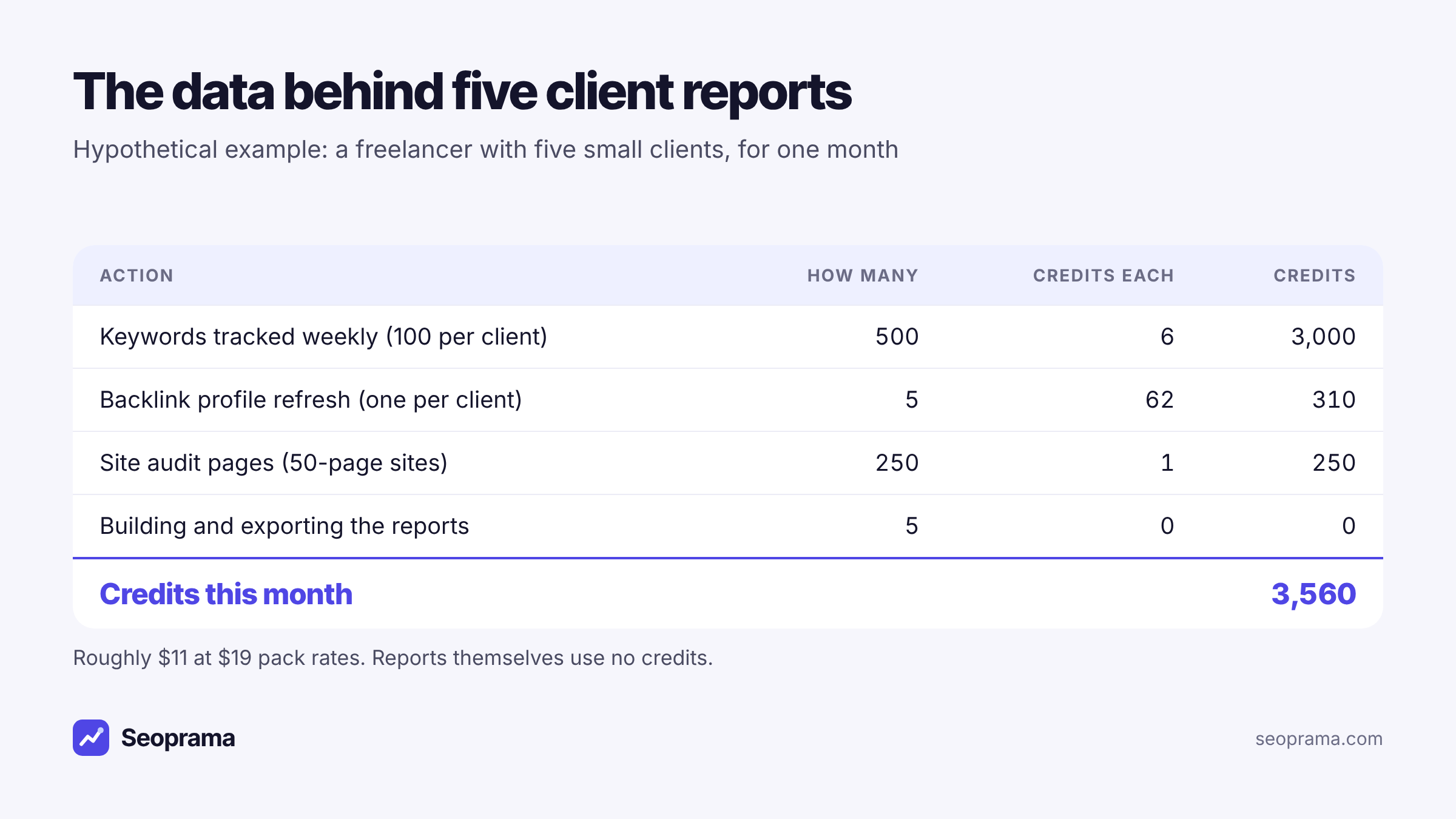
So the full picture for five clients:
| What | Monthly cost |
|---|---|
| Data credits (rank tracking, backlinks, audits) | about $11 at $19 pack rates |
| Premium (report builder, white label, full history) | $10, free for the first 3 months |
| Per-client or per-report fees | none |
That’s about $21 a month for five white-label clients once the free months end. Compare that with the reporting line alone on a per-client tool, before you’ve paid for any SEO data.
And here’s where pay-as-you-go helps. Credits never expire.
If one client pauses in December, you stop their tracker and their share of the cost stops. The credits you didn’t use roll into January. On a per-client plan, you’d be changing the plan to get the same effect.
If you want to price your own mix of clients and tools, the package builder gives you a monthly number before you spend anything.
Tick the tools you use, enter how much, and get a monthly number in your currency before you spend anything.
Building your first report, step by step
Here’s how I’d set up a reusable client report in Seoprama. It takes the longest the first time.
1. Make sure the data is flowing. Set up a rank tracker for the client’s keywords (weekly is plenty for reporting), connect Search Console and GA4 once, and run a site audit. If you also track AI prompts for them, add those.
2. Start a report and add cards. Begin with clicks and impressions from Search Console, then a rankings card, then backlinks. Keep it to one screen’s worth of cards at first.
3. Pick the right shape for each card. Trends work as line charts. Counts work as a single big number with the change. Keyword lists work as tables. Pie charts are rarely the answer, but clients like them for “where does traffic come from”.
4. Add the client’s logo and your notes. Upload the logo once and reuse it on the cover and in page headers. With Premium you can hide Seoprama’s branding entirely, so the report shows your logo and the client’s.
5. Export. PDF for the client, A4 or Letter, in portrait or horizontal layout, with a cover page and page numbers. Excel if they want the numbers, with one sheet per card.
The next month, change the date range and the live numbers update. You rewrite the notes, check the cards still tell the right story, and export again.
Adding AI search to client reports
More clients are asking a new question in monthly calls: “Does ChatGPT recommend us?” You can answer it in the same report.
If you track a client’s prompts in Seoprama, an AI prompt tracking card shows how often they were mentioned or cited, week by week, next to their Google rankings. Ten buying questions checked weekly in ChatGPT, Gemini and Google AI Overviews use about 260 AI credits a month. AI credits are a separate balance from SEO credits, and the $2.99 trial doesn’t include them, so budget for a small AI credit pack (from $4.99) if you add this.
I’d keep it to one card and one sentence of commentary. AI answers move around, and clients can overreact to a single week. Show the trend over a month or a quarter and say plainly what you’re doing about it.
Showing traffic and rankings side by side
The most useful thing a combined report does is put rankings next to real clicks. Rankings alone mislead clients. A keyword can sit at position three and bring almost nothing because a featured snippet sits above it. Another can slip from four to six with no change in clicks.
So pair them. Put the Search Console clicks card first, then the rankings card under it. When a client asks why rankings dropped, you can point at clicks and show they held. When clicks dropped, you can point at the ranking card and show which pages lost ground.
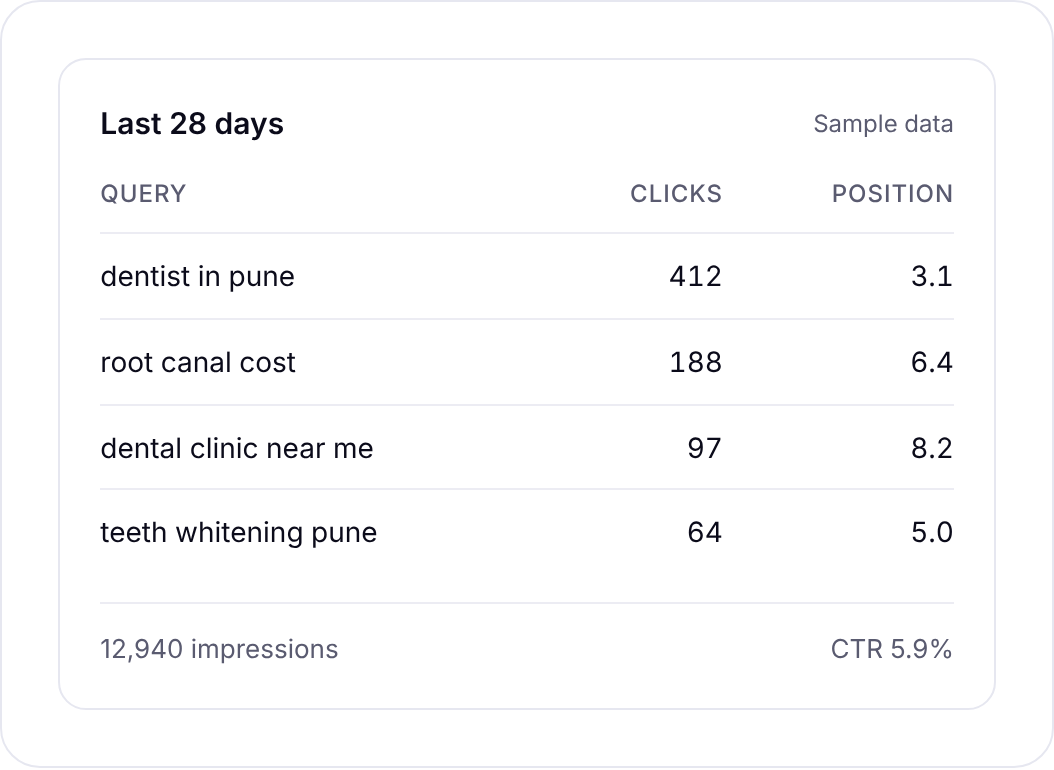
If you want quick wins to mention in the “next month” section, Search Console insights sorts pages with lots of impressions and few clicks, and queries sitting just off page one. That’s 5 credits, and it often writes your plan for you.
Moving off a per-client reporting tool
If you already pay for a reporting platform, don’t switch in the middle of a client’s month. Here’s a calmer way to do it.
- List what your current reports actually show. Open last month’s PDF for each client and write down every chart. You’ll likely find a few that nobody has mentioned in a year. Those don’t need to come with you.
- Check your history. Export the old tool’s data for each client, at least the last 12 months of rankings and traffic. Search Console and GA4 keep their own history, but tracked rankings usually live inside the tool you tracked them in.
- Start tracking in Seoprama a month early. Set up the rank trackers and audits before you cancel, so your first Seoprama report has a full month of data behind it.
- Rebuild one client’s report first. Get the template right for your simplest client, then duplicate it for the rest and swap the logo and data source.
- Send both versions once if you’re nervous. Most clients won’t notice the change. The ones who do usually comment on the layout, not the numbers.
One field note: the switch is a good moment to cut reports down. Clients rarely complain that a report got shorter. They complain when they can’t tell what happened this month.
Who this suits, and who it doesn’t
A flat-priced report builder inside your SEO tool is a good fit if you:
- report mainly on SEO: rankings, Search Console, GA4, links and audits
- have a handful to a few dozen clients and don’t want the bill to grow per client
- want white-label PDFs without a separate reporting platform
- have uneven months, with clients pausing and returning
It’s a weaker fit if you need one dashboard across paid ads, social, email and call tracking. Dedicated reporting platforms connect to far more sources, and if your clients expect that, pay for it. It’s also not the tool if you want live client logins to a dashboard rather than a monthly report you send.
But for most freelancers and small SEO teams, the monthly report is a PDF with rankings, traffic and a few notes. You don’t need a subscription that charges you more every time you win a client for that. It’s also useful if you only run SEO for your own site: the same report works as a monthly check-in with yourself or your boss.
Getting started without committing to anything
Here’s the low-risk way in.
- Start with the $2.99 trial (₹99 + GST in India). It gives you SEO credits to set up a rank tracker and run an audit on one client’s site.
- Build your report template in the free 3 months. Send it to a real client and see if they read it.
- Once the free months end, decide on Premium. If you’re sending reports every month, $10 for all of them is easy to justify.
You can see the whole reporting setup on the report builder page, or start the trial and build your first report today.
About 21 keyword searches, or a few searches plus a backlink lookup and a week of rank tracking. No monthly plan, and credits never expire.
Frequently asked questions
Is there an SEO report builder without a monthly subscription?
Seoprama’s report builder is free for your first 3 months. After that it’s part of the Premium add-on, $10 a month (₹500 + GST in India) for all your reports, with no fee per client or per report, and you can cancel any month.
Does building a client report use credits?
No. Reports use data you’ve already collected. Credits are only used when a tool fetches new data, such as a rank check, a backlink lookup or a site audit.
Can I white-label SEO reports?
Yes, with Premium. You can hide Seoprama’s branding and show your own logo and your client’s on every page.
What data can I put in a client SEO report?
Tracked keyword rankings, AI prompt tracking, Search Console, GA4, backlinks and site audit results, plus your own text and images. Each card can be a table, bar, pie, line chart or a single number.
Can I export the report to PDF or Excel?
Yes. PDF exports come in A4 or Letter, in portrait or horizontal layout, with a cover page and page numbers. Excel exports give you one sheet per card.
How much history can a report show?
Without Premium, Seoprama keeps the last 14 days of rank and AI prompt tracking, so reports can show that period. With Premium, every daily check is kept for good from the day you switch it on, so you can report on any period.