A technical SEO audit checklist you can copy into a spreadsheet
A free technical SEO audit checklist to copy into Sheets or Excel. Each row maps to a site audit report section, plus the checks you still do by hand.
- The checklist below has 24 checks in seven blocks. Copy it into Google Sheets or Excel and work down it.
- Rows 1 to 19 map to the six sections of Seoprama's site audit report, so one crawl fills most of the sheet.
- Rows 20 to 24 are outside the audit (Google's index report, HTTPS, structured data, mobile, hreflang). The sheet says where to check each one.
- The audit costs 1 credit a page. A hypothetical 800-page site audited, fixed and re-audited comes to 1,645 credits, about $5.20 at $19 pack rates.
Somebody has asked you for a technical SEO audit. Maybe it’s your manager before a redesign, maybe it’s a quarterly review, maybe traffic dipped and everyone wants to know if “something’s broken”.
You need two things. A list of what to check, so you don’t miss anything. And a way to check it that doesn’t involve clicking through 800 pages by hand. This post gives you the first as a technical SEO audit checklist you can paste into a spreadsheet, and shows how each row maps to a section of an automated site audit, so one crawl does most of the work.
The technical SEO audit checklist (copy this into a spreadsheet)
Select the table, copy it, and paste it into cell A1 of a new Google Sheet or Excel file. The columns come across as columns. Status, Pages affected, Owner and Notes are empty on purpose. You fill them in as you go.
| # | Check | Where to check | Good result | Status | Pages affected | Owner | Notes |
|---|---|---|---|---|---|---|---|
| 1 | robots.txt doesn’t block pages you want in Google | Audit: crawl basics | Nothing important blocked | ||||
| 2 | Sitemap is found and the crawl reaches the pages you expect | Audit: crawl basics | Page count roughly matches your CMS | ||||
| 3 | Important pages are reachable through internal links | Audit: crawl basics | Key pages found by the crawler | ||||
| 4 | No broken pages (4xx) | Audit: broken and redirected | Zero on pages with links or traffic | ||||
| 5 | No server errors (5xx) | Audit: broken and redirected | Zero | ||||
| 6 | No redirect chains or loops | Audit: broken and redirected | One hop at most | ||||
| 7 | No slow responses | Audit: broken and redirected | Key templates respond quickly | ||||
| 8 | No accidental noindex | Audit: indexing | Only pages you chose to hide | ||||
| 9 | No canonical conflicts | Audit: indexing | Each page points at the right canonical | ||||
| 10 | Important pages aren’t buried deep | Audit: indexing | Money pages a few clicks from home | ||||
| 11 | No dead-end pages without outgoing links | Audit: indexing | Every page links on somewhere | ||||
| 12 | Titles present, unique, not too long | Audit: titles and headings | No missing or duplicate titles | ||||
| 13 | Meta descriptions present and unique | Audit: titles and headings | No missing or duplicate descriptions | ||||
| 14 | One H1 per page, headings in order | Audit: titles and headings | No missing or multiple H1s | ||||
| 15 | No thin pages | Audit: content and images | Thin pages merged, improved or noindexed | ||||
| 16 | No duplicate content | Audit: content and images | One page per topic | ||||
| 17 | Images have alt text | Audit: content and images | Alt text on meaningful images | ||||
| 18 | Speed scores on main templates | Audit: speed and JavaScript | No template far behind the others | ||||
| 19 | Content visible when JavaScript renders | Audit: speed and JavaScript | Same content with rendering on | ||||
| 20 | Google’s own index report looks right | Google Search Console | Key pages indexed, exclusions explained | ||||
| 21 | http and non-www versions redirect to one version | Redirect checker, by hand | One permanent hop | ||||
| 22 | Structured data is valid | Google’s Rich Results Test | No errors on key templates | ||||
| 23 | Pages work on a phone | Your phone, by hand | Readable, tappable, nothing cut off | ||||
| 24 | hreflang set up (multilingual sites only) | By hand | Each language points at the others |
Use the same few words in Status every time (Pass, Fix, Won’t fix, Not checked) so you can filter. Pages affected is a number from the crawl. Owner is the person who’ll fix it, which on most in-house teams means a developer, a content person or you.
There’s no file to download. The table is the template, and a 24-row sheet you understand beats a 200-row workbook you don’t.
How the checklist maps to the site audit
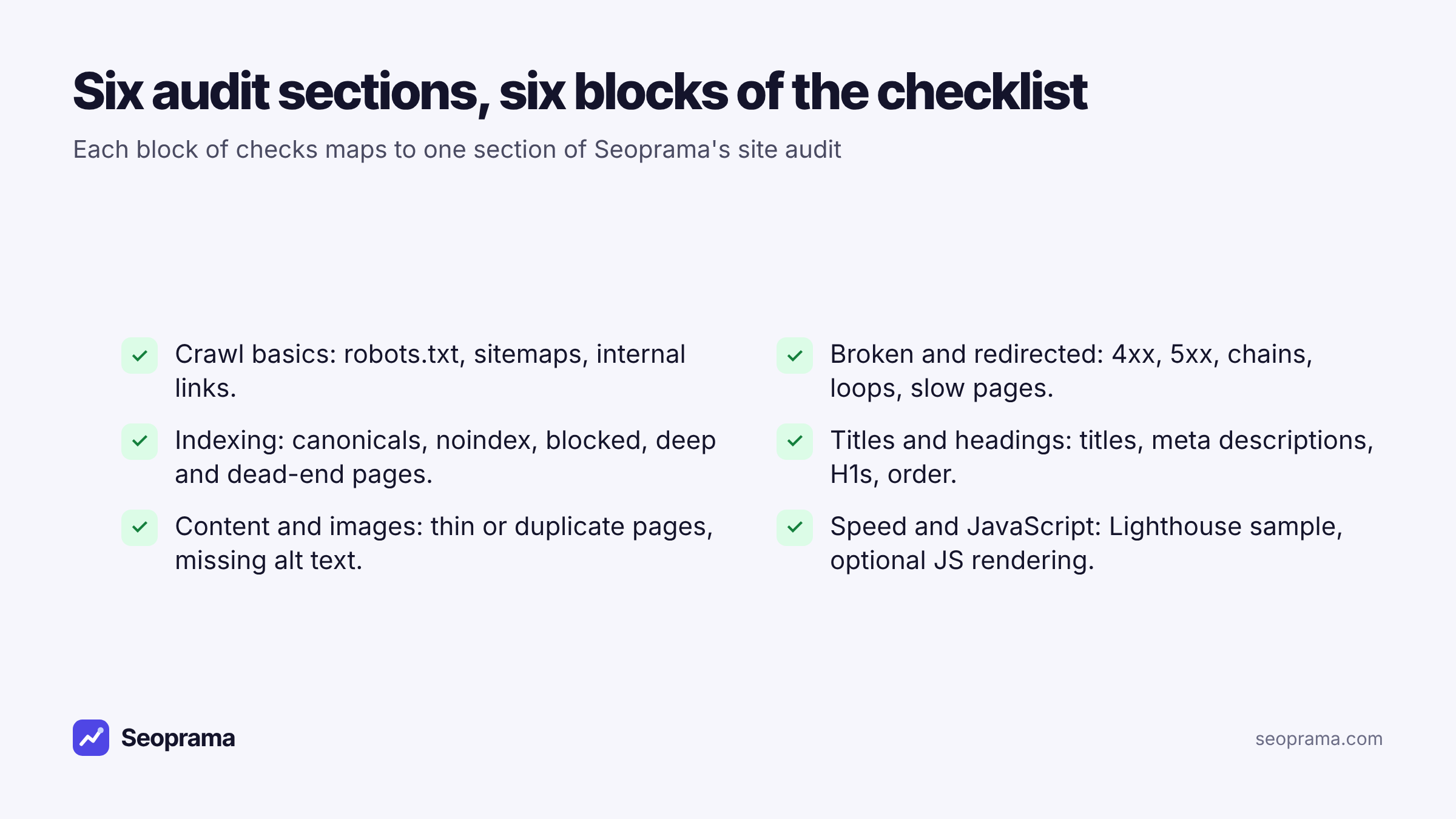
Rows 1 to 19 aren’t a random list. Each block matches one section of the report in Seoprama’s site audit, so after one crawl you can open a section and fill in its rows in one sitting.
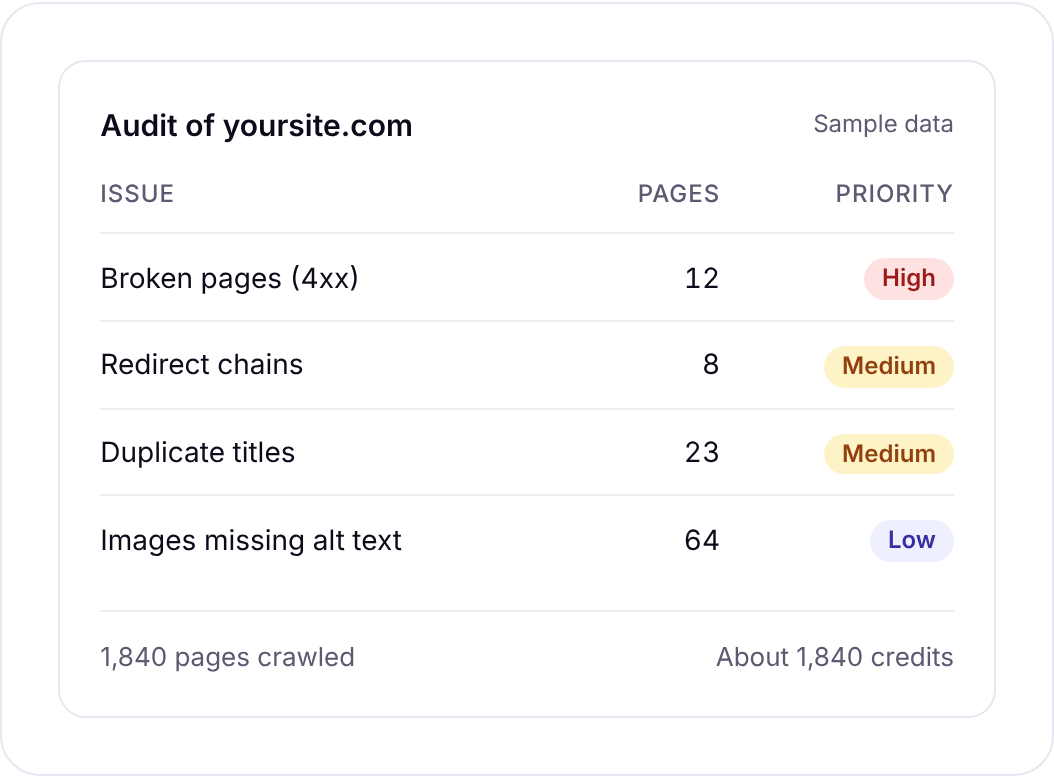
The audit crawls up to 10,000 pages, following internal links and reading robots.txt and sitemaps. It groups issues with a priority and a detail page each. That’s the bit you’ll appreciate when filling in Pages affected and Owner: you’re copying a count and a list from a detail page, not building one yourself.
Rows 20 to 24 sit outside the audit. I’ve kept them in because an audit checklist that only lists what one tool can check is a sales sheet, not a checklist. More on those below.
About 21 keyword searches, or a few searches plus a backlink lookup and a week of rank tracking. No monthly plan, and credits never expire.
Crawl basics: can search engines reach your pages?
Start here, because everything else depends on it. If the crawler can’t reach a page, neither can Google.
Row 1, robots.txt. The classic mistake is a staging rule (“Disallow: /”) copied to the live site. Less dramatic, but more common, is a rule blocking a folder that later became important, like /blog/ or /products/. Open your robots.txt and read it. It’s usually ten lines.
Row 2, sitemap and page count. Compare the number of pages the crawl found with what your CMS says you have. If the CMS has 800 and the crawl found 300, something’s stopping the crawler. If it found 3,000, you probably have filter or parameter URLs multiplying.
Row 3, internal links. A page nobody links to is hard for search engines to find and tends to rank badly. Check that your important pages show up in the crawl at all.
Field note: the page count gap in row 2 is the single most useful number in an audit. It tells you within a minute whether you have a reach problem or a bloat problem.
Broken pages, server errors and redirects
The “broken and redirected” section of the audit covers rows 4 to 7: broken pages (4xx), server errors, redirect chains and loops, and slow responses.
Rows 4 and 5. Don’t treat every 404 the same. A broken page in your main navigation, or one with backlinks, is urgent. A dead link to a 2019 event page can wait. Put that judgment in the Notes column so whoever fixes it knows what comes first.
Row 6. Redirect chains usually come from stacked rules (http to https, then non-www to www, then an old slug to a new one) or from redesigns that never updated older redirects. Point each old URL straight at its final destination.
Row 7. Slow responses often cluster on one template, like search results or a heavy category page. Note the template as well as the URLs.
To look at one chain in detail, paste the URL into the redirect checker. It follows up to 10 hops and shows each status code, for 2 credits a URL. It checks one URL at a time, so use the audit to find chains across the site and the checker to inspect the ones that matter.
Indexing: are the right pages eligible to rank?
Rows 8 to 11 come from the audit’s indexing section: canonical conflicts, noindex and blocked pages, deep pages, and pages with no outgoing links.
Row 8, noindex. Go through the noindexed pages and ask one question of each: did someone choose this? Thank-you pages and internal search results, yes. Your pricing page, no. A noindex left over from staging is the most expensive one-line mistake in SEO.
Row 9, canonicals. Canonical conflicts show up a lot on stores, where filtered and sorted URLs point at the wrong page or at themselves. Pick the version you want to rank and make every variant point there.
Row 10, deep pages. If a service page takes six clicks to reach from the homepage, move it closer. Link it from the menu, a hub page or related posts.
Row 11, dead ends. Pages with no outgoing links are usually templates someone stripped down: landing pages, old PDFs turned into HTML. Add links to related pages.
Titles, headings, content and images
Rows 12 to 17 are the ones that generate the longest lists, and the ones you’re most tempted to skip. Don’t skip them, but do sort them.
The audit’s titles and headings section flags missing, too long or duplicate titles and meta descriptions, missing or multiple H1s, and heading order. Its content and images section flags thin or duplicate content and images missing alt text.
My order, for what it’s worth:
- Duplicate titles on important pages (row 12). Two service pages with the same title compete with each other.
- Duplicate content (row 16). Decide which page wins and merge or redirect the other.
- Thin pages (row 15). Improve the ones that should rank, and merge or noindex the rest.
- Missing H1s and meta descriptions (rows 13 and 14). Quick fixes, often done in bulk in the CMS.
- Alt text (row 17). Worth doing for accessibility and image search. Rarely why a site isn’t ranking.
If a row shows 400 affected pages, check whether it’s one template. Fixing the template fixes all 400 at once, and that’s a very different job from fixing 400 pages.
Speed and JavaScript
Rows 18 and 19 come from the speed and JavaScript section. The audit runs Lighthouse speed scores on a sample of pages, and offers optional JavaScript rendering for sites that need it.
Row 18. A sample is enough. You’re looking for a template that’s far slower than the rest, like a product page loading a dozen scripts. Note the template and hand it to a developer.
Row 19. Turn on JavaScript rendering if your site is built on a framework that loads content with JavaScript. Then compare: if a page’s text or links only appear with rendering on, search engines have more work to do to see them. If you’re not sure whether your site needs it, ask your developer. Most simple CMS sites don’t.
JavaScript rendering and speed tests add a little to the audit’s cost, and the app shows the total before the crawl starts.
The checks you still do by hand
Rows 20 to 24 aren’t in Seoprama’s site audit, and I’d rather say so than pretend one crawl covers everything.
Row 20, Google’s index report. Only Google knows what it indexed. Google Search Console is free and shows indexed and excluded pages with the reason for each. If you only do one thing outside the crawl, do this. Seoprama’s Search Console insights adds your clicks, impressions and positions by page and query for about 5 credits a report, which helps you decide which flagged pages actually get traffic.
Row 21, one version of the site. Type the http, https, www and non-www versions of your homepage into the redirect checker. All of them should reach the same final URL in one permanent hop. That’s four checks, 8 credits.
Row 22, structured data. Test your main templates (product, article, local business) in Google’s Rich Results Test. One test per template is enough.
Row 23, mobile. Open your top five pages on an actual phone. Look for text that’s too small, buttons too close together and tables cut off.
Row 24, hreflang. Only for sites in more than one language or country. Check that each language version points at the others and at itself. If your site is in one language, mark it Not applicable and move on.
Running the checklist in an afternoon
Here’s how I’d run it from scratch on a mid-sized site.
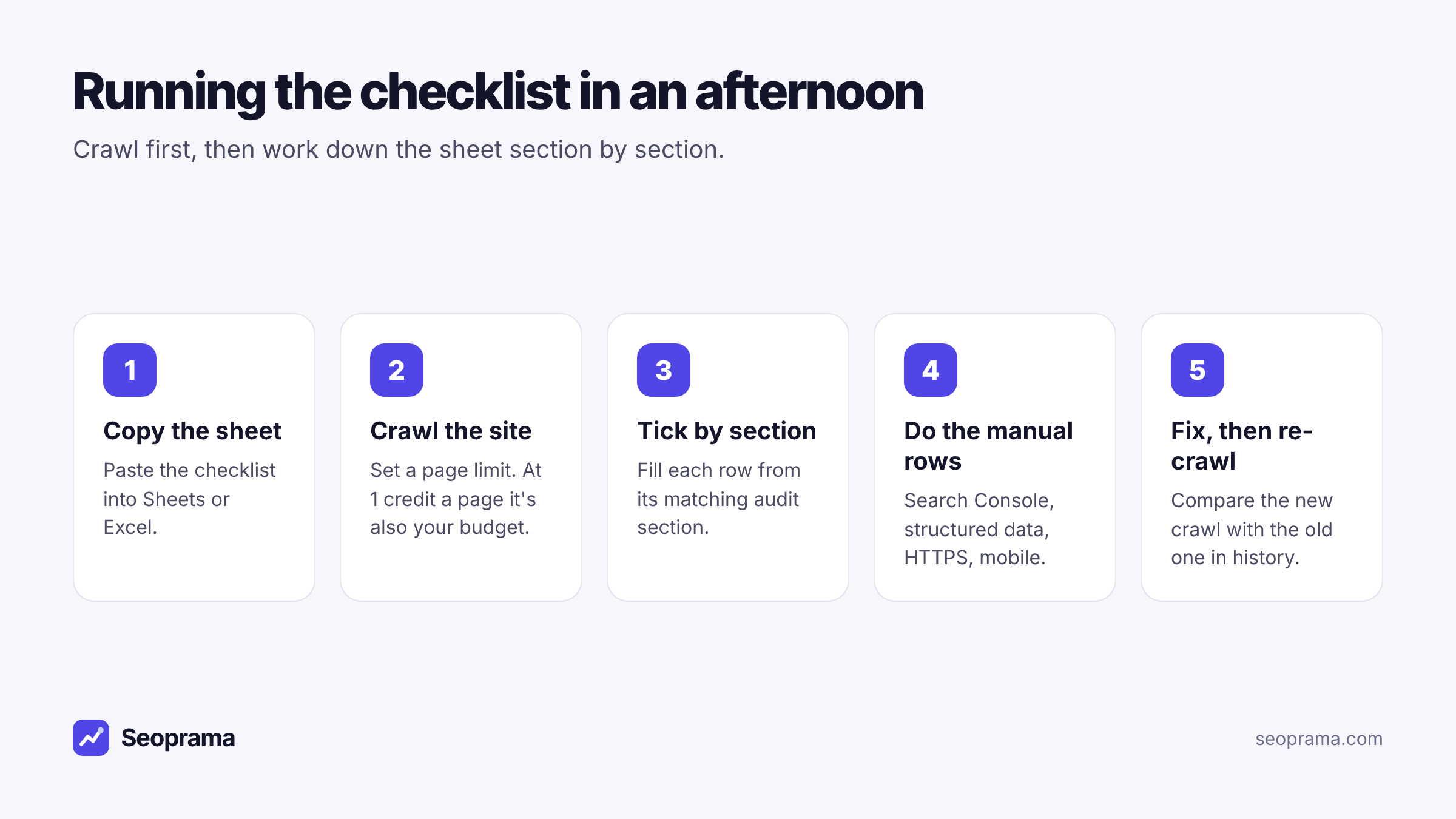
1. Copy the sheet. Paste the checklist into a new spreadsheet and share it with whoever will own fixes.
2. Crawl the site. Enter the site in the site audit and set a page limit a little above your page count. At 1 credit a page, the limit is also your budget. You can audit any site, not only one you’ve verified, which helps when you’re checking a site for a colleague or before an agency starts.
3. Tick by section. Open each section of the report and fill in its rows: Status, Pages affected, and an Owner. Don’t fix anything yet. Just record.
4. Do the manual rows. Search Console, the four homepage versions, structured data, a phone, hreflang if you need it. This takes under an hour on most sites.
5. Fix, then re-crawl. Sort by priority, hand the fix list over, and run the audit again once the fixes are live. Earlier audits stay in your history, so you can compare the two crawls side by side.
One thing that isn’t built yet: scheduled re-crawls. You run each audit when you want one. For a checklist audit that’s fine, because you re-crawl when the fixes are done, not on a timer.
1 credit per page crawled, with history so you can compare crawls.
What a checklist audit costs
The site audit costs 1 credit per page crawled, with no audit fee on top. Here’s a hypothetical example: an 800-page site, audited once, fixed, then audited again, with a Search Console report and 20 redirect checks along the way.
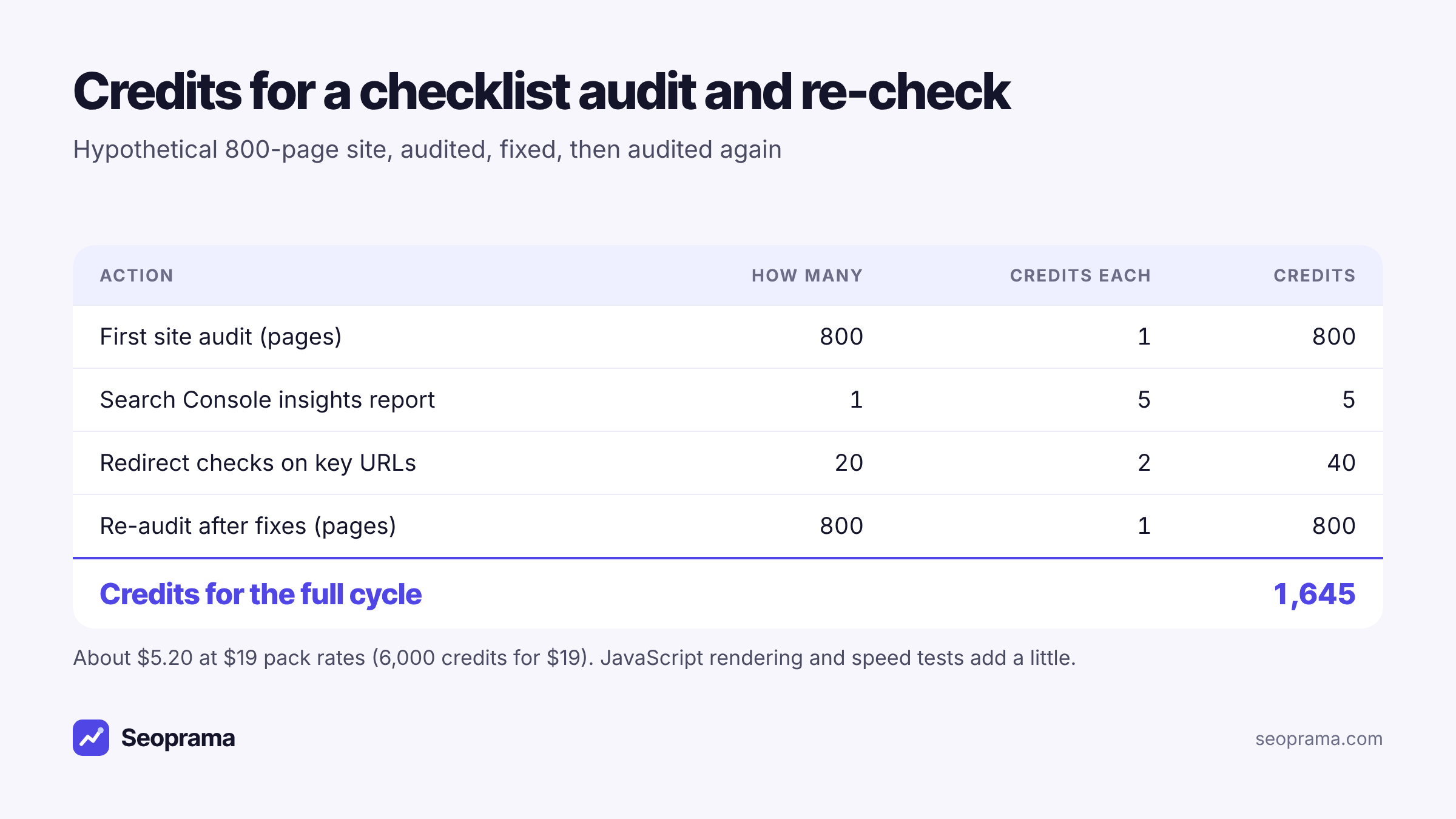
That’s 1,645 credits for the full cycle, about $5.20 at $19 pack rates (6,000 credits for $19). The pack covers it with 4,355 credits left, and credits never expire. In India, the ₹549 + GST pack has 2,900 credits, enough for the same cycle with 1,255 to spare.
If you only need the first crawl, the $2.99 trial gives you 1,000 credits, which covers the 800-page audit with room for the redirect checks and a Search Console report. In India the ₹99 + GST trial gives 700 credits.
For comparison, Ahrefs Lite is $129 a month and includes 10,000 audit pages, according to the plan comparison on seoprama.com. Those plans come with much more than audits, and if you’d use the rest of the suite, that changes the maths. For an in-house marketer who needs a solid audit a few times a year, paying per page is the cheaper route.
If you’re weighing a monthly tool against a single crawl, there’s a longer write-up on running a one-time SEO audit. You can compare pack sizes on the pricing page.
Buy credits once and spend them only when you run something. Bigger packs give more credits per dollar.
Keeping the checklist useful after the first audit
The sheet is worth more the second time you use it.
Add a column for each audit date and keep the Status values. After a few rounds you’ll see which rows keep coming back. Broken pages that reappear after every content update point to a process problem, like editors deleting pages without redirecting them. That’s a conversation with the content team, not another fix ticket.
Re-run the technical site audit after any redesign, migration or CMS change, and once or twice a year otherwise. Weekly crawls mostly make sense for large or fast-changing sites.
Frequently asked questions
What should a technical SEO audit checklist include?
Crawlability (robots.txt, sitemaps, internal links), broken pages and redirects, indexing (noindex, canonicals, deep pages), titles and headings, content and images, and speed. Add the checks a crawler can’t do: Google’s own index report, structured data, mobile and hreflang.
Is there a downloadable version of this checklist?
Not as a file. The table in this post is the template. Copy it into Google Sheets or Excel and it keeps its columns.
How long does a technical SEO audit take?
The crawl itself does most of the work. Filling in the checklist from the report and doing the manual rows takes an afternoon on a site of a few hundred to a few thousand pages. Fixing everything takes longer, which is why the sheet has an Owner column.
Can one tool check everything on the list?
No. Seoprama’s site audit covers rows 1 to 19. Google’s index report needs Google Search Console, and structured data, mobile layout and hreflang are checked separately.
How much does a technical SEO audit cost?
In Seoprama, 1 credit per page crawled. An 800-page site is about 800 credits, which the $2.99 trial covers. Auditing it twice with a few extra checks comes to 1,645 credits, about $5.20 at $19 pack rates.